Pilot AI Receptionist Dental Rollout: 30/60/90 Plan
Pilot an AI receptionist dental rollout in 90 days without disrupting the office. Weekly milestones, call-volume thresholds, and rollback criteria.
By DentalBase Team••Updated May 20, 2026•17m
Share:
#AI receptionist#Dental Front Desk#DentiVoice#phone systems#Practice Management
Table of contents
To pilot AI receptionist dental tools the right way, you don't flip a switch and hand your phones over. You phase the rollout, set quantitative rollback triggers, and protect the patient experience while you learn what the AI is actually good at in your office.
Most failed AI rollouts in 2026 share the same root cause. The practice bought the software, switched it on for every call type at once, and panicked when the first awkward conversation happened in week two. By month three, the AI was off and the team was burned out from the experiment.
This guide gives you a 30/60/90 day playbook with weekly milestones, specific call-volume thresholds, and rollback criteria you set before you start. By week eight you'll know whether to keep, kill, or scale. For broader phone strategy, see our 2026 owner's guide to phone systems for dental offices. And before piloting, confirm AI is the right fit at all using our AI receptionist pay-off analysis. If you haven't run vendor demos yet, our dental virtual receptionist demo guide covers which platforms offer live demos and how to score them before committing to a pilot.
What does it mean to pilot an AI receptionist for a dental office?
To pilot an AI receptionist for a dental office means running the AI on a narrow, controlled slice of your call volume for a fixed period, with measurable success criteria and a defined exit plan. It's not a free trial. It's a structured experiment where you decide upfront what would make you keep the tool, kill it, or expand it.
Pilots succeed when the practice owner and the front desk design the rollout together.
A real pilot has four ingredients. A bounded scope (which call types, which hours, what percentage of volume). A baseline measurement of your current performance before the AI touches anything. A list of weekly milestones that prove the AI is on track. And a kill switch with quantitative triggers that anyone on the team can pull without asking permission.
What a pilot is not: a vendor demo, a 14-day free trial, or "let's just turn it on and see what happens." Those approaches generate anecdotes, not decisions. Per ADA practice resources, the offices that adopt new technology successfully are the ones that treat rollout as a project, not an event. Our 2026 buyer's guide for dental virtual receptionists covers vendor selection before the pilot starts.
Why phase the rollout instead of going all-in on day one?
You phase the rollout because the cost of one bad week is bigger than the cost of a slow start. A single botched call to a high-value new patient can cost $1,200 in lost first-year revenue and a Google review that damages months of marketing. Phasing protects against that downside while still letting you learn fast.
The four failure modes that kill day-one rollouts:
Patient confusion at peak. The AI handles a Monday-morning rush before it's been tuned, books appointments incorrectly, and you spend the rest of the week cleaning up. Dental Economics analysis shows phone errors compound fast.
Staff revolt. Your front desk wasn't briefed properly, hears the AI mishandle a call, and decides on day three this thing is going to replace them. Trust never recovers.
PMS sync drift. The integration writes to the wrong provider column or a custom appointment type, and your schedule looks broken on day five. Fixing it retroactively eats more time than starting clean.
Insurance and emergency edge cases. An AI that hasn't been trained on your specific protocols answers a benefits question wrong or fails to triage an emergency. The financial and legal exposure is real.
Phasing kills all four risks. Start narrow, prove the AI works on simple call types, then widen the aperture. HubSpot research on customer onboarding shows phased rollouts of any service tool produce 30-50% better long-term retention than big-bang launches.
The same logic stretches further once a pilot succeeds and the question shifts to expansion. We map that second step in our guide to rolling out a virtual receptionist across multiple dental locations, where the failure modes change from technical to organizational: shared scripts, location-level reporting, and who owns escalations once more than one office is on the same answering layer.
Phasing also forces owners to confront the strategic questions a pilot alone cannot answer: what to tell patients before the first AI-handled call, when to brief the front desk team, and how to define success at the 30 and 60 day marks. The broader playbook on switching to a virtual receptionist at a dental practice puts the pilot inside a real change-management plan, so the rollout lands as a structured transition rather than an isolated experiment.
See how DentiVoice handles a phased rollout
Walk through what gets switched on in week one, what stays untouched, and how the kill switch works in real time.
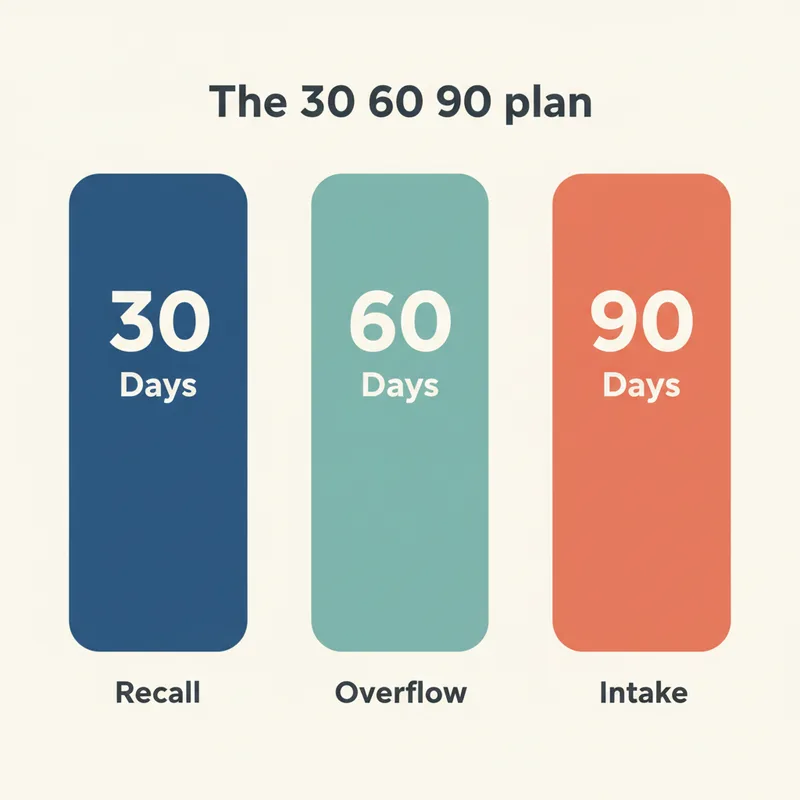
A 30/60/90 day pilot AI receptionist dental rollout starts with the lowest-risk call types in month one, adds controlled daytime overflow in month two, and expands to full intake in month three only if month-two metrics hold. Each phase has a defined scope, a volume cap, and explicit go/no-go criteria you check at week's end.
Each phase has a specific scope and a volume cap before expansion.
Phase
Scope
Volume Cap
Go-Forward Trigger
Rollback Trigger
Month 1: Days 1-30
After-hours only + daytime recall outbound
~25% of weekly call volume
Booking accuracy â¥95%, zero PMS sync errors
2+ misbooked appointments OR any patient complaint
Month 2: Days 31-60
Add daytime overflow (when staff line is busy)
~50% of weekly call volume
Answer rate â¥98%, conversion within 5pts of human baseline
Conversion drops 10pts+ vs baseline
Month 3: Days 61-90
Full intake including new patients, with hot-handoff to human on case value > $5K
~80% of weekly call volume
Recovered revenue â¥3x AI cost; staff NPS positive
New-patient drop-off rate above 15%
Notice month one only handles after-hours and recall. Two reasons. After-hours calls are revenue you're already losing, so anything the AI captures is upside with zero downside risk. Recall outbound is structured and predictable, perfect AI territory. AI dental recall calls beat human callers for exactly this reason. Pair this with structured reactivation outreach and you've got a near-zero-risk first month.
Weekly milestones inside each phase: week 1 is configuration and baseline measurement, week 2 is shadow mode (AI runs but staff still answers, you compare), weeks 3-4 go live on the phase scope. Repeat the same pattern in months 2 and 3. Per ADA Health Policy Institute research, structured implementation cadences in dental practices outperform ad-hoc rollouts by a wide margin.
What KPIs and weekly milestones should you track during the pilot?
A pilot AI receptionist dental rollout needs six core KPIs tracked weekly, with green-yellow-red thresholds set before week one. Answer rate, booking conversion, escalation rate, average handle time, patient sentiment score, and staff hours saved. Each gets a target value and a red-flag trigger that pauses expansion if hit.
KPI
Target (Green)
Watch (Yellow)
Red Flag (Stop)
Answer rate
â¥95%
90-95%
<90%
Booking conversion
Within 5pts of baseline
5-10pts below
10pts+ below
Escalation rate
15-25%
25-35%
>35% (AI overwhelmed)
Avg handle time
Within 30s of human avg
30-60s longer
60s+ longer
Patient sentiment
No new negative reviews
1 ambivalent mention
Any direct AI complaint
Staff hours freed
5+ hours/week
2-5 hours
<2 hours by week 4
Two practical points. First, you need a baseline before the AI ever takes a call. Pull two weeks of call analytics from your phone system: answer rate, average handle time, missed-call count, and your team's current new-patient conversion. Without this, you can't tell what the AI is actually doing differently. Our missed-calls baseline guide walks through the analytics pull.
Second, run a weekly 15-minute pilot review with the front desk lead and the practice owner. Same time every Monday, same six KPIs, same go/no-go decision. HubSpot's customer success metrics framework consistently shows weekly cadence beats monthly for any rollout under 90 days. Skip the fancy dashboard. A shared spreadsheet works fine.
How do you set rollback criteria before you start?
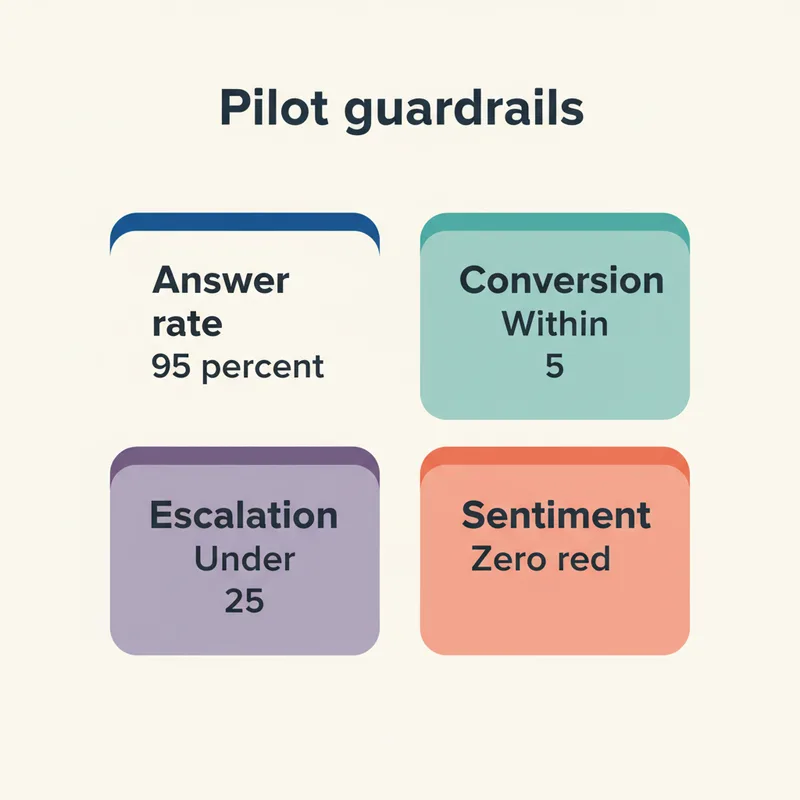
You set rollback criteria by defining the exact KPI thresholds and event types that trigger an automatic pause, before the pilot goes live. Anyone on the team can invoke the kill switch without escalating to the owner. The triggers are quantitative, not subjective. "Bad vibe" doesn't count.
Set the four guardrails before the AI takes its first call.
The three-tier rollback structure
Tier one is a soft pause. One KPI hits red for one week. Action: stop expanding scope, hold steady at current phase, investigate the cause within 72 hours. Tier two is a phase rollback. Two KPIs hit red in the same week, or one KPI stays red for two consecutive weeks. Action: revert to the previous month's scope and re-validate. Tier three is full kill. Any patient-safety incident, a missed dental emergency, a HIPAA-adjacent privacy concern, or three consecutive weeks of red KPIs. Action: AI off, human-only operation, post-mortem within 7 days.
The kill switch protocol
Document who can pull the kill switch (every front desk staff member, not just the owner). Document how (one phone call to the vendor, plus a Slack/email to the team channel, plus a dated note in the pilot tracker). Document what happens immediately after (calls route 100% to staff line, AI goes to recall-only mode, weekly review meeting moves to next-day to review the trigger). Dental Economics research on practice miscommunication shows the practices that recover fastest from any operational disruption are the ones with pre-documented escalation paths.
When to extend vs end
If you're at week 8 and the metrics are yellow, not red, extend the current phase by two weeks before deciding. The AI usually improves with another tuning cycle. If you're at week 8 and metrics are red, end the pilot. Don't keep paying to find out if it gets better. The decision should take 15 minutes, not a month.
How do you keep the front desk on board through the pilot?
Keep the front desk on board by including them in the pilot design from week zero, framing the AI as workload reduction not replacement, and showing a measurable early win inside the first two weeks. Staff who help build the protocol defend the protocol. Staff who get told about it after the fact resist it.
The pre-launch conversation
Two weeks before week one, sit down with the front desk team. Three points to cover honestly. What problem this is solving (your missed-call rate is X%, our team is doing Y hours of recall on top of regular work, this is the relief plan). What the pilot scope is (after-hours and recall only in month one, not your daytime calls). What's in it for them (those hours come back, performance reviews now reward retention not call volume, no headcount cuts). Front-desk burnout signals are real and your team knows it. Acknowledge them.
The early-win playbook
By end of week 2, you need one concrete win to share with the team. The most reliable one: count the after-hours calls the AI booked that would have been voicemail in the old world. BrightLocal consumer research consistently shows responsiveness is a top driver of practice choice. A single number ("we recovered 12 calls last week that would have died on voicemail") shifts staff sentiment more than any vendor pitch.
Training and handoff drills
Run two 30-minute handoff drills before week one. The AI escalates a simulated call to a staff member, who picks up mid-conversation. Practice the script for taking over without making the patient repeat themselves. Per BLS occupational data on dental practices, the offices with the lowest staff turnover are the ones where training is treated as a recurring habit, not a one-time event. Add a 10-minute review of one AI call recording per week to the pilot cadence.
Walk through a 90-day pilot plan with our team
We'll review your call data, recommend a phased scope for your practice, and show you the kill switch in real time.
The goal of any pilot AI receptionist dental rollout isn't to prove the AI works. It's to find out, fast and cheaply, whether the AI works in your specific office, on your specific call mix, with your specific team. The 90-day phased structure makes that answer obvious by week eight.
Practices that skip the structure usually pay for it twice. Once in the rough first month, and again in the second pilot they have to run six months later because the first one created a trust deficit with the team. Get the playbook right the first time. Set the triggers, train the team, measure weekly, and trust the numbers when they come in.
The smartest first move isn't to sign a contract. It's to pull two weeks of your current call analytics this week. Without that baseline you can't run a pilot that means anything. With it, you'll know your week-one targets before you ever talk to a vendor. For pricing benchmarks before you commit, see our 2026 dental virtual receptionist cost breakdown.
Ready to design your 90-day pilot?
DentiVoice ships with a pilot framework built in: phased scopes, configurable kill switches, and a weekly KPI dashboard your team actually checks. Book a 20-minute walkthrough.
A pilot AI receptionist dental rollout works best at 90 days, structured as 30/60/90 phases. Shorter than 60 days doesn't give the AI enough time to tune. Longer than 120 days means you've lost discipline and the pilot has become permanent without a real decision.
No proactive announcement is needed. The AI greeting introduces itself naturally if asked. Train staff to acknowledge it transparently if a patient inquires. Most patients don't notice or don't mind during routine calls. Avoid making it a marketing event during the pilot itself.
Any practice with at least 100 weekly calls and a measurable missed-call problem. Below that volume, AI subscription cost may exceed recovered revenue, and a pilot risks confusing more patients than it helps. Run the missed-call math first to confirm fit before committing to a pilot.
You can run a limited pilot with manual ticket creation instead of direct PMS write-back. This works for after-hours and recall scopes in month one. Daytime overflow in month two and full intake in month three need PMS integration to avoid scheduling conflicts and double-bookings.
Most vendors offer pilot pricing of $400 to $900 per month with no long-term commitment. Add roughly $500 to $1,500 for setup including PMS integration and protocol training. Total 90-day exposure typically runs $1,700 to $4,200 for a single-location practice running a structured pilot.
Check the six KPIs weekly. By week 4, answer rate should be at or above 95% on piloted scope. By week 6, booking conversion should be within 5 points of human baseline. By week 8, recovered revenue should be visible in your phone analytics. If not, end the pilot.
Pushback usually means they weren't included in the design. Pause expansion, run a 30-minute team session to walk through scope, KPIs, and the kill switch. Show the early-win number from weeks 1 to 2. If pushback continues after transparency, the issue is broader than the pilot and needs a separate conversation.
Was this article helpful?
DT
Written by
DentalBase Team
Expert dental industry content from the DentalBase team. We provide insights on practice management, marketing, compliance, and growth strategies for dental professionals.