Dental Appointment Reminder Timing: When to Send & How Often
Learn the best dental appointment reminder timing to reduce no-shows. Get the ideal schedule for SMS, email, and phone reminders backed by data.
Share:
Table of contents
Dental appointment reminder timing is the single biggest factor in whether your patients actually show up. A perfectly worded message sent five days early gets forgotten. The same message sent three hours before gives you no time to fill the slot if they cancel.
This guide breaks down the exact timing windows that produce the highest confirmation rates for SMS, email, and phone reminders. You'll get a touchpoint-by-touchpoint schedule, time-of-day recommendations backed by published data, and a framework for adjusting your cadence based on appointment type. No filler. Just the timing strategy your front desk needs.
Why Does Dental Appointment Reminder Timing Matter More Than the Message?
Dental appointment reminder timing determines whether your message arrives when the patient is ready to act on it. A well-crafted reminder that lands at the wrong moment gets ignored, while even a basic "your appointment is tomorrow" text sent at the right time drives confirmations. Timing is the variable most practices overlook.
Think about how your own schedule works. A reminder that arrives on Monday for a Friday appointment gets buried under three days of life. You might read it, think "I'll deal with that later," and never come back to it. But a reminder that arrives Wednesday evening for a Friday morning appointment hits during a planning window. You're thinking about the rest of your week. You confirm in 10 seconds and move on.
The data supports this. Research published in the Journal of Dental Hygiene found that SMS reminders reduce no-show rates by up to 38% when sent in a structured sequence with specific timing intervals. Not just "send a text." The timing of that text matters as much as sending it at all. And according to the ADA Health Policy Institute, 72% of patients rank convenience as a top factor in choosing a dental provider. A poorly timed reminder feels inconvenient. A well-timed one feels helpful.
For a four-operatory practice seeing 35 patients a day, even a 5% improvement in show rate means nearly two extra patients daily. At $350 average production per visit, that's $700 a day or roughly $14,000 a month in recovered revenue. All from adjusting when you send your reminders.
Related: Need ready-to-use message templates for each touchpoint in this sequence? → Dental Appointment Confirmation Scripts: SMS, Email & AI
What Is the Best Schedule for Dental Appointment Reminders?
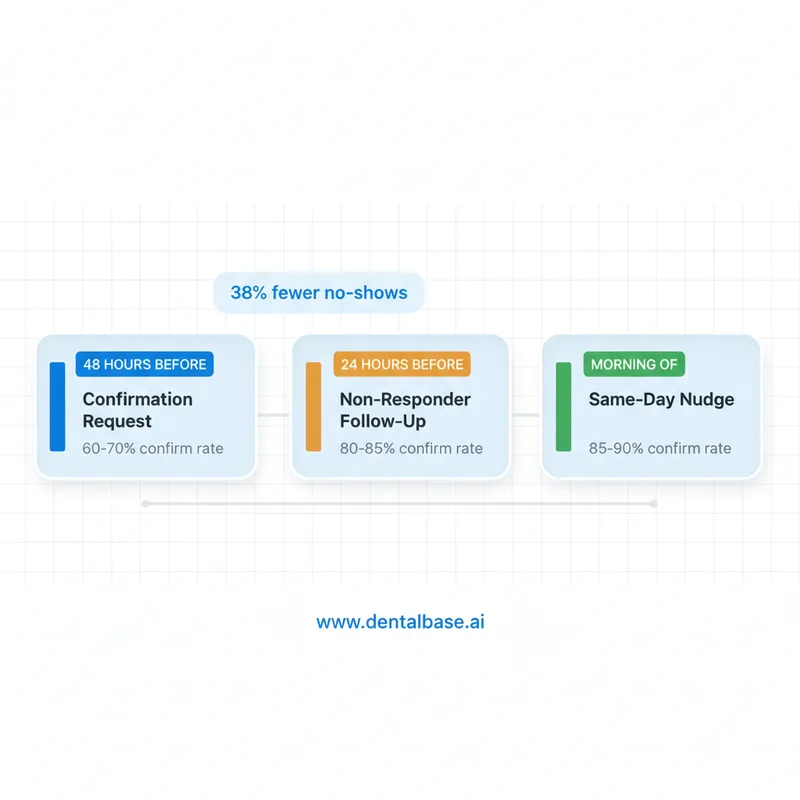
The most effective dental appointment reminder timing follows a three-touch sequence: a 48-hour confirmation request, a 24-hour follow-up for patients who didn't respond, and an optional same-day morning nudge. Each touch has a different purpose, and skipping one weakens the entire chain.
Touch 1: 48-Hour Confirmation (The Anchor)
Send your first reminder exactly 48 hours before the appointment. This is the core touchpoint. It gives patients enough time to check their calendar, move things around, and reschedule if needed. It also gives your front desk a full business day to fill any cancellations from that batch.
The 48-hour window works because it sits in a psychological sweet spot. Close enough that the appointment feels real and imminent. Far enough out that rescheduling doesn't feel rushed or panicked. If you only have bandwidth for one reminder, this is the one to send.
Touch 2: 24-Hour Follow-Up (Non-Responders Only)
If a patient didn't confirm after the 48-hour message, send a shorter follow-up at the 24-hour mark. This isn't a repeat of the first message. It's a gentle escalation: "We haven't heard back about your appointment tomorrow. Would you like to keep this time?" Patients who haven't responded to your first touch are your highest no-show risk. This second message catches the ones who saw it, meant to reply, and forgot.
The key detail here is targeting. Don't send this to patients who already confirmed. Redundant reminders annoy people and increase opt-out rates. Your system should track who replied "C" or clicked the confirm link and exclude them from the 24-hour follow-up automatically.
Touch 3: Same-Day Morning Nudge (Optional)
A brief same-day reminder sent between 7 AM and 8 AM works as a final nudge. Keep it short: "Reminder: your appointment at [Practice] is today at [Time]." Don't ask for confirmation at this point. It's too late to backfill the slot if they cancel. The purpose is simply to keep the appointment top of mind as the patient starts their day.
Some practices skip this touch entirely. That's fine for recall patients who confirmed 48 hours ago. But for new patients or patients with a history of no-shows, the morning nudge catches the ones who confirmed and then forgot.
Related: A structured follow-up system in the first 48 hours after a visit matters just as much as the reminder before it. → New Patient Follow-Up System: The First 48 Hours Matter
What Time of Day Should You Send Dental Reminders?
The best time of day to send dental reminders depends on the channel, but across SMS, email, and phone, mid-morning and early evening consistently outperform other windows. Reminders sent during transition moments in a patient's day get seen and acted on faster than those arriving during deep-focus work hours.
SMS: 10 AM-12 PM and 5-7 PM
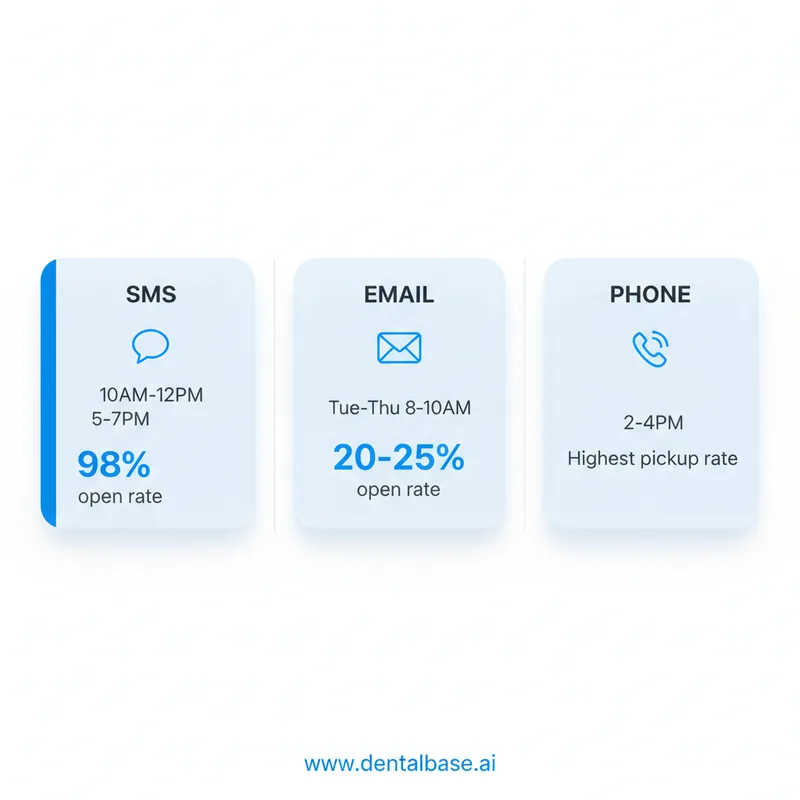
Text messages have a 98% open rate, but open rate and response rate aren't the same thing. A text that arrives at 6:30 AM while someone is rushing through their morning routine gets read and swiped away. That same text at 10:30 AM, when the patient is between meetings or on a mid-morning break, gets a reply.
The evening window between 5 PM and 7 PM works well for a different reason. Patients are transitioning out of work mode and into planning mode. They're thinking about tomorrow. A 48-hour reminder arriving at 5:30 PM on Wednesday for a Friday appointment lands during that mental shift. According to Dental Economics, 73% of patients book appointments after hours when given the option, which tells you when they're in scheduling mode.
Email: Tuesday-Thursday, 8-10 AM
Email open rates in healthcare hover around 20-25%, so timing matters even more than with SMS. Sending on Tuesday through Thursday mornings between 8 AM and 10 AM catches patients during their inbox-clearing routine. Monday inboxes are flooded with weekend backlog. Friday emails compete with end-of-week wrap-up. According to HubSpot research, 47% of recipients decide whether to open an email based on the subject line alone, so pairing the right send time with a clear subject line compounds the effect.
Phone Calls: 2-4 PM
If your front desk still makes confirmation calls (or your AI receptionist handles them), the early afternoon window is your best bet. Morning calls interrupt people at work. Evening calls feel intrusive. But 2-4 PM catches patients in a lower-energy stretch of their day when they're more likely to pick up. Keep confirmation calls under 60 seconds. Anything longer and you're burning front desk time that could go toward in-office patients.
Send Every Reminder at the Right Time, Automatically
An AI receptionist sends confirmations at 48 hours, follows up with non-responders at 24 hours, and handles same-day nudges without your front desk touching a single message.
Learn About AI Reception →How Many Reminders Should a Dental Office Send Per Appointment?
Two to three reminders per appointment is the optimal range for most dental practices. Below two, you're leaving confirmation rates on the table. Above three, you hit diminishing returns: opt-outs increase, patients get annoyed, and your team spends more time managing a system that isn't producing better results.
Here's how the math works in practice. A single 48-hour reminder typically produces a 60-70% confirmation rate. Adding the 24-hour follow-up for non-responders pushes that to 80-85%. The same-day nudge adds another 3-5%. But a fourth touch, say a phone call on top of all three texts, only moves the needle 1-2% while generating noticeably more opt-outs and patient complaints.
| Touches Sent | Typical Confirmation Rate | Opt-Out Risk | Recommendation |
|---|---|---|---|
| 1 (48-hour only) | 60-70% | Low | Minimum viable. Works for established recall patients. |
| 2 (48h + 24h follow-up) | 80-85% | Low | Best for most practices. Highest ROI per touch. |
| 3 (48h + 24h + same-day) | 85-90% | Moderate | Ideal for new patients and high-value procedures. |
| 4+ (adding phone call) | 86-91% | High | Diminishing returns. Reserve for chronic no-show patients only. |
Channel mixing matters here, too. Two SMS messages and one email feel different to a patient than three identical texts. Varying the channel between touches signals that the practice is organized, not just spamming. A common pattern: SMS at 48 hours, email at 24 hours (with pre-visit instructions for new patients), SMS nudge same-day morning. That's three touches across two channels, which keeps engagement high without wearing out your SMS welcome.
If you're managing this manually, two touches are realistic; three require automation. A front desk team handling 35 patients per day can't reliably track who confirmed, who didn't, and who needs the follow-up message, especially when they're also managing check-ins and insurance at the same time.
See Automated Reminder Timing in Action
DentiVoice sends the right message at the right time on the right channel, tracks confirmations, and follows up with non-responders automatically.
Book a Free Demo →Does Reminder Timing Change by Appointment Type?
Yes. Dental appointment reminder timing should flex based on the appointment type because new patients, recall patients, and specialist referrals have different preparation needs, different familiarity with your practice, and different no-show risk profiles.
New Patient Appointments
New patients need a longer runway. Send an initial confirmation 5-7 days before the visit. This isn't a reminder in the traditional sense. It's an orientation touch: confirm the date, tell them what to bring (insurance card, ID, referral form), and link to any digital intake forms. Then follow the standard 48-hour and 24-hour sequence on top of that. New patients who complete their paperwork before arrival are significantly less likely to cancel because they've already invested effort in showing up.
The stakes are higher here, too. According to ADA data, the average patient lifetime value for a general dentist runs $12,000-$15,000. A new patient no-show doesn't just cost you one visit. It costs you the entire relationship. That's why the extra 5-7-day touch is worth the effort.
Hygiene Recall Appointments
Recall patients are your most familiar audience. They know where the office is, they know their hygienist, and they've been through this before. The standard 48-hour confirmation plus a 24-hour follow-up for non-responders is enough. Skip the 5-7 day advance touch unless they've missed appointments in the past. Recall patients actually respond faster to shorter, warmer messages because they don't need onboarding. A casual "Hi Sarah, your cleaning with Lisa is Thursday at 2 PM. Reply C to confirm" works better than a formal template.
Specialist Referrals and High-Value Cases
Specialist consultations (implant evaluations, orthodontic consults, surgical extractions) carry higher production value and typically require patient preparation. Send the 5-7 day advance touch with specific prep instructions: fasting requirements, medication holds, and imaging to bring. Then the standard 48-hour and 24-hour sequence. For cases over $2,000 in estimated production, some practices add a personal phone call from the treatment coordinator at the 48-hour mark instead of an automated text. That personal touch signals importance and reduces cancellations on your highest-value slots.
| Appointment Type | First Touch | 48-Hour | 24-Hour | Same-Day |
|---|---|---|---|---|
| New patient | 5-7 days (with prep info) | SMS confirm | Follow-up if no reply | Morning nudge |
| Hygiene recall | Skip | SMS confirm | Follow-up if no reply | Optional |
| Specialist referral | 5-7 days (with prep list) | Phone or SMS confirm | Follow-up if no reply | Morning nudge |
| Emergency follow-up | Skip | SMS confirm | Skip (too close) | Morning nudge only |
Different Appointment Types, One Automated Workflow
AI receptionists adjust reminder timing and messaging automatically based on appointment type, patient history, and confirmation status.
Learn About AI Reception →What Happens When Patients Don't Respond to Reminders?
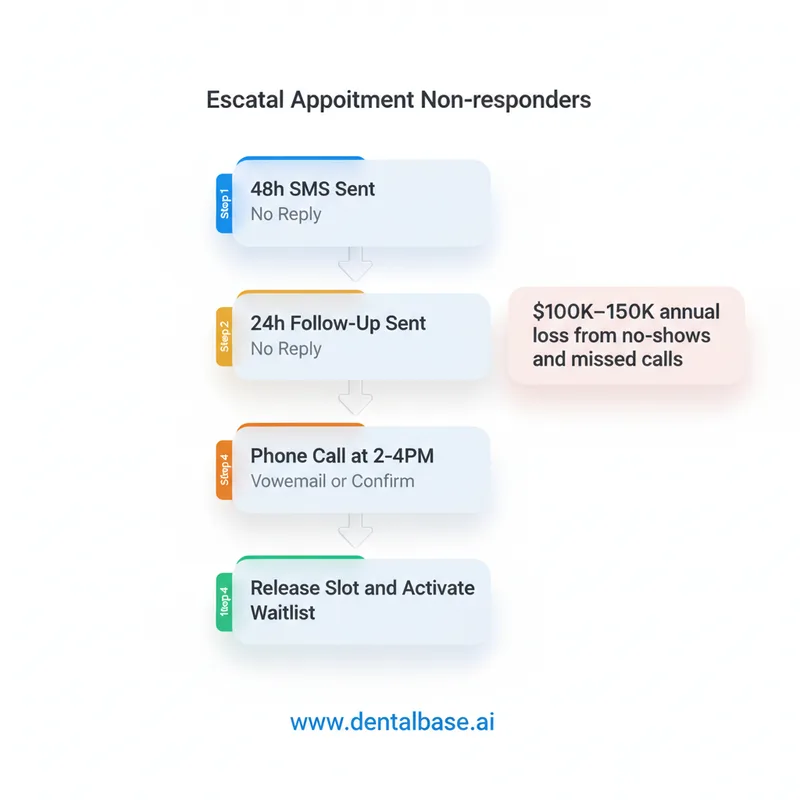
When a patient doesn't respond to two reminders, they become your highest no-show risk. The right response isn't to send a third text. It's to escalate the channel, activate your waitlist, and protect the revenue sitting in that time slot.
The Non-Responder Escalation Protocol
After the 48-hour SMS and 24-hour follow-up both go unanswered, trigger a phone call. This can come from your front desk or from an AI system that handles outbound calls. Phone calls convert non-responders at a higher rate than a third text because they're harder to ignore and they feel more personal. The best window for this call is between 2 PM and 4 PM the day before the appointment.
If the call goes to voicemail, leave a brief message and move to the waitlist protocol. At this point, you've made three contact attempts. The patient has had every opportunity to confirm. Holding the slot open for an unconfirmed patient while someone on your waitlist is ready to fill it is a business decision, not a courtesy question.
The Real Cost of Unconfirmed Appointments
Empty chair time is the most expensive problem in a dental practice because the overhead keeps running whether a patient is in the chair or not. Rent, staff wages, equipment leases, and utilities don't pause when someone no-shows. According to Dental Economics, the average practice loses $100,000-$150,000 annually from missed calls and no-shows combined. That number gets worse if your tech stack doesn't automate the escalation from reminder to waitlist backfill.
The practice that runs a structured non-responder protocol, whether manually or through automation, recovers a meaningful portion of that lost revenue. An automated system that detects a non-response, places a call, and texts the next waitlist patient when the slot opens handles this in seconds. A front desk team doing it manually takes 10-15 minutes per slot, and that's time they often don't have during a packed morning.
The practices that keep their no-show rates below 8% aren't sending better messages. They're sending them at the right time, in the right sequence, and responding to silence with a clear escalation plan instead of hoping the patient shows up. That's the real advantage of getting your dental appointment reminder timing right. Not any single message, but a system that adapts based on patient behavior and fills gaps before they become empty chairs.
Stop Losing Revenue to Poorly Timed Reminders
See how DentalBase automates the entire reminder sequence, from 48-hour confirmations to non-responder escalation and waitlist backfill.
Book a Free Demo →Want more guides on running a smarter dental practice?
Browse Resources →Sources & References
- ADA Health Policy Institute - Dental Practice Research
- Phone Calls: Are You Losing Patients at Hello? - Dental Economics
- Why Patient Self-Scheduling Isn't Optional Anymore - Dental Economics
- HubSpot - Marketing Statistics and Benchmarks
- BrightLocal - Local Consumer Review Survey
- HIPAA Privacy Rule - U.S. Department of Health and Human Services
Frequently Asked Questions
Send the first reminder 48 hours before the appointment for most visit types. New patients and high-value procedures benefit from an earlier heads-up at 5-7 days out, followed by the standard 48-hour confirmation. This gives patients time to reschedule without the appointment slipping from memory.
SMS reminders perform strongest between 10 AM and 12 PM or 5 PM and 7 PM when patients are between tasks. Email reminders work well on Tuesday through Thursday mornings between 8 AM and 10 AM. Avoid sending any reminders before 8 AM or after 9 PM to respect patient boundaries.
Two to three reminders per appointment is optimal. A 48-hour confirmation, a 24-hour follow-up for non-responders, and an optional same-day morning nudge cover the full window without creating fatigue. Sending four or more reminders per appointment increases opt-out rates without improving show rates.
Yes. New patients need an earlier first touch at 5-7 days before the visit so they can prepare insurance documents and complete intake forms. Recall patients are familiar with the process and respond well to the standard 48-hour confirmation only. Specialist referrals should include prep instructions in the first reminder.
Yes. Research published in the Journal of Dental Hygiene found that SMS reminders reduce no-show rates by up to 38% when sent in a structured two-touch sequence. Practices without any reminder system typically see no-show rates between 12% and 18%, while those with automated sequences keep rates below 8%.
If a patient does not respond after two text or email reminders, escalate to a phone call during the afternoon window. If they still don't respond by end of business the day before, consider releasing the slot and moving the next patient on your waitlist into that time. Unconfirmed appointments are your highest no-show risk.
Text messages have a 98% open rate compared to roughly 20% for email, making SMS the stronger channel for time-sensitive reminders. Email works well as a secondary channel for new patients who need pre-visit instructions or documents. The most effective approach uses SMS as the primary channel and email as a supplement.
Was this article helpful?
Written by
DentalBase Team
Expert dental industry content from the DentalBase team. We provide insights on practice management, marketing, compliance, and growth strategies for dental professionals.