Dental Website Color Psychology: Blue vs Green vs White
Dental website color psychology explained: how blue, green and white affect trust, calm and bookings, and how to build a palette that works.
Share:
Table of contents
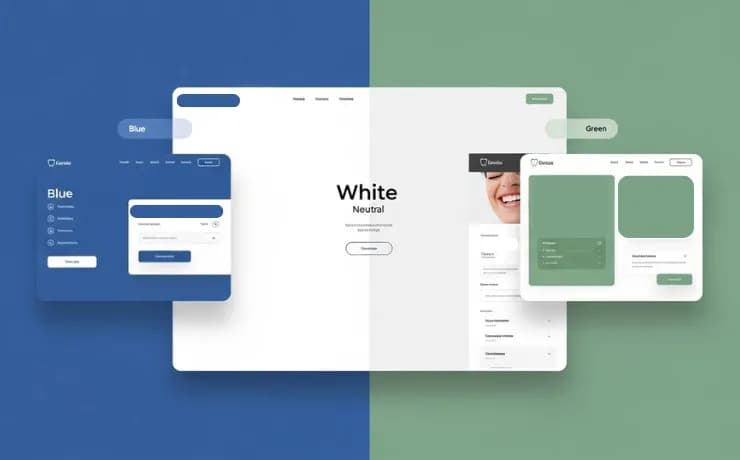
Dental website color psychology comes down to three choices: blue for trust, green for calm and white for cleanliness. Most practices use white as a base with blue or green accents, which keeps the site calming without feeling sterile. See how DentalBase applies this in our practice growth services.
Choosing the right colors for a dental website is not just a design decision. It’s a psychological one. Patients often form an impression of a dental practice within seconds of landing on a website. Color plays a major role in shaping that first impression, influencing trust, comfort, and even appointment bookings.
In this guide, we explore dental website color psychology, focusing on the three most common and effective choices in dental web design: blue, green, and white.
Why does color psychology matter on a dental website?
Color psychology matters on a dental website because many patients arrive anxious, and color shapes their first impression before they read a word. Calm, trustworthy palettes support comfort, credibility and appointment bookings, while harsh or cluttered palettes work against all three.
Dental anxiety is real. Many patients arrive at a website already feeling nervous, uncertain, or skeptical. Strategic color choices can:
Reduce perceived anxiety
Increase trust and professionalism
Improve user experience and time on site
Boost conversion rates for appointment bookings
A well-designed color palette helps communicate reassurance before a single word is read.
Most people looking for a dentist run a search before scheduling. Your website is often the first impression a patient gets. According to PatientPop research, 48% of patients spend over two weeks researching before they book. The palette also has to hold up across repeat visits.
Color also works with everything else on the page. According to BrightLocal, 98% of people read local reviews before choosing a business. The site has to match the reputation patients have already seen.
How does blue build trust and professionalism on a dental website?
Blue builds trust on a dental website because it is widely associated with reliability, cleanliness and calm. That is why so much of healthcare uses it. It suits practices that want to project expertise and technology, especially cosmetic and multi-location practices.
What Blue Communicates
Blue is one of the most widely used colors in healthcare and for good reason. Psychologically, blue is associated with:
Trust and reliability
Cleanliness and competence
Calm and emotional stability
When Blue Works Well
Blue is ideal for dental practices that want to emphasize expertise, advanced technology, or long-standing credibility. It performs especially well for:
Cosmetic dentistry
Multi-location practices
Dental clinics targeting families and professionals
Pro tip: Pair blue with soft neutrals or white to avoid a cold or overly clinical feel.
Shade matters as much as hue. Deep navy reads as formal and established, while mid blues feel friendly and approachable. Keep your chosen shade consistent across your logo, buttons and headings.
How does green create calm on a dental website?
Green creates calm on a dental website because it is associated with nature, balance and health, which helps anxious patients relax. Muted or pastel greens suit pediatric, wellness and prevention-focused practices, while bright greens can feel overwhelming.
What Green Communicates
Green is closely linked to nature, balance, and health. In dental website color psychology, green is often perceived as:
Calming and stress-reducing
Reassuring and friendly
Wellness and health-focused
When Green Works Well
Green is effective for practices that want to create a more relaxed, patient-first atmosphere, such as:
Pediatric dentistry
Wellness-oriented or integrative clinics
Practices emphasizing prevention and long-term care
Pro tip: Muted or pastel greens work better than bright greens, which can feel overwhelming.
Green can drift toward a spa look if it is overused. Balance it with white space and clear clinical details such as provider credentials and technology.
Color and layout work together for younger patients and their parents. See what parents look for in a pediatric dentist website.
How does white make a dental website feel clean and modern?
White makes a dental website feel clean and modern because it signals hygiene, simplicity and transparency, and it gives photos and text room to breathe. It works as the base layer for most practices, with blue or green accents added so the page does not feel sterile.
What White Communicates
White is the foundation of modern dental web design. It signals:
Cleanliness and hygiene
Transparency and simplicity
Modern professionalism
When White Works Well
White-dominant designs are perfect for:
High-end or boutique dental practices
Cosmetic and smile makeover specialists
Clinics aiming for a modern, premium feel
White works well when combined with blue or green accents to avoid looking sterile or empty.
Too much empty white can read as unfinished. Use real photos of your team and office, plus one accent color, to give the eye somewhere to land.
Blue vs Green vs White: Which Is Right for Your Practice?
The right choice depends on your brand and patients: choose blue for trust and expertise, green for calm and wellness, or white for a clean, premium look. Most effective dental websites blend all three, using one as the primary color and the others as accents.
There is no single winning color, only the right combination for your brand and audience.
Choose blue if trust, expertise, and professionalism are your priority
Choose green if calmness, wellness, and patient comfort matter most
Choose white if you want a clean, modern, and premium look
The most effective dental websites often blend all three, using one as a primary color and the others as supporting accents.
| Color | What it communicates | Works well for | Watch out for |
|---|---|---|---|
| Blue | Trust, reliability, calm | Cosmetic, multi-location and family practices | A cold, clinical feel without soft neutrals |
| Green | Calm, balance, wellness | Pediatric, wellness-oriented and prevention-focused practices | Bright greens that overwhelm |
| White | Cleanliness, simplicity, a modern feel | Boutique, cosmetic and premium practices | A sterile, empty look without accents |
If you are unsure, start with white and one accent color, then ask a few patients how the site feels.
How do you build a dental website color palette step by step?
Build a dental website palette by choosing one primary color, a white or soft neutral base, and one accent for buttons and key actions. Test it on a phone and check text contrast before you commit, then apply it the same way across every page.
- Start with your brand and your patients, and decide whether trust, calm or a premium feel matters most.
- Pick one primary color, blue or green, and a white or soft neutral base.
- Keep blue or green accents to roughly 10-30% of the page so the design stays calm without looking sterile.
- Choose one contrasting accent for booking buttons and calls to action.
- Check contrast and test the palette on mobile before launch.
Write down your exact color values and where each one is used, so future pages and ads stay consistent.
Test on a phone first. Google reports that mobile accounts for 62% of dental-related searches, and that 44% of patients who found healthcare through mobile search scheduled an appointment. See how mobile-first design wins more new patients and how to turn website visitors into booked appointments.
Do accessibility and contrast matter for dental website colors?
Yes, accessibility and contrast matter for dental website colors. Patients with low vision or color vision differences must be able to read text and find buttons. Aim for a contrast ratio of at least 4.5:1 for normal body text under WCAG level AA. Never rely on color alone to convey meaning.
Pale text on a white background fails contrast quickly, even when the colors look calming. Free tools such as Google Lighthouse flag low-contrast text automatically. The CDC's overview of disability and health is a reminder that patients include people with vision disabilities. Moz explains how accessibility and SEO overlap. Our guide to ADA compliance for dental websites covers the full checklist, including color contrast.
Test in real conditions too: a phone in bright light, an older monitor and browser zoom turned up.
Which colors should a dental website use sparingly or avoid?
Use bright, saturated colors sparingly on a dental website, because they can feel overwhelming to anxious patients and compete with your content. Red in particular can read as urgent or alarming in a medical setting, so reserve it for error messages and true emergencies.
Your palette should also match your logo, signage and in-office design. Dental branding strategies that attract the right patients shows how to carry one palette across every touchpoint. HubSpot's branding guide covers how color fits into a wider brand system. According to Dental Economics, 57% of dental practices are looking to redesign their websites. Its coverage of dental practice website design trends is worth reading before you pick a new palette.
Dark, heavy backgrounds deserve caution too. For nervous patients, a dark page with small light text can feel intense. Heavy imagery also costs speed: Google reports that consumers expect websites to load in 3 seconds or less.
What should you remember when choosing dental website colors?
Choose dental website colors to match your brand and your patients, keep the palette calm and consistent, and check contrast and mobile display before launch. A white base with blue or green accents is the safest starting point for most practices.
If you only change one thing, start with your booking button. Give it the most contrasting accent on the page and keep it the same color everywhere. A patient who is ready to book should never have to hunt for the next step.
Color is a silent communicator. In dental web design, it sets emotional expectations before patients ever pick up the phone. Thoughtful use of blue, green, and white can transform a website from visually appealing to psychologically reassuring.
At DentalBase, we design dental websites with conversion-driven color strategies grounded in psychology, not guesswork.
FAQ: Dental Website Color Psychology
Which color is right for a dental website?
There is no single right color. Blue builds trust, green promotes calmness, and white reinforces cleanliness. The right choice depends on your brand and patients.
Do colors really affect dental website conversions?
Yes. Color influences emotions and decision-making, which directly impacts appointment bookings and user engagement.
Should dental websites use bright colors?
Bright colors should be used sparingly. Soft, muted tones are more effective for reducing anxiety and maintaining professionalism.
Can I mix blue, green, and white together?
Absolutely. Many high-performing dental websites use white as a base with blue or green accents for balance and clarity.
Related Reading
Related: Color is one design decision among many covered in our broader guide. Read the full 2026 design trends and cost guide →
Sources & References
Frequently Asked Questions
Dental website color psychology is the study of how colors influence patients' emotions and decisions on a practice website. Blue tends to signal trust, green calm and white cleanliness, so palette choices shape comfort, credibility and whether a nervous visitor decides to book.
Soft blue and muted green are the most calming choices for a dental website. Blue builds trust and emotional stability, while green reduces stress and feels reassuring, especially for anxious or pediatric patients. Pair either with a white base and avoid bright, saturated tones.
Blue and white signal cleanliness, professionalism and safety, which matches what patients expect from healthcare. They also give photos and text plenty of room, so visitors can find information and book without feeling overwhelmed.
Yes, especially if you want a calm, wellness-oriented feel. Muted greens work well and suit pediatric, wellness-oriented and prevention-focused practices, while bright greens can feel overwhelming. Pair green with a white base so the page stays clean.
Colors influence emotion and trust, which shapes whether a visitor stays and books, but no palette works alone. Clear calls to action, fast mobile pages and readable contrast matter just as much. Treat color as one part of a conversion-focused design.
Yes. Text and buttons need enough contrast for patients with low vision, and color should never be the only way to convey meaning. Check your palette against the Web Content Accessibility Guidelines and test it with a tool such as Google Lighthouse.
Was this article helpful?
Written by
DentalBase Team
Expert dental industry content from the DentalBase team. We provide insights on practice management, marketing, compliance, and growth strategies for dental professionals.