Tips for Shooting Great Dental Videos on a Smartphone
Discover how to film professional-quality dental videos using just your phone. Dental Base reveals the lighting, audio, and framing secrets that build patient trust without breaking the bank
Share:
Table of contents
In the world of modern dentistry, trust is the currency that matters most. Patients are no longer just looking for the closest clinic; they are looking for a provider they feel comfortable with before they ever step foot in the waiting room.
Video is the single most effective way to build that trust. A short clip of you explaining a procedure or a smiling patient testimonial can do more for your conversion rates than paragraphs of text ever could.
But here is the hurdle many dentists face: the belief that high-quality video requires a professional film crew, expensive lights, and a Hollywood budget.
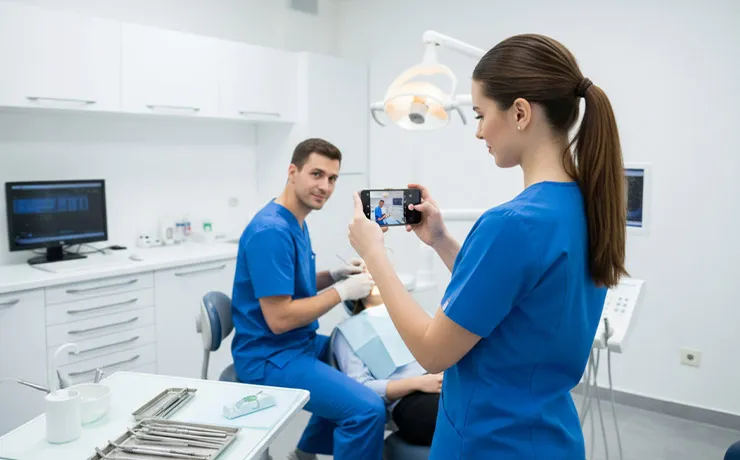
At Dental Base, we are here to tell you that the camera currently sitting in your pocket—your smartphone—is powerful enough to create stunning, patient-converting content. Whether you have the latest iPhone or a Samsung Galaxy, you have a 4K production studio at your fingertips.
Here is how to use it effectively to market your dental practice.
1. Lighting: The Difference Between "Amateur" and "Pro"
You can have the best camera in the world, but if your lighting is bad, your video will look grainy and unprofessional. In a dental office, lighting can be tricky because clinical lights are often too harsh, while waiting room lights can be too dim.
Face the Light, Don't Back It
The golden rule of smartphone videography is simple: the light source should be behind the camera, shining on your face. Never film with a bright window behind you, or you will turn into a dark silhouette.
Find a large window with indirect sunlight. This acts as a giant "softbox," smoothing out skin textures and making the subject look approachable. If natural light isn't an option, avoid standing directly under overhead fluorescent lights, which create unflattering shadows under the eyes (the "raccoon" effect).
Investing in a Ring Light
If you plan to film consistently, a simple LED ring light is the best $30 investment you can make. It provides consistent, even lighting regardless of the weather outside. Position it slightly above eye level and angle it down for the most flattering look.
2. Audio Quality: More Important Than Video Quality
Viewers will forgive slightly shaky video or less-than-perfect lighting, but they will click away immediately if the audio is bad.
The "Echo Chamber" Problem
Dental offices are full of hard surfaces—tile floors, glass partitions, and sanitized countertops. This creates echo, which makes audio sound distant and hollow on a smartphone recording.
To combat this, try to film in a room with soft surfaces. A private office with a rug, curtains, or even a bookshelf can help absorb sound. If you must film in a clinical operatory, try to keep the phone close to the subject (within 3 feet) to capture their voice clearly.
Use an External Microphone
The built-in microphone on your phone is omnidirectional, meaning it picks up everything—including the HVAC hum and the suction noise from the next room.
To instantly upgrade your quality, buy a small lavalier (clip-on) microphone that plugs into your phone. These are inexpensive and isolate the speaker's voice, making your message crisp and clear.
3. Stability and Framing
Nothing screams "amateur" like shaky, handheld footage that induces motion sickness.
Use a Tripod
You don’t need a heavy-duty camera tripod. A lightweight, tabletop tripod designed for smartphones is perfect for dental videos. Place it on a desk or counter to keep your shot rock-steady. This allows you to use your hands naturally while speaking, rather than clutching the phone.
The Rule of Thirds
When framing your shot, don't just center your face. Imagine a tic-tac-toe grid over your screen (most phones have a setting to turn this grid on). Place your eyes along the top horizontal line.
If you are filming a testimonial or an interview style video, position the subject slightly to the left or right third of the frame, looking slightly across the camera, rather than dead-center. This looks more cinematic and less like a mugshot.
Vertical vs. Horizontal
Before you hit record, know where this video is going.
Instagram Reels / TikTok / Stories: Shoot Vertical (9:16). This takes up the whole phone screen and captures attention.
Website / YouTube / Facebook: Shoot Horizontal (16:9). This looks more professional on desktop computers and fits standard video players.
4. Preparation: Clean the Lens and The Scene
This sounds incredibly basic, but it is the most common mistake we see.
The "Fingerprint Fog"
Your phone spends all day in your pocket or hand. The lens is likely covered in fingerprints and oil. This creates a hazy, "dreamy" blur that ruins sharpness. Wipe your lens with a microfiber cloth (or even your shirt) before every single take. The difference in clarity is immediate.
Check Your Background
Look at what is behind you. Is there a messy pile of paperwork? A scary-looking dental tool? An overflowing trash bin?
Curate your background to convey professionalism and cleanliness. A neatly organized shelf, a diploma on the wall, or a clean, modern dental chair (without instruments out) makes for a great backdrop.
5. Content Delivery: Be a Human, Not a Lecturer
When the camera turns on, many dentists stiffen up and start using complex medical jargon ("malocclusion," "periodontal maintenance").
Remember, you are filming for patients, not for a dental conference.
Look at the Lens: Don't look at yourself on the screen. Look directly at the little black dot of the lens. This creates eye contact with the viewer.
Keep it Short: Attention spans are short. Aim for 30 to 60 seconds for social media tips. If you are explaining a procedure, break it down into bite-sized pieces.
Smile: You are in the business of smiles! Start and end every video with a genuine smile. It sets the tone for the entire interaction.
6. The Critical Step: HIPAA Compliance
We cannot talk about dental video marketing without mentioning compliance.
If you are filming anywhere in your office, ensure no patient files, computer screens with names, or other patients are visible in the background.
If you are filming a patient testimonial:
Get a signed media release form (HIPAA authorization) specifically for marketing use.
Do not film until they have explicitly agreed.
Avoid filming them in a vulnerable position (e.g., while in the chair with a bib on). It is often better to film them in the lobby or consultation room where they feel more confident.
Start Shooting Today
The best video is the one you actually film. Don't let the pursuit of perfection stop you from creating content. Your patients want to see you—your personality, your expertise, and your care.
If you have a library of raw footage on your phone but don't know how to edit, brand, or distribute it, that is where we come in.
Dental Base helps practices turn simple smartphone clips into polished, high-converting marketing assets. Grab your phone, find good light, and hit record. We can handle the rest.
Frequently Asked Questions
Yes. Modern smartphones can record in 4K, and when a dentist uses good lighting, clear audio, and steady framing, the video quality is more than enough to clearly explain procedures and build trust.
Short videos, usually 30 to 60 seconds, are easier to watch and understand. They help patients quickly learn about treatments without feeling overwhelmed or confused.
They should be. Ethical dental practices only film testimonials after a patient signs a HIPAA media release and avoid recording any personal health information on screen.
Look for clear audio, good lighting on the dentist’s face, simple language without heavy jargon, and a clean, professional background.
Was this article helpful?
Written by
DentalBase Team
Expert dental industry content from the DentalBase team. We provide insights on practice management, marketing, compliance, and growth strategies for dental professionals.