Dental Practice Automation: What to Automate First in 2026
Dental practice automation can free 20+ staff hours a week. Get the 90-day roadmap and the 12 areas to automate first in 2026, in order.
Share:
Table of contents
What is dental practice automation?
Dental practice automation is the use of software, AI, and integrated systems to handle administrative and clinical tasks without staff intervention. It covers calls, scheduling, recall, intake, insurance verification, billing, reviews, and reporting. Done well, it gives back staff time, reduces leakage, and creates a consistent patient experience around the clock.
People often confuse it with digitization. Digitization is moving paper charts to an EHR or a paper recall list to a spreadsheet. Useful, but the work still happens manually. Automation is the next step: the system itself decides what to do based on rules you set. A digitized recall list is a CSV. An automated recall list calls and texts the right patient on the right day, books them, and updates the chart, all without anyone touching it.
That distinction matters because it changes what you should buy. A "digital" front desk tool that needs a person to click "send" all day is not really automation. A properly automated front office books appointments while the lights are off.
Automation vs. digitization in plain terms
Three quick examples that sit on most front desks:
- Recall: Digitization gives you a list. Automation calls, texts, and emails patients who are due, then books them.
- Calls: Digitization records voicemails. Automation answers the call, books the appointment, and writes the chart note.
- Insurance: Digitization scans the card. Automation checks eligibility, breakdowns, and frequency limits before the patient walks in.
Why automate your dental practice in 2026?
The case for automation in 2026 comes down to four levers: capture more of the calls you already pay marketing to generate, free your team from low-value admin work, lift case acceptance and collections, and grow without proportionally growing payroll. Each lever is measurable, and most can be tied to a specific revenue or cost line.
Start with what you are losing today. The average dental practice misses 15 to 20 calls per week (Dental Economics), and roughly 80% of callers who hit voicemail do not leave a message and never call back (Forbes). After-hours calls represent roughly 27% of total call volume. If you are paying for Google Ads or SEO and your phones go to voicemail at 5:01 PM, you are funding leads for the practice down the street. Dental Economics has documented how patient communication breakdowns compound across the booking funnel.
The labor side is the second story. Dental assisting wages and front office wages have both climbed steadily, and the Bureau of Labor Statistics shows clear upward pressure across administrative roles. Automation does not replace your team. It removes the repetitive 30 to 40 hours per week that should not be on a human's plate in the first place, based on our experience auditing dental front offices.
Four strategic objectives worth the investment
- Stop call leakage. Answer every inbound, after hours and during the lunch crunch. This is the single line item with the fastest payback.
- Cut admin burden. Move confirmations, recalls, intake, and verification off the front desk so staff can sell treatment.
- Lift revenue per chair. Better recall, better follow-up, fewer holes in the schedule.
- Scale without scaling payroll. Open a second op or a second location without doubling administrative headcount.
Stop losing patients to voicemail.
DentiVoice answers every call, books appointments into your PMS, and works after hours, on weekends, and during the lunch rush.
12 core areas of dental practice automation
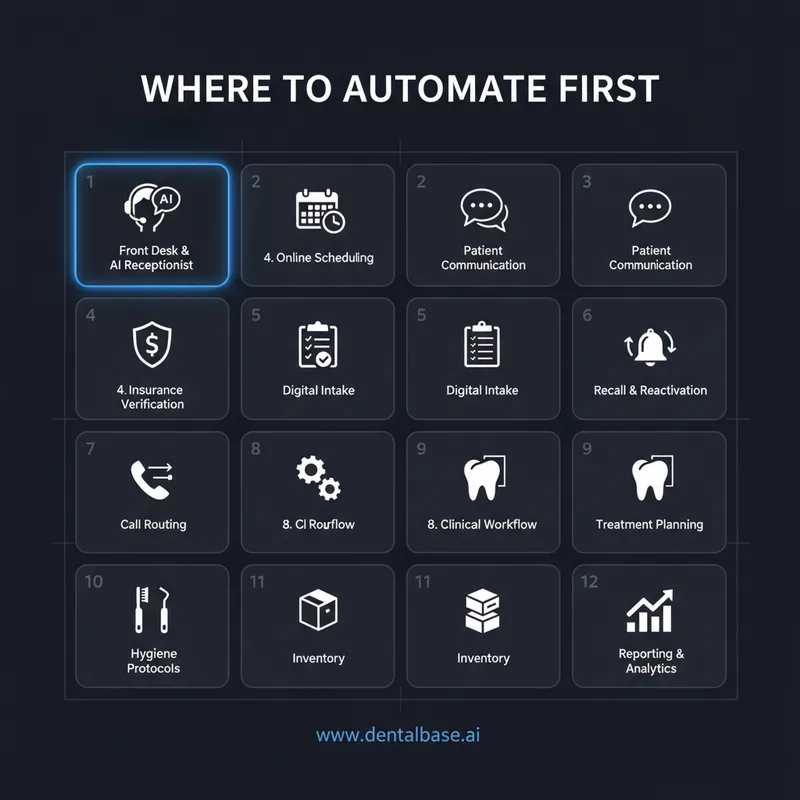
The 12 core areas of automation in a dental office cover every part of the patient journey, from the first call through to long-term recall. They split into three groups: front-desk and patient-facing (calls, scheduling, intake, communication), back-office and revenue (billing, insurance, recall, reactivation, reporting), and clinical workflow (chairside, treatment planning, hygiene, inventory). Use this as your shopping list.
Twelve operational areas in a dental practice can be automated today with mature, dental-specific tools. Not all are equal. Some pay back in weeks (call answering, recall). Some take months and require workflow changes (clinical documentation, inventory). Use this list to map your current stack and find the gaps that are actually costing you money.
1. Front desk and AI receptionist
Phase 1 starts at the phone, which is why picking the right dental virtual receptionist is the single highest-leverage automation decision a practice makes. If you haven't already, start with the dental virtual receptionist buyer's guide to understand the category before evaluating vendors.
An AI receptionist answers inbound calls 24/7, books, reschedules, and triages. This is the highest-impact area for almost every practice because it directly recovers calls you are already paying to generate. Before choosing a platform, understand what a dental AI receptionist can and can't do so you set realistic expectations and configure the right handoff rules.
2. Online scheduling and self-booking
Most patients want online booking, but only a minority of practices offer it. Becker's Dental Review reports that practices adopting online scheduling and automated confirmations see meaningfully lower no-show rates. A self-booking widget on your website turns a 9 PM Google search into a confirmed Tuesday morning appointment.
3. Patient communication and reminders
Two-way SMS confirmations, pre-visit instructions, and post-op check-ins. SMS appointment reminders alone reduce no-show rates by roughly 38% per the Journal of Dental Hygiene. Reminder cadence and channel matter more than the platform you pick.
4. Insurance verification and billing
Eligibility checks, breakdowns, and frequency limits run before the patient arrives. Claims submission, attachments, and rejection follow-ups handled by software, not a person.
5. Patient intake and digital paperwork
Forms sent ahead of the visit, completed on a phone, parsed into the chart. No clipboards. No retyping. Cleaner data going into treatment planning.
6. Recall and reactivation
The system identifies who is due, contacts them across channels, books them, and updates the chart. Automated recall systems lift patient return rates by 25 to 40% per Dental Economics. Patient reactivation is where many practices find a hidden 5- to 6-figure annual recovery.
7. Call routing and overflow
Calls during peak hours go to AI handling. After-hours calls get answered, not logged. After-hours volume is roughly a quarter of all patient calls.
8. Clinical workflow and chairside support
Operatory turnover prompts, sequence templates, and AI-assisted charting. The clinical side moves slowest because it touches care, but the gains compound over time.
9. Treatment planning and case presentation
Auto-generated visual treatment plans, financing options surfaced at the chair, electronic signature for case acceptance.
10. Hygiene protocol automation
Standardized perio charting, recall intervals tied to risk, and protocol prompts during the visit. This is where consistency across hygienists actually shows up.
11. Inventory management
Usage tracking, par levels, automated reorders, and supplier price comparison. Smaller wins per item, but supply costs add up across a year.
12. Reporting and analytics
Daily dashboards on production, collections, schedule fill, and missed calls. Call-level reporting is the piece most practices miss.
Related: Want to see what one missed evening costs your practice? After-hours revenue your practice is leaving on the table
What are the benefits and ROI of dental practice automation?
The benefits of automation in a dental office fall into three buckets: time saved, revenue captured, and errors avoided. Based on our experience auditing dental front offices, a solo practice typically frees 15 to 20 hours per week, a 2 to 4 provider group frees 30 to 40, and a multi-location group frees 60 or more.
That time goes back into patient care or, more often, removes the need for the next admin hire.
Revenue capture is the bigger story. The first place to look is the call log. Practices with online scheduling and automated confirmations see lower no-show rates per Becker's industry data, and most patients run a search before they ever pick up the phone (Pew Research). If your phones miss those callers, your marketing dollars subsidize someone else's chair.
The recall side compounds. About 20 to 30% of patients become inactive within 18 months without proactive follow-up (ADA), and reactivating an existing patient costs roughly 5 to 7 times less than acquiring a new one (Harvard Business Review). A working recall system is one of the highest-ROI automations in the entire stack, and it almost always exists in some half-functional form already on your front desk.
Where the ROI actually shows up
| Area | What changes | Typical payback |
|---|---|---|
| Missed calls | Every inbound answered, even after hours and at lunch | Weeks |
| Recall and reactivation | Lapsed patients booked without staff effort | 1 to 3 months |
| Online scheduling | Lower no-show rates, after-hours bookings captured | 1 month |
| Insurance verification | Fewer write-offs, faster collections | 1 to 2 months |
| Reporting | Decisions on data, not gut feel | Ongoing |
Two cautions. First, do not pay for "ROI" you cannot measure. If your vendor cannot show you which calls were answered, which appointments were booked, and which patients showed up, you do not have an ROI report. You have a marketing brochure. Second, the savings are real but they only land if you actually reduce something on the back of them. Free hours that get reabsorbed into busywork are not savings.
Tie your automation to real numbers.
DentalBase ties calls, ads, bookings, and revenue together so you can see what each automation is actually producing.
How do you implement dental practice automation in 90 days?
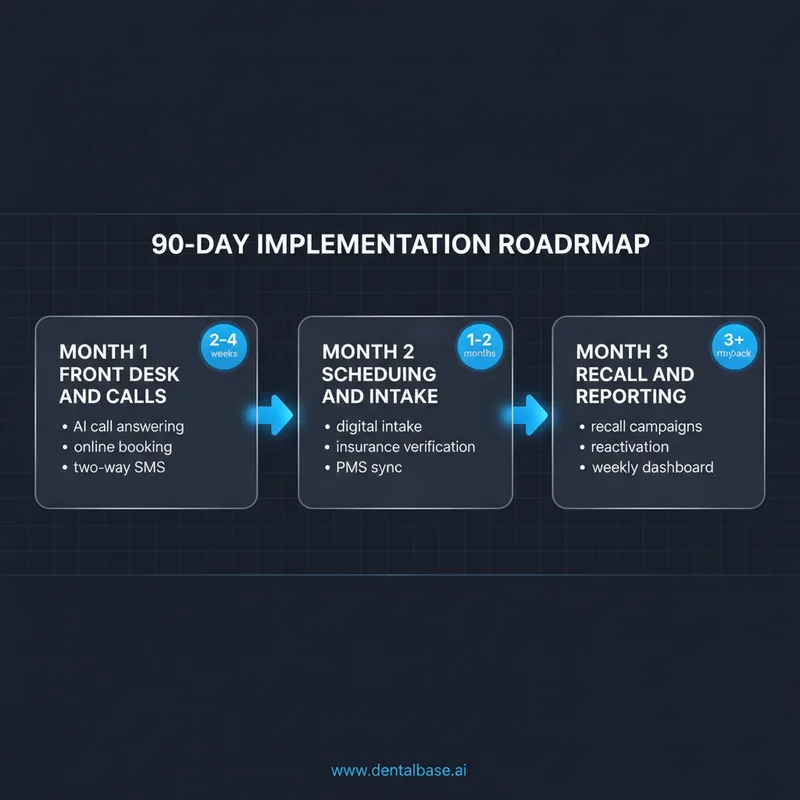
A practical implementation moves in three phases over 90 days, sequenced so each phase pays for the next. Month one fixes the front of the funnel. Month two cleans up scheduling and intake. Month three layers in recall, reactivation, and reporting. The order matters because rolling out everything at once is the most common reason these projects stall.
Month 1: front desk and calls
Install AI call handling, online booking, and two-way SMS confirmations. This is where the highest-impact wins live. You should see missed-call rate drop and after-hours bookings appear within the first two weeks. Run the existing front desk in parallel for 2 weeks before cutting over.
Month 2: scheduling, intake, and verification
Move intake forms fully digital, turn on automated insurance verification, and connect the booking widget to your PMS. Train the team on the exception cases, not the happy path. The happy path runs itself.
Month 3: recall, reactivation, and reporting
Launch the recall and reactivation campaigns against your inactive patient list. Stand up a weekly dashboard covering missed calls, booked appointments, conversion rate, and production. Audit your tech stack at day 90 to retire anything you are paying for that the new system has replaced.
Common implementation mistakes (and how to avoid them)
| Mistake | Why it hurts | Fix |
|---|---|---|
| Automating a broken process | Bad workflows just run faster | Map the workflow, fix it, then automate |
| Buying 7 point tools | Data silos, no single source of truth | Pick a platform, integrate the rest |
| Skipping training | Adoption stalls in week 3 | Designate one champion per system |
| Set and forget | Reminders go stale, scripts get outdated | Monthly 30-minute review |
| Forcing one channel | Some patients want a call, some want a text | Let patients pick their preferred channel |
| Ignoring HIPAA | Vendor breaches become your problem | BAA with every cloud automation vendor |
| Underestimating PMS integration | "Easy integration" rarely is | Confirm bridges with Open Dental, Dentrix, or Eaglesoft up front |
HIPAA, BAAs, and the security baseline
Automation does not change your obligations under HIPAA. It actually raises the stakes because more PHI moves through more systems. Every cloud automation vendor that touches patient information needs a signed Business Associate Agreement, encryption in transit and at rest, role-based access controls, and audit logs you can pull on demand. The CDC dental settings guidance is also worth a read for the broader infection-control and information-handling baseline.
What is the future of dental practice automation?
The next chapter of automation in dentistry is predictive, not reactive. Today's tools react: a patient calls, the AI answers; a recall date hits, a text goes out. The next generation will look three weeks ahead, predict the gaps, and proactively reach out to fill them.
Predictive no-show scoring is already showing up in early commercial tools.
Two trends will shape what your stack looks like in 2027. The first is deeper integration between dental software, medical EHRs, and pharmacy systems for shared patient context. The second is AI in clinical decision support, where the system flags pattern changes in radiographs or risk markers in periodontal charting for the dentist's review. Neither replaces the dentist. Both raise the floor on consistency.
For a broader look at which AI applications are delivering measurable results in dental practices right now, our guide to AI dental trends in 2026 maps the full landscape from diagnostics to front-office tools.
The staffing model will shift, too. Traditional front-office roles will move toward exception handling, complex problem-solving, and patient relationship work, while routine confirmations, verifications, and follow-ups run on their own. AI-driven search behavior is also changing how patients find you, which feeds directly into how your front-of-funnel automation needs to be designed. The BrightLocal Local Consumer Review Survey shows just how heavily prospective patients weight reviews and online presence before they ever call.
Putting your dental practice automation roadmap to work
The right way to put a dental practice automation roadmap to work is to sequence by ROI, not by what is easiest to install. Fix calls in month 1, scheduling and intake in month 2, recall and reporting in month 3. Each phase produces measurable results that fund the next. Skipping the sequence is the most common reason rollouts stall.
The single biggest insight from working with hundreds of practices on this is one thing: the order of operations matters more than the tools you pick. Start with the calls, then the schedule, then recall, then reporting. Each phase funds the next.
If you only do one thing this quarter, fix the front desk. Put an AI receptionist on the phones, add online booking to the website, and turn on two-way SMS. The rest of the roadmap gets easier once those three are running.
See dental practice automation in action
Walk through the DentalBase platform with one of our specialists. See how AI call answering, recall, and reporting work together in your PMS.
Want more practice growth playbooks?
Sources & References
Frequently Asked Questions
Dental practice automation uses software to handle repetitive administrative tasks without manual intervention. This includes appointment scheduling, patient reminders, insurance verification, billing, intake forms, and recall campaigns. The goal is to free up staff time so your team can focus on patient care instead of paperwork.
Yes, when you choose HIPAA-compliant tools with encryption, access controls, and audit trails. Automated systems often improve security over manual processes because they reduce human error and unauthorized access. Always verify that vendors sign business associate agreements and conduct regular security audits.
The most commonly automated tasks include appointment scheduling and confirmations, patient intake forms, insurance verification, billing and claims processing, recall and follow-up campaigns, phone call handling with AI receptionists, review requests, and reporting. Most practices start with reminders and scheduling before expanding.
Not at all. Solo and small practices often benefit the most because automation replaces the extra admin help they can't afford to hire. A solo practice can save 15-20 hours per week, which is roughly equivalent to one full-time employee. Multi-location groups use automation to standardize operations across sites.
Yes, significantly. Practices using automated two-way reminders where patients can confirm or reschedule via text, email, or voice report 35-50% fewer no-shows. The key is using the patient's preferred communication channel and pairing reminders with a waitlist strategy to fill last-minute cancellations.
Costs vary by scope. Individual tools like automated reminders start around $100-300 per month. Comprehensive platforms that cover scheduling, communication, billing, and AI reception typically run $500-1,500 per month. Mid-sized practices report $50,000-$150,000 in annual savings, making the ROI substantial within the first year.
A basic setup covering reminders, online scheduling, and digital forms can go live in 2-4 weeks. Full automation across all 12 core areas typically takes 60-90 days when rolled out in phases. The biggest variable is staff training, not the technology itself.
Most modern automation platforms integrate with popular PMS systems like Dentrix, Eaglesoft, Open Dental, and Curve Dental through APIs or direct connectors. Before purchasing any tool, verify compatibility with your specific PMS version and ask for a live integration demo rather than relying on marketing claims.
Was this article helpful?
Written by
Dentalbase Team
The Dentalbase Team is a collective of dental marketing experts, AI developers, and practice management consultants dedicated to helping dental practices thrive in the digital age.


