Get a Dental AI Receptionist Demo: Top Picks for 2026
Requesting a dental AI receptionist demo? Compare what to test, which vendors offer live demos, and how to pick the right fit for your practice in 2026.
Share:
Table of contents
A dental AI receptionist demo is the fastest way to figure out whether an AI phone system can actually handle your patient calls or whether it's going to create more problems than it solves. And right now, with at least a dozen vendors pitching AI receptionists to dental practices, the demos are where marketing claims meet reality.
Here's why that matters. According to ADA Practice Transitions, 38% of new patient calls go unanswered during business hours. Each of those missed calls represents $1,200 or more in lifetime patient value, based on figures from Dental Economics. So the tool you pick to answer those calls isn't a small decision. This guide walks you through what to look for in a demo, which vendors are worth your time, and how to compare them without getting lost in sales pitches.
Why Should You Request a Dental AI Receptionist Demo Before Buying?
A demo is the only reliable way to test whether an AI receptionist handles real dental workflows correctly before you commit your budget. Sales pages list features, but demos expose the gaps that matter: how the system responds under pressure, whether it books accurately into your PMS, and how it handles the calls your front desk dreads.
Think about what's actually at stake. The average dental practice misses 15-20 calls per week, according to Dental Economics. And 80% of callers who reach voicemail don't leave a message and won't call back. That's not a minor inconvenience. For a practice generating $1.2 million annually, those missed calls could represent $150,000-$200,000 in lost production.
But here's the thing. Not every AI receptionist handles dental calls well. Some stumble on insurance questions. Others can't distinguish between a routine scheduling call and a genuine emergency. A few can't even book into your Dentrix or Open Dental system without manual workarounds. You won't know any of this from a features page. You'll know it from a demo.
The practices that get burned are the ones that skip this step. They sign a 12-month contract based on a polished slide deck, then spend 3 months troubleshooting booking errors and patient complaints. A 30-minute demo could have surfaced every one of those problems.
See How AI Call Handling Works for Dental Practices
DentiVoice answers patient calls 24/7, books directly into your PMS, and triages emergencies without putting callers on hold.
Learn About DentiVoice →What Should a Dental AI Receptionist Demo Actually Show You?
A strong demo should show live call handling, real-time PMS booking, and how the system responds to edge cases like emergencies, cancellations, and insurance questions. If the vendor only shows you a scripted walkthrough with perfect scenarios, you're watching a commercial, not a demo.
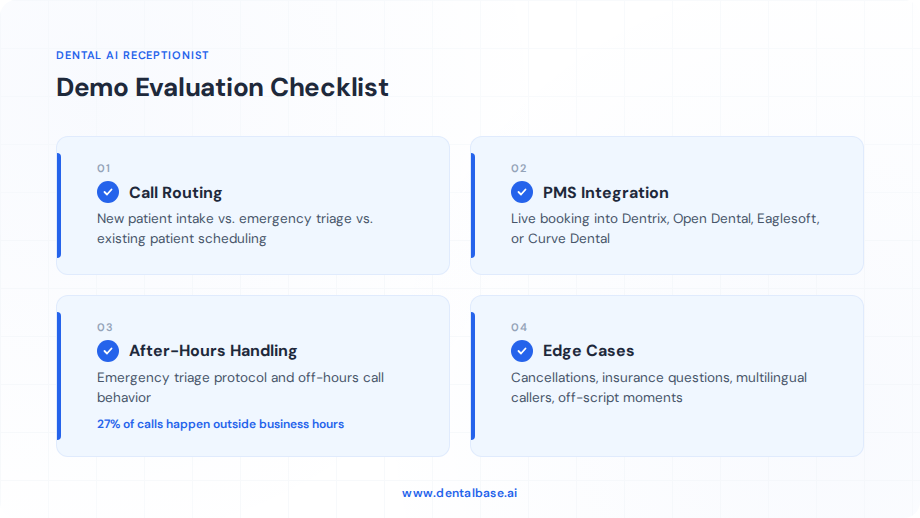
Start with call routing. Can the AI distinguish between a new patient calling to schedule a cleaning and an existing patient with a broken crown who needs to be seen today? That distinction matters because those two calls require completely different workflows. The new patient needs intake questions, insurance capture, and an available hygiene slot. The emergency patient needs triage, a same-day opening, and possibly a warm transfer to clinical staff.
Then test PMS integration. This is where most vendors fall short. Ask the demo to book an appointment into a live or sandbox instance of your practice management system. Watch whether it selects the correct provider, operatory, and appointment type. A system that can "schedule appointments" in theory but writes them to the wrong provider in Eaglesoft or Curve Dental is worse than no system at all.
Key Scenarios to Run During Your Demo
- New patient with insurance questions: Can the AI capture insurance details, check whether the practice accepts that plan, and still complete the booking? Or does it stall and ask the caller to "call back during business hours"?
- Same-day cancellation with backfill: Does the system attempt to fill the open slot from a waitlist or recent no-show list, or does it just confirm the cancellation and hang up?
- After-hours emergency: How does it triage? Does it follow your practice's emergency protocol, or does it give a generic "please visit the nearest ER" response?
- Non-English speaker: If your patient base includes Spanish or other language speakers, test whether the AI handles multilingual calls or drops them.
After-hours calls make up 27% of total patient call volume, according to Dental Economics. If your demo doesn't include an after-hours test, you're only seeing 73% of the picture.
Related: Already narrowing your vendor list? See how platforms compare on features, pricing, and real user feedback. → Dental AI Receptionist Reviews (2026)
Which Dental AI Receptionist Vendors Offer Live Demos in 2026?
Several vendors now offer live or interactive demos, but the format and depth vary significantly. Some let you call a test number and interact with the AI yourself. Others only offer guided sales walkthroughs where a rep controls what you see.
That difference matters more than you'd think. A self-service phone demo lets you throw curveballs at the AI: mumble, interrupt, ask an off-script question, switch topics mid-call. A guided walkthrough lets the sales rep steer you toward the scenarios that work and away from the ones that don't.
Demo Format Comparison
| Demo Format | What It Reveals | What It Hides |
|---|---|---|
| Self-service phone test | Real conversational ability, latency, error recovery | PMS integration depth (usually not connected in test mode) |
| Guided sales walkthrough | Feature breadth, UI/dashboard, reporting capabilities | Real-world call handling under unscripted conditions |
| Sandbox/trial access | Full product behavior over days or weeks | Scale performance (trial volume is usually capped) |
| Recorded demo only | Polished best-case performance | Almost everything - you can't test anything yourself |
The strongest signal comes from vendors who let you make unscripted calls to a live system. If a vendor only offers a recorded demo or a tightly controlled walkthrough, ask why. Sometimes there's a legitimate reason, like HIPAA restrictions on connecting to a real PMS during a sales demo. But if they can't offer any form of live interaction, that's worth noting on your evaluation.
A growing number of platforms now offer 7-14 day trial periods where you can route a portion of your actual calls through the system. This is the gold standard. You're testing with your patients, your call patterns, and your PMS. No simulation compares to that.
How Do You Compare Dental AI Receptionist Demos Side by Side?
Build a scoring rubric before your first demo so you're comparing identical criteria across every vendor. Without a rubric, you'll default to whichever demo felt the smoothest, which usually just means the vendor had the better sales rep, not the better product.
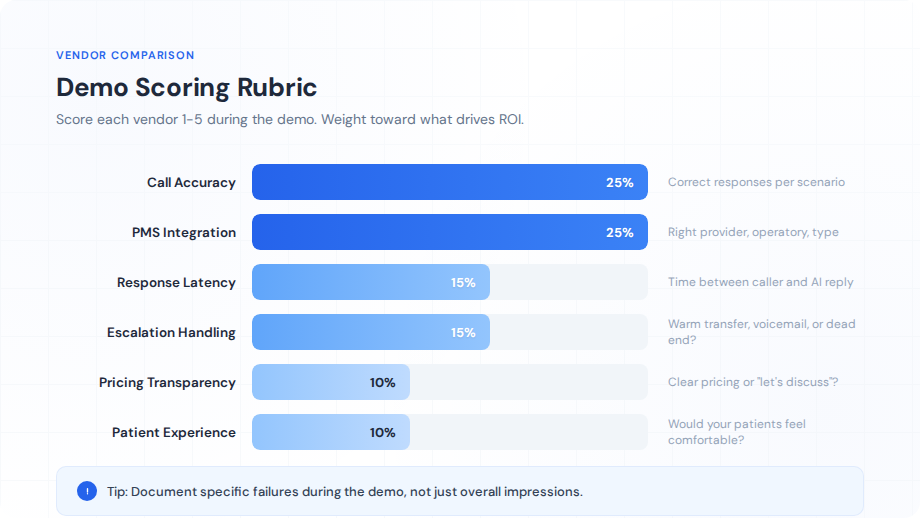
Here's a practical framework. Weight each category based on what matters most to your practice, then score every vendor on a 1-5 scale during or immediately after the demo. Don't wait until the next day. Details fade fast.
Demo Scoring Rubric
| Category | Weight | What to Score |
|---|---|---|
| Call accuracy | 25% | Did the AI correctly understand and respond to each scenario? |
| PMS integration depth | 25% | Did it book into the right provider, operatory, and appointment type? |
| Response latency | 15% | How long between the caller finishing a sentence and the AI responding? |
| Escalation handling | 15% | How does it handle calls it can't resolve? Warm transfer, voicemail, or dead end? |
| Pricing transparency | 10% | Did they give clear pricing, or was it "let's discuss after you sign"? |
| Patient experience | 10% | Would your patients feel comfortable talking to this system? |
Here's a real scenario where this rubric pays off. A three-provider practice in Texas tested two AI receptionist platforms last year. Both looked impressive in their guided demos. But when the office manager ran 15 identical call scenarios through each system's self-service test line, one platform booked into the wrong provider 4 out of 15 times. The other got all 15 right but had a 3-second response delay that made conversations feel unnatural. Without the rubric, they would have picked based on gut feeling. With it, they chose the accurate platform and worked with the vendor to reduce latency during onboarding.
Document everything. Screen-record the demo if the vendor allows it. Take notes on specific failures, not just overall impressions. "It felt slow" isn't useful feedback for your decision. "Response latency averaged 2.8 seconds on scheduling calls and 4.1 seconds on insurance questions" is.
Ready to Test DentiVoice With Your Own Call Scenarios?
Book a live demo and see how DentiVoice handles scheduling, emergencies, and after-hours calls for practices like yours.
Book a Free Demo →What Are the Red Flags During a Dental AI Receptionist Demo?
The biggest warning signs are scripted-only demos, no PMS integration during the trial, and vague answers about HIPAA compliance. Any one of these should make you pause. All three together? Walk away.
Let's break these down. A scripted-only demo means the vendor controls every variable. They've pre-loaded the "patient" info, pre-selected the scenario, and pre-tested the outcome. That tells you nothing about how the AI performs when a real patient calls with background noise, an accent, or a question the system wasn't trained on.
Red Flags to Watch For
- No live PMS write-back: If the vendor says "we'll connect to your PMS after you sign," you have no proof the integration actually works. Some platforms claim Dentrix integration but only support a limited subset of scheduling functions. Ask to see a booking appear in a PMS instance during the demo. Period.
- No after-hours testing: Your practice gets 27% of its calls outside business hours. If the demo only runs during a 2 PM sales call, you're not seeing how the system performs at 9 PM on a Saturday when a patient has a cracked tooth.
- Vague HIPAA answers: Any vendor handling patient health information needs a Business Associate Agreement. If they can't produce one during the demo, or if they say "we're working on it," that's not a vendor ready for your practice.
- No call recordings shared: You should be able to review recordings of test calls after the demo. If the vendor won't share them, ask why. Transparency about call quality is a basic expectation.
- Pricing withheld until contract stage: A vendor that won't discuss pricing until you've sat through multiple demos and a "custom proposal" meeting is optimizing for their sales process, not your evaluation process.
Green Flags That Signal a Strong Vendor
On the flip side, watch for vendors that let you run your own scenarios unscripted. That's confidence. Look for platforms that proactively share their error handling and fallback protocols. Every AI system makes mistakes. The good ones have a plan for when it happens, like a warm transfer to voicemail with an automatic callback trigger, rather than just hanging up on the patient.
Also pay attention to how the vendor talks about their limitations. A company that says "our AI handles 85% of inbound calls without human intervention and here's what happens with the other 15%" is giving you a realistic picture. One that claims "99% accuracy" without showing you the methodology behind that number? Skepticism is appropriate.
Related: Wondering how AI fits into your broader front desk workflow? → Dental Front Desk Automation: What to Automate and What to Keep Human
How Much Should You Expect to Pay After the Demo?
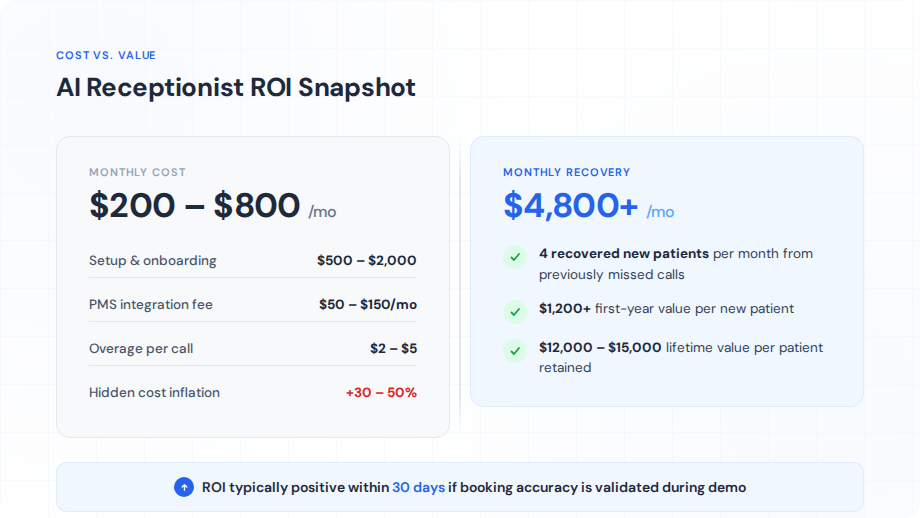
Most dental AI receptionist platforms charge between $200-$800 per month depending on call volume, feature tier, and PMS integration depth. Per-call pricing models typically run $1-$3 per handled call. Which model works better for your practice depends entirely on your call patterns.
Flat-rate plans make sense for practices with predictable, high call volumes. If you're a two-provider office handling 150-200 calls per week, a $500/month flat rate is predictable and likely cheaper per call than a per-call model. But if your volume fluctuates seasonally, say you're a pediatric practice that gets slammed in June and quiet in January, per-call pricing keeps your costs proportional to actual usage.
Hidden Costs to Ask About During the Demo
The monthly subscription is just the starting number. Based on our experience working with dental practices evaluating these tools, hidden costs can inflate the real price by 30-50%. Here's what to ask about before you compare vendor quotes:
- Setup and onboarding fees: Some vendors charge $500-$2,000 upfront for initial configuration, PMS connection, and call flow customization. Others include it. Big difference.
- PMS integration fees: Connecting to Dentrix, Open Dental, or Eaglesoft sometimes carries a separate monthly charge of $50-$150 on top of the base subscription.
- Overage charges: If you're on a flat-rate plan with a call cap, what happens when you exceed it? Some vendors charge $2-$5 per additional call. Others throttle to voicemail. Neither is great if you don't know about it in advance.
- Contract length and cancellation: Monthly contracts give you flexibility. Annual contracts often come with a 15-20% discount but lock you in. If the demo hasn't convinced you this vendor will work long-term, don't sign for 12 months.
ROI Math: Is It Worth It?
Here's a practical way to think about return. Dental Economics puts the average patient lifetime value for general dentistry at $12,000-$15,000. A single missed new patient call costs your practice $1,200+ in first-year value alone. If your practice misses even 5 new patient calls per month and an AI receptionist catches 4 of those, that's $4,800 per month in recovered revenue against a $200-$800 monthly cost. The math usually works out within the first 30 days.
That said, ROI only materializes if the system actually books accurately. An AI receptionist that answers every call but books 20% of them incorrectly creates a different kind of problem: double-bookings, wrong providers, patients showing up for appointments that don't exist in the PMS. Which circles back to why the demo matters so much. You need to validate accuracy before the ROI calculation means anything.
Explore More Practice Growth Resources
From missed call recovery to virtual receptionist buying guides, we've built a library of resources for practice owners evaluating their options.
Browse Resources →The demo is where you separate vendor promises from actual performance. Your front desk handles over 100 patient touchpoints every week, and each one of those interactions shapes whether a patient stays, schedules, or calls the practice down the street. That's too important to hand off to a system you haven't tested.
Here's your next step. Build your scoring rubric using the framework above, review what to look for in AI receptionist software, then book 2-3 demos this week. Run the same 10 call scenarios through each platform. Score them. Compare them. And make the decision based on data, not demos designed to impress you.
See How DentiVoice Handles Real Patient Calls
Book a live dental AI receptionist demo and test DentiVoice with your own scenarios. No scripts, no staged calls.
Book a Free Demo →Explore more guides and tools for dental practice growth.
Browse Resources →Sources & References
- ADA Practice Transitions - Dental Practice Phone Statistics
- Dental Economics - AI Adoption in Dental Practices
- U.S. HHS - HIPAA Compliance Requirements
- Bureau of Labor Statistics - Dental Industry Employment Data
- BrightLocal - Local Consumer Review Survey
- Dental Economics - Patient Lifetime Value Benchmarks
Frequently Asked Questions
Most vendor demos run 30-45 minutes for a guided walkthrough. Self-service phone demos are shorter, typically 5-10 minutes per test call. Plan for at least 2-3 sessions per vendor if you want to test edge cases like after-hours handling and emergency triage beyond the standard pitch.
Some vendors offer sandbox PMS connections during the demo phase, while others only connect to your live system after signing. Ask specifically whether the demo includes a live write-back to Dentrix, Open Dental, Eaglesoft, or your PMS. If they can't show real-time booking, that's a gap worth questioning.
Run at least 10 scenarios covering a new patient booking, insurance verification question, same-day cancellation, emergency triage, after-hours inquiry, rescheduling request, and a caller asking for directions. Throw in a tricky one like a patient calling about a billing dispute to see how the AI handles off-script moments.
Most vendors offer free demos as part of their sales process. Some provide a free trial period of 7-14 days with limited call volume. Be cautious of vendors that require a signed contract before any live testing, as this limits your ability to evaluate real-world performance.
Ask the vendor to show you their Business Associate Agreement, encryption protocols for call recordings, and data storage policies during the demo. A compliant vendor should be able to produce these documents immediately. Vague answers about compliance are a serious red flag.
Monthly costs range from $200-$800 depending on call volume, PMS integration depth, and feature tier. Per-call pricing models run $1-$3 per call. Ask about setup fees, PMS integration charges, and overage rates during the demo - these hidden costs can add 30-50% to your monthly bill.
Yes. Testing 2-3 vendors using the same call scenarios gives you a direct comparison of call quality, booking accuracy, and integration depth. A single demo from one vendor makes it impossible to benchmark performance or negotiate pricing effectively.
Was this article helpful?
Written by
DentalBase Team
Expert dental industry content from the DentalBase team. We provide insights on practice management, marketing, compliance, and growth strategies for dental professionals.