Dental Practice Automation Guide 2026: Complete Roadmap
Complete dental practice automation guide for 2026. Learn how to save 20+ hours weekly with proven automation strategies, tools, and implementation tips.
Share:
Table of contents
What Is Dental Practice Automation? [Complete Guide for 2026]
Dental practice automation is transforming how modern dental offices operate in 2026. This comprehensive guide shows you how to automate your dental practice from scheduling and billing to patient communication and front desk operations. Whether you're looking for dental automation software or AI tools for dental practices, this roadmap will help you save 20+ hours per week and reduce overhead costs by up to 40%.
In today's competitive healthcare landscape, dental practice automation has evolved from a luxury to a necessity. The latest dental automation tools leverage artificial intelligence, machine learning, and cloud-based platforms to streamline workflows, enhance patient experiences, and dramatically improve practice efficiency.
This guide covers everything you need to know about dental office automation in 2026, including practical implementation strategies, cost breakdowns, ROI calculations, and real-world case studies from practices that have successfully automated their operations.
Why Automate Your Dental Office in 2026
1. Automation vs. Digitization
Digitization converts analog processes into digital formats. It includes moving from paper charts to electronic health records. Automation goes further by enabling digital systems to act independently. These actions are based on predetermined criteria. For example, digitization creates electronic patient records. Automation uses those records to automatically send reminders. Reminders are based on treatment history and recommended intervals. These processes support evidence-based preventive care.
2. Key Objectives of Automation
Reduce Administrative Burden: Free your team from repetitive tasks like appointment confirmations, insurance verification, and patient follow-ups. Studies show dental practices spend 30-40% of staff time on administrative tasks that can be automated.
Improve Patient Experience: Modern patients expect instant responses, 24/7 scheduling, and seamless communication. Automated patient communication dental systems provide consistent, immediate service that increases satisfaction and retention.
Increase Revenue: Automation reduces no-shows by up to 30%, accelerates payment collection, and identifies revenue opportunities through automated recall campaigns and treatment follow-ups.
- Scale Operations: Whether you're a solo practitioner or managing multiple locations, dental practice management automation allows you to grow without proportionally increasing overhead costs.
3. ROI of Dental Automation Tools
The financial benefits of dental automation tools are substantial and measurable. According to 2026 industry data, practices implementing comprehensive automation see:
20-30% reduction in overhead costs within the first year
15-25% increase in patient retention through improved communication
35-50% decrease in no-show rates with automated reminders
$50,000-$150,000 annual savings for mid-sized practices
Average ROI of 300-500% within 18-24 months
These dental automation ROI figures represent real returns from practices that have strategically implemented automation across multiple operational areas, not just point solutions.
4. How Much Time Does Dental Automation Save?
Time savings vary by practice size and automation scope, but here's what typical implementations achieve:
Solo practices: 15-20 hours per week (equivalent to one full-time employee)
Small group practices (2-4 providers): 30-40 hours per week
Multi-location practices: 60-100+ hours per week across all locations
This time can be reallocated to patient care, strategic growth initiatives, or reducing staff burnout—all of which contribute to a more profitable and sustainable practice.
12 Core Areas of Automation in Dental Practices
1. Front Desk Automation & AI Receptionists
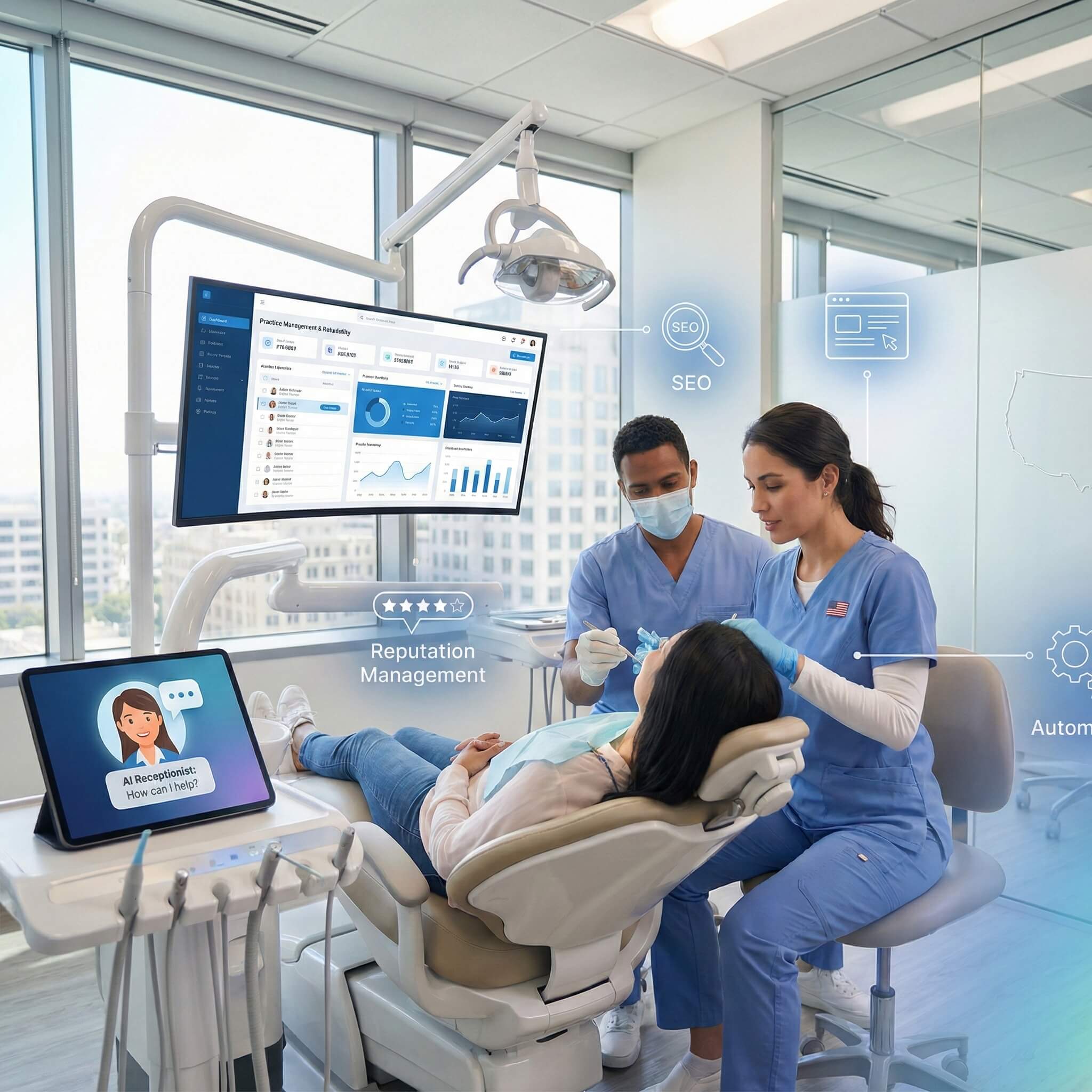
AI receptionists answer calls, schedule appointments, and handle patient questions 24/7. Automating the front desk reduces missed calls, improves responsiveness, and saves 10–15 staff hours per week.
2. Dental Scheduling & Online Booking
Automated scheduling allows patients to book appointments anytime while optimizing chair time. Intelligent scheduling reduces gaps, increases appointment fill rates, and improves patient convenience.
3. Patient Communication & Automated Reminders
Automation ensures consistent communication through reminders, confirmations, pre- and post-visit messages, and review requests. This reduces no-shows and improves patient compliance without manual effort.
4. Insurance Verification & Billing Automation
Automated insurance verification and billing speed up payments and reduce claim errors. Practices see faster collections, fewer denials, and significant reductions in administrative workload.
5. Patient Intake Forms & Digital Paperwork
Digital intake forms replace paper paperwork and allow patients to complete forms before arrival. This reduces wait times, eliminates data entry errors, and keeps patient records accurate and complete.
6. Recall Campaigns & Follow-Up Automation
Automated recall systems track patient visit history and send follow-ups to keep schedules full. These systems help recover inactive patients and maintain consistent hygiene appointments.
7. Dental Call Automation & Phone Management
Call automation routes calls efficiently, records conversations, and handles overflow or after-hours inquiries. This improves call handling efficiency and ensures no patient inquiry is missed.
8. Clinical Workflow Automation & Chairside Support
Clinical automation streamlines operatory workflows, documentation, and task sequencing. This reduces clinical delays, improves consistency, and allows providers to focus on patient care.
9. Treatment Planning & Presentation Automation
Automated treatment planning tools organize diagnoses, generate visual case presentations, and improve patient understanding. This leads to better case acceptance and clearer communication.
10. Hygiene Protocol Automation
Hygiene automation standardizes perio charting, recall intervals, and treatment protocols. This ensures consistent care, improves compliance, and supports long-term patient health tracking.
11. Inventory Management Automation
Automated inventory systems track supply usage and trigger reorders when stock is low. This prevents shortages, reduces waste, and controls supply costs.
12. Reporting & Analytics Automation
Automation generates real-time reports on production, collections, scheduling, and performance. These insights help owners make faster, data-driven decisions without manual reporting.
Automation Tools and Technologies Used Today
The dental practice automation technology landscape includes specialized practice management software, patient communication platforms, and integrated clinical systems designed specifically for dental workflows. Understanding the capabilities and limitations of different tool categories helps practices select solutions that align with their operational needs and technical capabilities.
Patient communication automation has evolved significantly, with AI-powered systems now capable of handling complex scheduling requests and basic patient inquiries. These tools integrate with existing practice management systems to access patient information and provide personalized responses based on treatment history and appointment preferences.
The key to successful automation implementation lies in selecting tools that integrate seamlessly with existing systems while providing scalable functionality that grows with practice needs. Modern automation platforms offer modular approaches, allowing practices to implement specific features gradually rather than requiring complete system overhauls.
Common Software Categories
Practice management systems serve as the foundation for most dental practice automation, integrating scheduling, billing, and patient communication functions within a single platform. These comprehensive systems typically include automated appointment reminders, insurance verification, and basic reporting capabilities. Specialized communication platforms focus exclusively on patient interaction automation, offering advanced features like AI receptionists, multi-channel messaging, and sophisticated follow-up sequences.
Clinical documentation software automates treatment note creation, procedure coding, and clinical decision support. Digital imaging platforms automatically organize and store radiographs with appropriate patient associations and HIPAA-compliant security measures. Financial management tools automate billing processes, payment plan administration, and collections workflows, often integrating directly with banking systems for seamless transaction processing.
Comparison of Automation Functions
The following table compares key automation functions across different software categories:
| Function | Practice Management | Communication Platform | Clinical Software | Integration Required |
|---|---|---|---|---|
| Appointment Scheduling | Full automation | Limited to confirmations | Read-only access | Native |
| Patient Communications | Basic reminders | Advanced AI responses | Clinical alerts only | API required |
| Insurance Processing | Complete workflow | Payment notifications | Treatment coding | Native |
| Clinical Documentation | Basic templates | Not applicable | Full automation | EHR integration |
| Reporting and Analytics | Practice metrics | Communication stats | Clinical outcomes | Data consolidation |
This comparison illustrates how different automation tools serve distinct functions while requiring varying levels of integration complexity. Practices must evaluate their specific needs against these capabilities to determine optimal technology combinations.
Benefits of Dental Practice Automation: ROI & Time Savings [2026 Data]
The benefits of automating dental practice operations are measurable, substantial, and impact every aspect of practice performance.
Operational and Financial Impacts
Reduce dental practice overhead by 20-35% through labor optimization
Increase revenue per operatory hour by 15-25%
Improve collection rates by 30-40%
Decrease no-show rates by 35-50%
Accelerate insurance payment cycles by 40-60%
Reduce errors and rework by 60-80%
Patient Experience Improvements
24/7 appointment scheduling availability
Instant response to patient inquiries
Consistent, professional communication
Reduced wait times through optimized scheduling
Seamless digital experience matching consumer expectations
Higher patient satisfaction scores (typically 15-30% improvement)
Practices with comprehensive automation report patient retention rates 20-25% higher than those relying on manual processes. The improved patient experience translates directly to word-of-mouth referrals and online reviews.
Implementation Considerations and Common Challenges
Successful dental practice automation requires careful planning, staff training, and gradual integration to reduce disruption and maximize benefits. Common challenges include staff resistance to change, system integration issues, and the time required for setup and training. Practices often focus too heavily on technical features while overlooking the human factors that determine adoption success.
Staff concerns about job security or increased workflow complexity can slow implementation if not addressed early. Clear communication, hands-on training, and ongoing education help build confidence and encourage acceptance. Technical challenges such as software integration, data migration, and maintaining daily operations during transitions also require realistic timelines and contingency planning.
Assessing Automation Readiness
Automation readiness starts with evaluating current workflows to identify repetitive, time-consuming tasks and areas suitable for standardization. Documenting processes, measuring task duration, and identifying operational pain points establishes benchmarks for evaluating automation success.
Technical readiness includes assessing hardware, internet reliability, and software compatibility. Evaluating staff technical skills helps determine training needs and ensures implementation progresses at a pace appropriate for the team.
Change Management and Training
Effective change management focuses on staff engagement and phased implementation. Introducing simple, high-impact automation first allows teams to see immediate benefits without added complexity. Regular feedback sessions help identify challenges early and adjust implementation strategies.
Training should emphasize practical, hands-on use of automation tools tied directly to daily tasks. Ongoing support and designated automation champions within the team help reinforce adoption and ensure a smoother transition.
Dental Practice Automation Checklist
Essential items for your dental practice automation checklist:
✓ Automated appointment reminders configured
✓ Online scheduling enabled and promoted
✓ Digital intake forms implemented
✓ Insurance verification automation active
✓ Recall system running automatically
✓ Review requests automated
✓ AI receptionist or advanced phone system deployed
✓ Billing automation optimized
✓ Staff trained on all systems
✓ Analytics dashboard monitoring key metrics
✓ Monthly automation performance review scheduled
7 Common Dental Automation Mistakes (And How to Avoid Them in 2026)
| Common Automation Mistake | Why It’s a Problem | Recommended Solution |
|---|---|---|
| Automating broken processes | Automation magnifies existing inefficiencies | Document and optimize workflows before automating |
| Buying too many point solutions | Disconnected tools create data silos and integration issues | Prioritize integrated platforms or ensure strong integration capabilities |
| Neglecting staff training | Automation fails without proper user adoption | Allocate time and resources for training and ongoing support |
| Setting and forgetting automation | Unmonitored automation loses effectiveness over time | Conduct monthly reviews to analyze performance and adjust settings |
| Ignoring patient preferences | Some patients dislike automated communication | Allow patients to choose communication channels and frequency |
| Skipping the implementation plan | Rolling out too much at once overwhelms users | Use a phased implementation plan with clear milestones |
| Underestimating integration complexity | “Easy integrations” often require significant effort | Verify compatibility with your PMS and budget time for troubleshooting |
Compliance, Privacy, and Security in Automation
Dental practice automation must comply with healthcare regulations, especially HIPAA, to protect patient privacy and sensitive data. Because automated systems process large amounts of protected health information, security and compliance are essential when selecting and implementing automation tools. Practices remain fully responsible for compliance, even when violations involve automated systems.
Automation must meet the same privacy and security standards as manual workflows, including access controls, data encryption, and audit trails. Regular compliance audits are critical as automation increases data volume and complexity.
HIPAA compliance requires administrative, technical, and physical safeguards such as staff training, secure authentication, activity logging, and controlled system access. When using cloud-based tools, business associate agreements are required to define data handling, security responsibilities, and liability.
The future of dental practice automation will focus on artificial intelligence, predictive analytics, and more proactive patient engagement. Advanced AI tools will support clinical decision-making while preserving the human judgment essential to quality dental care.
Predictive analytics will help practices identify risks such as missed appointments, low treatment acceptance, or potential oral health issues before they occur. This allows practices to intervene early, improving patient outcomes and operational efficiency.
Greater integration between dental and medical systems will support coordinated, holistic patient care by enabling secure information sharing while reducing administrative workload. Long-term, automation will reshape staffing models, shifting administrative roles toward complex problem-solving and increasing demand for team members with technical and systems management skills.
Conclusion: Using Automation Strategically in Dental Practices
Successful dental automation requires a strategic approach that balances technology, staff readiness, and patient preferences. The most effective practices adopt automation gradually to enhance, not replace, human expertise and patient relationships.
Practices should begin with high-impact, low complexity processes that deliver measurable benefits and integrate smoothly with existing systems. Ongoing staff training and change management are essential to ensure adoption and maximize return on investment.
The goal of automation is to eliminate routine administrative work while preserving the personal touch that defines excellent dental care. By assessing current workflows, staff capabilities, and patient needs, practices can make informed decisions and implement automation in ways that improve efficiency without compromising care quality.
Sources & References
Frequently Asked Questions
Dental practice automation involves using technology and software to streamline administrative tasks, patient communications, and clinical workflows without human intervention. This includes automated appointment scheduling, patient reminders, billing processes, insurance verification, and treatment planning. By implementing automation systems, dental practices can reduce manual work, minimize errors, and free up staff time to focus on patient care and high-value activities.
Yes, when properly implemented with appropriate security measures. Modern dental automation systems are designed with robust encryption, access controls, and HIPAA-compliant data protection protocols. These systems often provide better security than manual processes by reducing human error and unauthorized access. However, practices must choose reputable vendors, implement proper staff training, conduct regular security audits, and maintain updated backup systems to ensure patient data remains protected.
Multiple dental practice tasks can be automated including appointment scheduling and reminders, patient intake forms, insurance verification and claims processing, treatment plan generation, inventory management, billing and payment processing, patient communication via emails and texts, recall scheduling, and basic diagnostic imaging analysis. Administrative tasks like staff scheduling, reporting, and compliance documentation can also be automated, typically saving practices 20+ hours per week.
No. Solo and small practices often benefit the most because automation replaces the “extra admin hands” they don’t have. Multi-location groups use automation to standardize operations and reporting across sites.
Yes—especially when reminders are two-way (confirm/reschedule), delivered via the patient’s preferred channel (SMS/email/voice), and paired with a waitlist or short-notice fill strategy.
Was this article helpful?
Written by
DentalBase Team
The DentalBase Team is a collective of dental marketing experts, AI developers, and practice management consultants dedicated to helping dental practices thrive in the digital age.