Virtual Dental Receptionist: Buyer's Guide (2026)
Compare virtual dental receptionist options for your practice. Learn what to look for, what to avoid, and how to calculate ROI before you buy.
Share:
Table of contents
A virtual dental receptionist can answer the calls your front desk is missing right now. According to ADA Practice Transitions data, 38% of new patient calls go unanswered during business hours, and most of those callers don't try again. They call the next practice on the list. That's revenue walking out a door you never opened.
This guide breaks down what a virtual dental receptionist actually does, how the major categories compare, what features matter most, and how to calculate whether the investment makes sense for your practice. No fluff. Just the information you need to make a confident purchasing decision.
What Is a Virtual Dental Receptionist and How Does It Work?
A virtual dental receptionist is an AI-powered phone system that answers incoming patient calls, schedules appointments, responds to common questions, and routes urgent matters to the right person. It works alongside your front desk team, not instead of them.
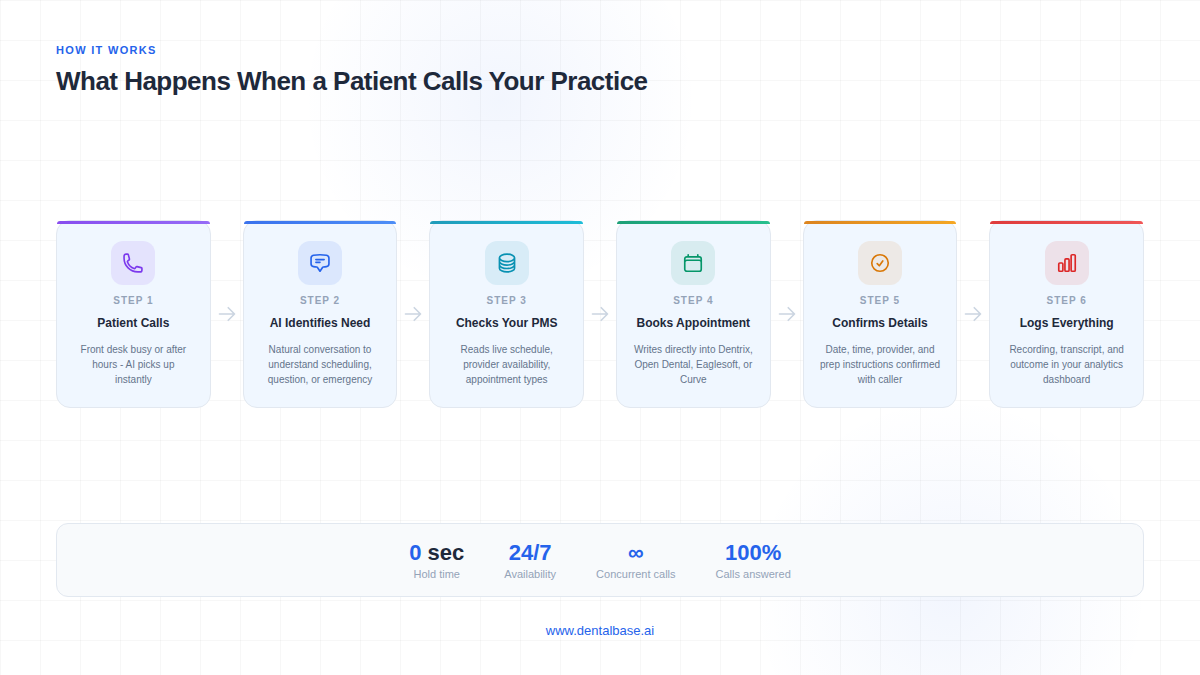
Here's how the typical call flow works. A patient calls your practice. If your front desk is busy, on another line, or it's after hours, the virtual receptionist picks up. It greets the patient using natural-sounding voice AI, identifies the reason for the call, and takes action. For a scheduling request, it checks your practice management software for open slots, books the appointment, and confirms the details with the patient. The entire interaction happens in real time.
The technology behind this varies by platform, but the core architecture usually combines a large language model for conversation, a speech-to-text engine for understanding the caller, and a text-to-speech engine for responding. What separates a virtual receptionist from a basic phone tree is the ability to hold a real conversation. Patients can say "I need to reschedule my cleaning next Thursday" instead of pressing 1 for scheduling, 2 for billing.
The most important distinction: a true virtual dental receptionist connects to your practice management system. Platforms like DentiVoice integrate directly with Dentrix, Open Dental, Eaglesoft, and Curve Dental to read and write appointment data. Without that connection, you're still relying on staff to manually enter every booking.
See How DentiVoice Handles Real Patient Calls
DentiVoice is an AI receptionist built specifically for dental practices. It answers calls, books into your PMS, and handles after-hours volume automatically.
Learn About DentiVoice →Why Are Dental Practices Switching to Virtual Receptionists in 2026?
The short answer: practices are losing patients they've already paid to attract. Marketing spend brings the phone call, but if nobody picks up, that investment is wasted. And the numbers paint a clear picture of how often this happens.
A Dental Economics report found that the average dental practice misses 15-20 calls per week. Not per month. Per week. And 80% of callers who reach voicemail don't leave a message and won't call back. So each missed call isn't a minor inconvenience. It's a lost patient.
Staffing pressure makes the problem worse. Your front desk handles check-ins, insurance verification, treatment plan questions, and the phone, all at the same time. During peak hours in a three-provider practice receiving 200+ calls per week, something gets dropped. Usually it's the phone. The Bureau of Labor Statistics projects dental employment growing only 4% through 2032, so hiring your way out of this problem isn't realistic for most practices.
After-hours demand adds another layer. According to Dental Economics, after-hours calls represent 27% of total patient call volume. That's more than a quarter of your inbound calls arriving when nobody is in the office. Patients calling at 7 PM or on a Saturday morning aren't going to wait until Monday. They'll search for another practice that picks up.
The Patient Expectation Shift
Patients in 2026 expect immediate response. Convenience is a top factor for 72% of patients choosing a dental provider, according to BrightLocal. And 77% want online booking capability, but only 26% of practices currently offer it. A virtual receptionist closes both gaps at once: instant phone response plus real-time scheduling.
AI Virtual Receptionist vs. Live Answering Service vs. Chatbot: What's the Difference?
These three categories get lumped together constantly, but they solve different problems at different price points. Understanding the difference saves you from buying the wrong solution for your practice.
| Feature | AI Virtual Receptionist | Live Answering Service | Website Chatbot |
|---|---|---|---|
| Channel | Phone (voice) | Phone (voice) | Website (text) |
| Availability | 24/7, no hold times | Varies by plan (often 24/7) | 24/7 |
| PMS Integration | Direct (reads/writes appointments) | None (takes messages only) | Rare (some offer scheduling links) |
| Can Book Appointments | Yes, in real time | No (message relay) | Sometimes (link-based) |
| Handles Insurance Questions | Yes (trained on your policies) | Limited (reads a script) | Basic FAQ only |
| Outbound Calls | Yes (recall, follow-up, reactivation) | No | No |
| Typical Monthly Cost | $299-$999 | $200-$1,500+ | $0-$300 |
| HIPAA Compliance | Built-in (with BAA) | Varies (ask for BAA) | Rarely |
The critical difference is what happens after the call. A live answering service takes a message and emails it to your office. Your staff still has to call the patient back, check availability, and manually book. An AI virtual receptionist completes the booking during the original call. That's a fundamentally different patient experience, and it's the reason conversion rates are higher with AI systems.
Chatbots fill a different gap entirely. They're useful for website visitors who prefer texting over calling, but they don't solve the missed phone call problem. And phone calls still account for the majority of new patient inquiries in dental. If you're choosing between the three, start with the channel where you're losing patients. For most practices, that's the phone.
Related: For a deeper look at how AI receptionists and human staff work together. → AI Receptionist + Human: The Omnichannel Approach
How Do the Top Virtual Dental Receptionist Platforms Compare?
Not all virtual dental receptionists are built the same. Some handle inbound calls only. Others include outbound follow-up, recall campaigns, and multi-location routing. The table below compares the key capabilities you should evaluate when narrowing your options.
| Capability | AI Voice Agent (Full PMS Integration) | AI Voice Agent (Basic) | Hybrid (AI + Live Operators) |
|---|---|---|---|
| 24/7 Voice Answering | Yes | Yes | Yes |
| Direct PMS Scheduling | Yes (Dentrix, Open Dental, Eaglesoft, Curve) | No (email/SMS notification) | Partial (operator enters manually) |
| Outbound Calls (Recall, Reactivation) | Yes | No | Sometimes (operator-dependent) |
| Insurance Question Handling | Trained on your accepted plans | Generic FAQ | Script-based |
| Multi-Location Support | Yes (location-specific routing) | Limited | Yes (at higher cost per location) |
| Urgency Triage | AI-driven with custom rules | Basic keyword detection | Human judgment |
| Scalability | Unlimited concurrent calls | Unlimited concurrent calls | Limited by operator availability |
| Cost Model | Flat monthly or per-location | Per-call or flat monthly | Per-minute + base fee |
The gap between "full PMS integration" and "basic" AI agents is wider than it looks. A basic AI voice agent might sound impressive on a demo call, but if it can't check your schedule or write an appointment into Dentrix, your team is still doing the manual work. You're paying for a fancier voicemail.
Where Hybrid Models Fit
Hybrid services pair AI with live human operators. They're a good fit for practices that want a safety net during the transition to full automation, or for offices with complex call flows that require human judgment. The trade-off is cost. Per-minute pricing adds up fast, especially for practices handling 50+ calls per day. And you're still dependent on operator availability during high-volume periods.
For a practice running two to five operatories with a small admin team, a full PMS-integrated AI agent gives you the broadest coverage at the most predictable cost.
What Features Should You Look For in a Virtual Receptionist?
The feature list that matters depends on your practice size, call volume, and what's currently falling through the cracks. But there are six non-negotiables every buyer should check before signing anything.
1. PMS Integration Depth
This is the single most important feature. A virtual receptionist that can't read your schedule or book directly into your PMS creates more work than it removes. Ask specifically: does it read available slots in real time? Does it write the appointment? Or does it just send a notification that someone needs to call back? Platforms like DentiVoice integrate with Dentrix, Open Dental, Eaglesoft, and Curve Dental at the read-write level. For the questions you should ask your vendor about integration, see our PMS integration checklist.
2. HIPAA Compliance and BAA
Any system handling patient health information needs to meet HIPAA requirements. That means encrypted call data, secure storage, access controls, and a signed Business Associate Agreement. Don't just take the vendor's word for it. Ask for documentation. If they hesitate, walk away. Our HIPAA compliance checklist for AI receptionists covers exactly what to verify.
3. Outbound Calling Capabilities
Inbound call handling is the baseline. But outbound capabilities, including missed appointment follow-up, patient reactivation, and recall reminders, are where the real revenue impact shows up. Reactivating an existing patient costs 5-7x less than acquiring a new one. A virtual receptionist that handles outbound turns a cost center into a revenue generator.
4. Call Routing and Escalation Logic
Not every call should be handled by AI. Emergencies, complex insurance disputes, and upset patients need a human. Your virtual receptionist should have configurable rules for when to transfer, where to transfer, and what to do if no one picks up the transfer. The systems that work well let you set keyword-based triggers and time-of-day routing. For a deeper look at which tasks should stay human vs. automated, see our front desk automation guide.
5. Multi-Location Support
If you operate more than one office, you need location-specific handling. That means separate greetings, separate schedules, and separate provider availability per location. Some platforms charge per-location fees. Others bundle it. Ask before you're surprised on the invoice. For group practices, our multi-location dental phone management guide covers routing, consistency, and reporting in detail.
6. Reporting and Call Analytics
You need to see what's happening. Call volume by hour, booking conversion rate, reasons for escalation, average call duration, and peak missed-call windows. Without this data, you can't measure ROI or optimize the system. Call scoring and analytics should be included, not an add-on.
See DentiVoice in Action
Book a free demo to hear how DentiVoice handles real patient calls, books into your PMS, and manages after-hours volume for your practice.
Book a Free Demo →How Much Does a Virtual Dental Receptionist Cost?
Pricing varies significantly depending on the platform type, call volume, and feature set. Most solutions in this space fall into one of three pricing models, and picking the wrong model can cost you more than the subscription itself.
The Three Pricing Models
Flat monthly fee: You pay a fixed amount regardless of call volume. This works well for practices with predictable, moderate call volume (100-300 calls per month). Typical range: $299-$799/month. The benefit is budget predictability.
Per-call pricing: You pay per handled call, usually $2-$8 depending on call complexity and duration. This sounds affordable at low volume, but a practice handling 400+ calls per month can easily exceed $1,500. It also creates a perverse incentive: you're penalized for growing.
Per-location pricing: Common for multi-office groups. Each location pays a base fee, often $199-$499, plus a shared platform cost. Good for DSOs and group practices that need centralized management with location-specific configuration.
Hidden Costs to Watch For
Setup fees can range from $0 to $2,000. PMS integration might cost extra, especially for older systems. Some vendors charge for outbound calling minutes separately from inbound. And annual contracts with early termination fees are common. Always ask for the total first-year cost, not just the monthly rate.
The ROI Math
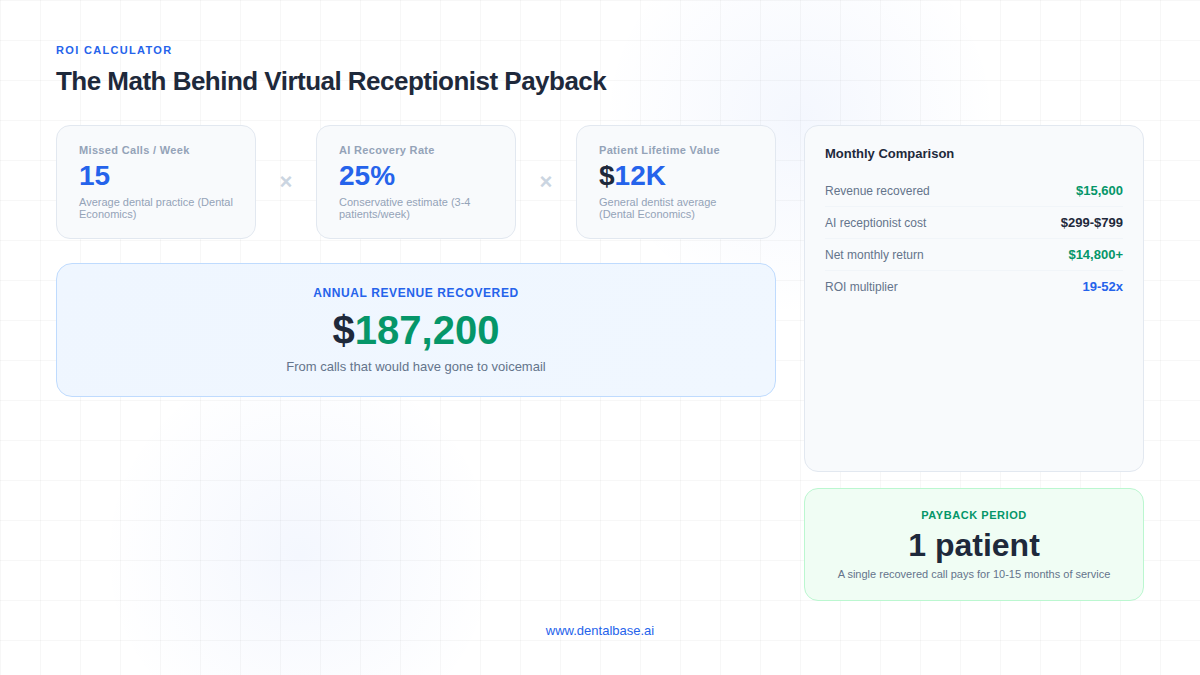
Here's where the math gets interesting. Dental Economics estimates the average patient lifetime value for a general dentist at $12,000-$15,000. If your practice misses 15 calls per week and a virtual receptionist recovers even 3-4 of those as booked appointments, you're looking at $36,000-$60,000 in lifetime value from new patients. Monthly. Against a subscription cost of $300-$800.
Put differently: a single recovered new patient call can pay for 10-15 months of service. Most practices see positive ROI within the first billing cycle. For a detailed breakdown, see our complete AI receptionist ROI guide.
Related: Not sure if your practice is ready for AI reception? Here's how to tell. → AI Receptionist for Small Dental Practices: Is It Worth It?
Common Mistakes Practice Owners Make When Choosing a Virtual Receptionist
After working with hundreds of dental practices evaluating call automation, the same mistakes come up repeatedly. Avoiding these five will save you months of frustration and thousands in wasted spend.
Buying a Chatbot When You Need a Phone Agent
Chatbots are everywhere because they're cheap to build. But the missed call problem is a phone problem. If 38% of your new patient calls go unanswered, a widget on your website isn't the fix. Make sure the tool you're buying handles the channel where you're actually losing patients.
Ignoring PMS Integration
A virtual receptionist that emails you a booking request instead of writing it directly into Dentrix or Open Dental is creating work, not removing it. Your front desk still has to open the email, check availability, enter the appointment, and confirm with the patient. That's not automation. That's a relay.
Choosing Based on Price Alone
The cheapest option almost always lacks PMS integration, outbound capabilities, or both. At $99/month, you're probably getting a basic IVR with a conversational veneer. When a single missed new patient call costs $1,200+ in lifetime value according to Dental Economics, the price difference between a $99 tool and a $499 tool is irrelevant if the $499 tool books one extra patient per month.
Not Testing Call Quality Before Signing
Demo calls are scripted. Real patient calls aren't. Patients mumble, talk over the AI, change their minds mid-sentence, and ask questions that aren't in the training data. You need to run the system on live calls for 2-4 weeks before committing. Any vendor that won't offer a trial period is a red flag.
Overlooking HIPAA
Some vendors market themselves as "HIPAA-ready" without actually having the infrastructure or willingness to sign a BAA. If there's no signed Business Associate Agreement, there's no HIPAA compliance. Full stop. Your practice is liable if patient data is mishandled, regardless of what the vendor promised verbally.
Related: Insurance verification is one of the tasks most practices automate first. → Dental Insurance Verification: How to Stop Wasting Hours on the Phone
How to Evaluate and Test a Virtual Receptionist Before You Commit
The vendor demo will always sound perfect. Your job is to stress-test the system under real conditions before you sign an annual contract. Here's a practical framework for evaluating any virtual receptionist platform.
Run a Live Trial (2-4 Weeks Minimum)
Set the virtual receptionist as your overflow handler during business hours and your primary responder after hours. Track every call. How many did it handle completely without human intervention? How many required escalation? What was the booking conversion rate? Compare these numbers against your current front desk performance for the same period.
Score Calls Against Your Own Standards
Pull 20-30 recorded calls from the trial period and score them. Did the AI correctly identify the caller's need? Did it offer the right appointment type? Did it capture new patient information accurately? Did it know your insurance policies? A structured call scoring system gives you objective data instead of gut feeling.
Ask These Questions Before Signing
Which PMS systems do you integrate with, and at what level (read-only vs. read-write)? Will you sign a BAA? What happens when the AI can't handle a call? What's the average response latency on the first greeting? Can I customize the call flow for my specific services? What does the onboarding process look like? Is there a month-to-month option, or only annual contracts?
Red Flags to Watch For
No trial period offered. Reluctance to provide a BAA. The demo uses a different AI model than the production system. Pricing that's vague or requires a "custom quote" for basic features. No call recording or analytics dashboard. And any vendor that claims 100% call handling with zero escalation is overpromising. Even the most advanced AI agents need human backup for 5-15% of calls.
What Does the Implementation Process Look Like?
Setting up a virtual dental receptionist follows a sequence of steps that apply to every practice, though the pace and complexity depend on your PMS, call volume, and how many locations you operate. Here's what the process involves from signing to go-live.
Step 1: PMS Connection and Data Sync
The first step is connecting the virtual receptionist to your practice management software. For systems like Dentrix, Open Dental, Eaglesoft, or Curve Dental, this usually means installing a secure bridge or API connector that gives the AI read-write access to your appointment schedule. The AI needs to see provider availability, appointment types, operatory assignments, and patient records to book correctly. Some PMS platforms require IT involvement or vendor-side configuration. If you're running an older version of your PMS, check compatibility before signing anything. For the specific questions to ask your vendor, see our PMS integration checklist.
Step 2: Call Flow Configuration
This is where the virtual receptionist gets trained on how your practice actually operates. You'll define greeting scripts, appointment types and durations, insurance policies you accept, emergency triage rules, transfer destinations, and after-hours handling logic. The more specific you are here, the fewer weird calls your staff will have to clean up later. A three-provider practice offering implants, Invisalign, and pediatric care needs different call flows than a solo GP doing cleanings and fillings. Don't accept a generic template. Insist on configuration that matches your actual service menu.
Step 3: Testing with Simulated Calls
Before any real patient hears the AI, you and your team should make test calls covering every scenario you can think of. New patient wanting to schedule. Existing patient rescheduling. Someone asking about insurance. An emergency call at 9 PM. A caller who changes their mind halfway through. A caller who speaks quietly or has an accent. The goal isn't perfection on every call. It's identifying the gaps that need configuration fixes before you go live.
Step 4: Staff Alignment
Your front desk team needs to understand what the virtual receptionist does and doesn't handle. Which calls get routed to AI? Which stay with humans? Where do escalated calls land? How does the team review AI-booked appointments each morning? Without this clarity, your staff will either fight the system or ignore it. The practices that get the most value from virtual receptionists treat the AI like a team member with a defined role, not a mysterious black box that sometimes answers the phone.
Step 5: Live Rollout (Start with Overflow)
The safest go-live approach is starting the virtual receptionist as your overflow handler. It picks up only when your front desk is busy or unavailable. This lets you evaluate real call performance without putting 100% of your volume through an untested system. Once you're confident in the call quality, expand to after-hours coverage, then to full-time primary answering if that fits your practice model. Rushing to full deployment before validating call handling is one of the most common implementation mistakes.
Related: See the full guide on which front desk tasks to automate first and which to keep human. → What to Automate at Your Front Desk (And What to Keep Human)
How Do Real Practices Use a Virtual Receptionist Day-to-Day?
The comparison tables and feature lists tell you what a virtual receptionist can do. But the real question for most practice owners is what it actually looks like on a normal day. Here's a realistic picture of how a three-operatory practice with two front desk staff uses a virtual receptionist across a typical Monday.
Morning: 8:00-8:30 AM (before the office opens)
Three patients called over the weekend. One wanted to book a cleaning, one had a broken crown, and one asked about Invisalign pricing. The virtual receptionist handled all three. The cleaning is already booked into Open Dental for Thursday at 2 PM. The broken crown caller was triaged as urgent and received a text confirming the office would call at 8:30 AM. The Invisalign inquiry got a detailed response about the consultation process and a booking offer. When the office manager opens her dashboard Monday morning, she sees three completed conversations with recordings, transcripts, and outcomes. No voicemails to decode. No callbacks to make.
Mid-morning: 10:00-11:30 AM (peak chaos)
Both front desk staff are slammed. One is checking in a patient, the other is on the phone with an insurance company. Three calls come in within 12 minutes. The virtual receptionist catches all three on the first ring. Two are scheduling requests - booked directly into the PMS. The third is an existing patient asking about a balance. The AI pulls up the patient record, confirms the balance, and offers to transfer to the billing team. No hold music. No voicemail. No lost patients.
Lunch: 12:00-1:00 PM
One staff member goes to lunch. Call volume doesn't slow down. Patients calling during their own lunch break represent some of the highest-intent new patient inquiries you'll get all day. The virtual receptionist handles every call with the same quality whether it's the first call of the morning or the fifteenth. No fatigue. No "can you call back later." No rushed conversations because someone is trying to eat a sandwich between rings.
After hours: 5:30 PM onward
After-hours calls represent 27% of total patient call volume, according to Dental Economics. A practice closing at 5 PM without a virtual receptionist sends every one of those callers to voicemail. With one, a patient calling at 7 PM to book a cleaning gets the same experience as someone calling at 10 AM. The appointment is booked, confirmed, and waiting in the schedule the next morning. For a deeper look at after-hours revenue opportunities, see our dedicated guide.
Hear How DentiVoice Handles These Scenarios
Book a demo and listen to real call recordings showing overflow handling, after-hours booking, and emergency triage in action.
Book a Free Demo →Is Your Practice Ready for a Virtual Receptionist?
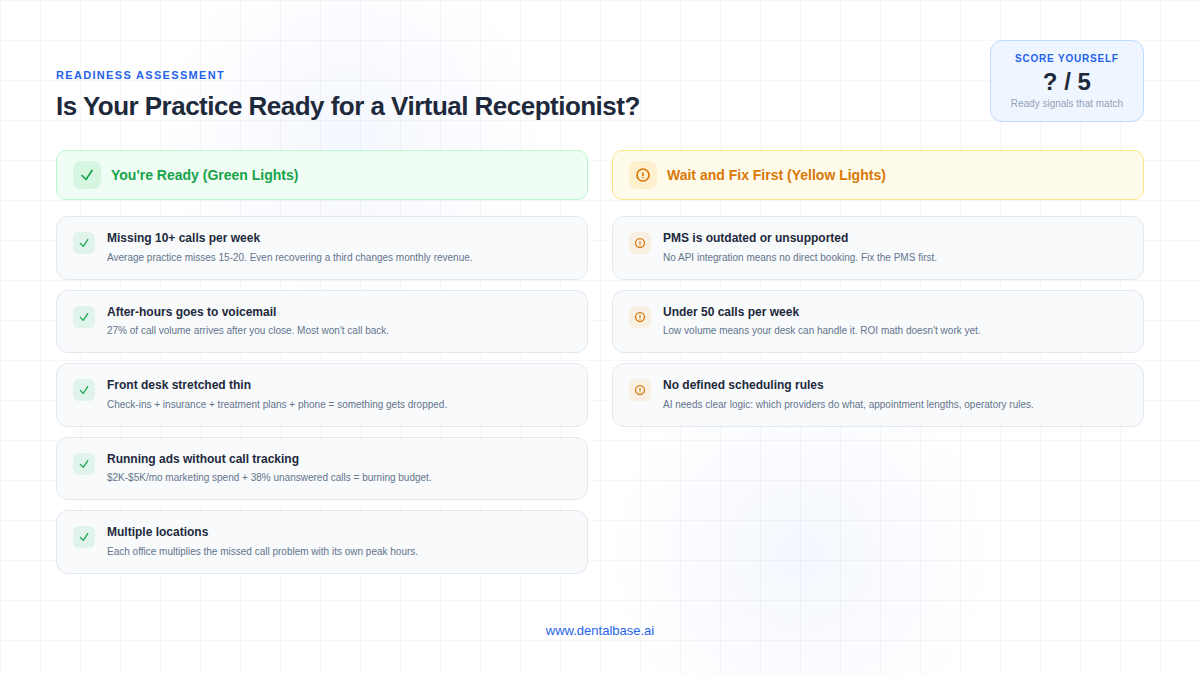
Not every practice needs a virtual receptionist today, and buying one before you're ready leads to poor adoption and wasted spend. The signals below help you evaluate whether your practice is at the stage where AI reception delivers real value or whether other priorities should come first.
Strong signals you're ready
- You're missing more than 10 calls per week. If your front desk regularly sends callers to voicemail during business hours, you have a recoverable revenue problem. The average dental practice misses 15-20 calls per week. Even recovering a third of those as booked patients changes your monthly numbers.
- After-hours callers go to voicemail with no follow-up system. If you're relying on patients to call back the next morning, most of them won't. They'll call the competitor who picked up.
- Your front desk is stretched across too many tasks. When the same person handles check-ins, insurance verification, treatment plan presentation, and the phone, something gets dropped. Usually it's the phone. A virtual receptionist removes the phone from that juggling act.
- You're running Google Ads or SEO and can't measure call conversion. If you're spending $2,000-$5,000 per month on marketing that generates phone calls, and 38% of those calls go unanswered, you're burning budget. A virtual receptionist with call analytics shows you exactly which calls converted and which were lost.
- You have more than one location. Multi-location practices multiply the missed call problem. Each office has its own peak hours, staffing gaps, and after-hours coverage needs. A virtual receptionist with location-specific routing solves this at a predictable per-location cost.
Signs you should wait
- Your PMS is outdated or unsupported. If you're running a PMS version that doesn't support API integration, the virtual receptionist can't book directly into your schedule. Fix the PMS first.
- Your call volume is under 50 calls per week. At very low volume, your front desk can likely handle every call. The ROI math doesn't work until you're consistently missing calls or need after-hours coverage.
- You haven't defined your appointment types and scheduling rules. A virtual receptionist needs clear logic: which providers do which procedures, how long each appointment type takes, which operatories are available when. If your scheduling is informal ("just ask Sarah, she knows"), formalize it first.
The right virtual dental receptionist will pay for itself quickly. But only if you pick one that actually fits your practice, your PMS, and your patient volume. Take the trial period seriously, run the numbers, and make the decision based on data.
Ready to Stop Missing Patient Calls?
See how DentiVoice answers calls, books appointments into your PMS, and handles after-hours volume. Free demo, no commitment.
Book a Free Demo →Want more guides like this?
Browse Resources →Sources & References
Frequently Asked Questions
Most reputable AI receptionist platforms are built with HIPAA compliance as a baseline, including encrypted data transmission and signed Business Associate Agreements. Always verify BAA availability and ask where patient data is stored before signing. Not every vendor meets the standard, so request documentation.
Yes, if the platform offers direct PMS integration. Systems like DentiVoice connect with Dentrix, Open Dental, Eaglesoft, and Curve Dental to write appointments in real time. Some platforms only send booking requests via email, which still requires manual staff entry.
Monthly costs typically range from $199 to $999 depending on call volume, features, and number of locations. Per-call pricing runs $2-$8 per handled call. Factor in setup fees, PMS integration costs, and any per-location add-ons when comparing total cost.
Modern AI voice agents sound natural and conversational, but most patients will recognize they are speaking with an automated system. Transparency matters here. Practices that disclose AI use upfront report higher patient satisfaction than those that try to hide it.
Yes. Most AI receptionists can be configured to triage urgent calls based on symptom keywords and either route them to an on-call provider or deliver after-hours emergency instructions. The triage logic should be customizable to your practice-specific protocols.
A well-configured virtual receptionist will transfer the call to a live team member during business hours or take a detailed message for callback. The key metric is escalation rate. Look for platforms where less than 15% of calls require human intervention.
No. It handles overflow calls, after-hours volume, and routine scheduling so your front desk can focus on in-office patients and higher-value tasks. Think of it as adding capacity, not replacing people. Most practices run AI alongside their existing team.
Setup varies by practice complexity. The process involves PMS connection, call flow configuration, simulated testing, staff alignment, and phased rollout. Practices with standard PMS setups and clear scheduling rules move faster than those requiring custom integrations or multi-location routing.
A practice missing 15 calls per week that recovers just 3-4 as booked patients generates $36,000-$60,000 in annual lifetime value from those recovered calls alone. Against a monthly subscription of $299-$799, most practices see positive ROI within the first billing cycle.
Strong readiness signals include missing 10+ calls per week, after-hours callers going to voicemail, a front desk stretched across too many tasks, and running ads without call conversion tracking. If your PMS is outdated or call volume is under 50 per week, address those first.
Was this article helpful?
Written by
DentalBase Team
Expert dental industry content from the DentalBase team. We provide insights on practice management, marketing, compliance, and growth strategies for dental professionals.