Phone Systems for Dental Offices: 2026 Owner's Guide
Phone systems for dental offices in 2026: missed-call math, after-hours coverage, recall, and the AI-front model. A practical owner's guide.
Share:
Table of contents
If you run a dental practice, your phone is doing more work than you think, and worse work than you'd expect. Phone systems for dental offices in 2026 carry new patient acquisition, recall, scheduling, insurance questions, and emergencies, all routed through the same staff during the same chaotic clinical hours. ADA Health Policy Institute data and operator surveys keep pointing to the same gap, and it's getting wider as practices grow.
This is the owner's guide for 2026. Not a vendor pitch, not a feature checklist. The math behind missed calls, the realistic cost of staffing the front desk, what after-hours and recall actually require, and where AI-front phone setups belong in a working practice.
You'll leave with a clear way to score your current setup, an honest read on whether AI fits your office, and a concrete next step you can take this week.
Why Are Phone Systems for Dental Offices Failing in 2026?
Most phone systems for dental offices were never designed for how patients now contact a practice. They were built around a static front desk, business hours, and the assumption that callers will leave a voicemail. None of those assumptions hold today, and the gap between what patients expect and what your phone setup delivers is where revenue leaks.
Start with the data. According to ADA Practice Transitions, 38% of new patient calls go unanswered during business hours. Forbes reports that 80% of callers who reach voicemail don't leave a message and never call back. Marchex puts the average hold time before a patient hangs up at 90 seconds. These numbers describe the same phenomenon from different angles: a caller who can't reach a human in roughly the time it takes to brew coffee is gone.
The reality is that patient call behavior has shifted faster than most phone setups. Patients call from mobile, often from a parking lot or between meetings. They have low patience and many alternatives. Weave Communications data confirms that if a call goes unanswered, most patients contact another practice. They don't wait. They pick the next listing.
What "failing" actually looks like in your office
- Daytime calls land in voicemail while the front desk is helping a patient at the counter or chasing an insurance verification.
- After-hours calls disappear. Dental Economics reports after-hours calls represent 27% of total patient call volume. Most go to a recorded message, not a person.
- Hold times drift over 90 seconds at peak hours, especially Mondays and the first business day after a holiday.
- Recall calls slip because the team is reactive on inbound and never gets to outbound.
If two of those four are true in your office, your phone system isn't broken. It's working exactly as designed. The design is just wrong for the current call mix.
Score your current phone setup before you change anything
Most owners overestimate how well their phones perform. A 30-minute call audit from a real call log usually changes the conversation. Browse the resources library for the templates we use.
Browse Resources →What Does a Missed Call Actually Cost Your Practice?
A single missed new-patient call costs the average general practice $1,200 or more in lifetime value, according to Dental Economics. That number trips up most owners because it doesn't feel real on a Tuesday afternoon when the phone rings out. The math, though, is hard to argue with once you write it down.
Lifetime value for a general dentist falls in the $12,000-$15,000 range. New patient acquisition cost runs $150-$300 through digital channels per WordStream. So when a marketing dollar finally produces a call, and that call goes to voicemail, you've paid for the lead twice: once to generate it, again to lose it. The lost revenue is the bigger of the two.
The weekly missed-call math
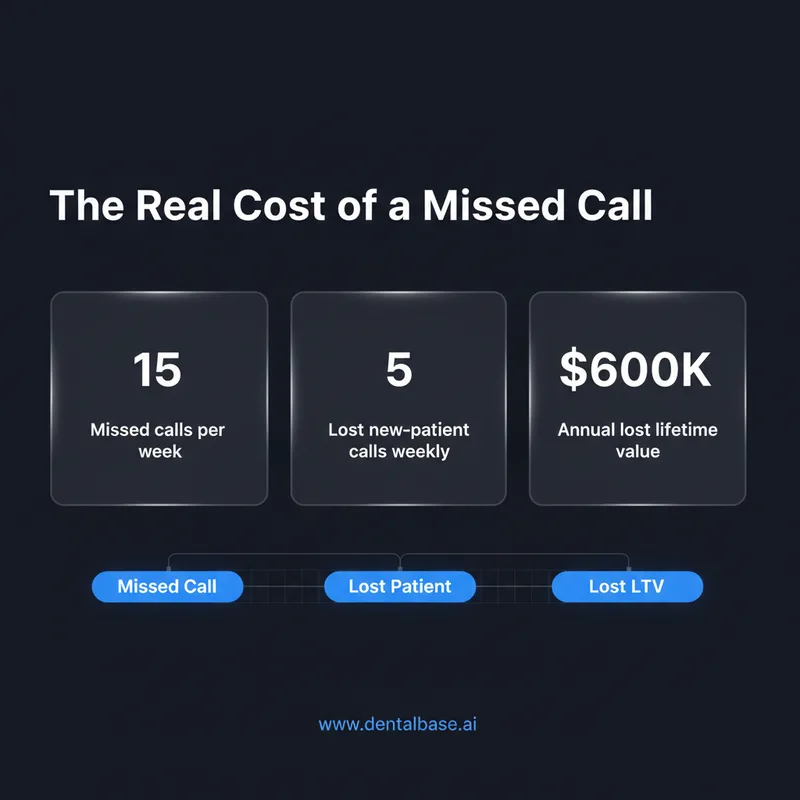
The average dental practice misses 15-20 calls per week. Assume the conservative end of that range: 15 missed calls a week. Roughly a third of inbound call volume during business hours is new-patient inquiries (the share varies by practice marketing). That's 5 missed new-patient calls weekly, or about 250 a year. If even one in five would have converted, you've lost 50 new patients. At $12,000 lifetime value, that's $600,000 in lost lifetime revenue. Annually.
That number isn't a marketing claim. It's the natural result of unanswered calls compounded across a year. Big difference between "we miss a few calls" and "we lose six figures of patient lifetime value to voicemail."
The recovery problem
Voicemail isn't a safety net. Forbes data shows 80% of voicemail-callers don't leave a message. Of the 20% who do, callbacks happen on the practice's schedule, not the patient's, and by then the patient has often booked elsewhere. Weave Communications research backs this: most callers who don't reach a person move on. Voicemail is a slow door slammed in your own face.
How Should the Front Desk Handle Calls During Clinical Hours?
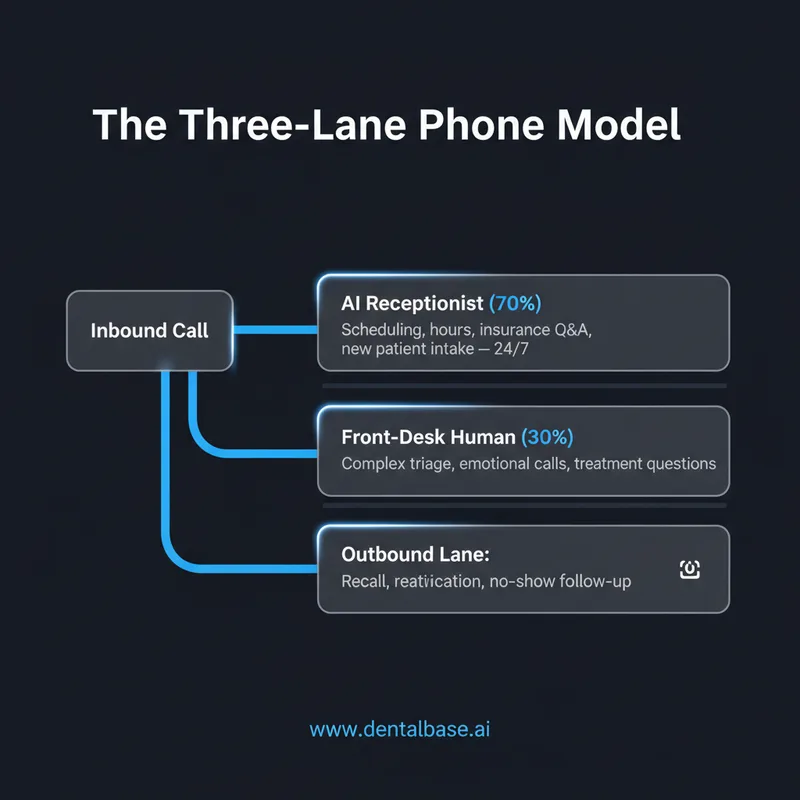
The front desk should answer the calls it can answer well, and stop trying to answer the calls it can't. That sounds obvious. In practice, most front desks try to do everything, drop calls under load, and burn out. A working setup separates clinical-hour call handling into three lanes: front-desk live, overflow, and outbound. Each lane needs a clear owner.
Look at your front desk on a busy Monday. The 9-11 AM block is usually a perfect storm. Patients arriving for first appointments, insurance verifications running for the day's schedule, the phone ringing every two to three minutes. You can't answer all of it without dropping something. Most practices drop the phone, because the patient at the counter is visible and the caller isn't.
The three-lane model
| Lane | What it handles | Who owns it |
|---|---|---|
| Front-desk live | Existing patient calls, in-office check-ins, urgent triage | Front-desk team, in-person priority |
| Overflow | Calls that ring through during peak hours, after-hours calls | AI receptionist or trusted answering service |
| Outbound | Recall, reactivation, no-show follow-up, treatment plan follow-through | Dedicated time block or automation |
The single most important shift here is treating overflow as a real lane, not as a failure. Treating it as a failure leads to the same broken pattern: more guilt, no system, calls still missed.
What needs to be true at the front desk
The front desk needs three things: ring time targets (under 30 seconds to a human voice), a documented escalation path for emergencies, and clean data flow into the practice management system. Whether the answering side of an overflow call is human or AI matters less than whether the handoff back into your Open Dental, Dentrix, or other practice management software is clean. A booked appointment that doesn't land in your schedule isn't booked. It's a story.
Related: Hidden costs of staffing the front desk often surprise owners. See the breakdown → Dental Front Desk Costs Are Higher Than You Think
What Is the AI-Front Phone Model, and Does It Fit Your Practice?
The AI-front phone model puts a conversational AI receptionist on the first ring of every inbound call, with handoff to a human only when the call needs it. The AI books appointments, answers routine questions, captures new-patient info, and triages urgent calls 24/7. It's a routing change, not a replacement.
This model works because most calls aren't complicated. Dental Economics data and practice call audits keep finding the same pattern: more than half of inbound calls are scheduling, rescheduling, hours-of-operation, insurance-accepted, and basic question handling. That's exactly the work AI handles well. The complex 30%, the emotional triage, the upset patient, the treatment plan questions, those still need a human. The AI front just makes sure those humans aren't drowning in the easy 70%.
Where AI-front fits, and where it doesn't
It fits well in single-location practices with 1-3 front-desk staff who feel constantly behind on calls. It fits even better in groups and DSOs that need consistent call answering across locations. It tends to not fit very small practices doing under 50 calls a week with light marketing, where one calm receptionist can handle everything herself.
What "AI receptionist" actually means in 2026
The 2026 version is conversational, not menu-tree. Not "press 1 for scheduling." A real AI receptionist holds a natural conversation, asks clarifying questions, books into your practice management system, and texts a confirmation. Tools like DentiVoice are designed specifically for dental workflows, including PMS integration with Curve Dental, Eaglesoft, and others, plus dental-specific triage. Dental Economics reports that 73% of practices plan to adopt AI tools by 2027, and the receptionist function is one of the most common starting points.
See an AI receptionist handle a real dental call
A live demo with your practice's actual call mix is the fastest way to know if the AI-front model fits. We use your scenarios, not generic ones.
Book a Free Demo →How Do You Cover After-Hours and Recall Calls?
After-hours and outbound recall are the two areas where most practice phone setups quietly fail. Both happen outside the front desk's attention, and both tie directly to revenue. After-hours coverage stops new patients from picking a competitor at 7 PM. Recall brings inactive patients back into the chair.
The numbers tell the story. Dental Economics reports after-hours calls represent 27% of total patient call volume. ADA data shows 20-30% of patients become inactive within 18 months without follow-up. Reactivating a patient costs 5-7x less than acquiring a new one according to Harvard Business Review. The cheapest revenue in your practice is sitting in your Open Dental or Dentrix recall list right now. You just have to call them.
After-hours: three options that actually work
- Live answering service. Human-staffed, often outside the dental industry. Can answer the phone but rarely book into your schedule. Cost: typically $1.50-$3 per call.
- AI receptionist with after-hours coverage. Books directly into the PMS. Handles new patient intake. Costs scale with call volume.
- On-call rotation. A staff member takes a forwarded line. Works for emergencies, fails for new-patient inquiries because most staff won't book at 9 PM.
For a typical practice trying to capture the 27% of after-hours call volume that is currently lost, only the first two options actually capture revenue. The third covers emergencies but doesn't grow the practice.
Recall: outbound is where it dies
Most recall systems fail because outbound calling is the first thing the front desk drops. The team starts the day intending to call lapsed patients, gets pulled into inbound, and never gets back. Automated recall systems increase patient return rates by 25-40% per Dental Economics. The reason isn't smarter scripts. It's that the calls actually happen.
SMS reminders help, but they don't replace voice for re-engagement. A combination, automated outbound calls for first-pass recall, SMS for confirmation, human follow-up for high-value lapsed patients, hits hardest. The key is removing "did the call get made?" from the front desk's daily anxiety list.
Outbound recall calls are the cheapest revenue you have
Reactivating an inactive patient costs a fraction of acquiring a new one. DentiVoice Follow-Up Automation handles outbound recall and reactivation calls without adding to your front-desk load.
See AI Receptionist →How to Choose Phone Systems for Dental Offices: A Buyer's Framework
Choosing the right phone setup for a dental office is less about picking a vendor and more about matching it to call volume, staffing, and growth plan. The right setup answers one question: at peak load, what gets dropped? If the answer is the phone, your system needs more capacity, human or AI or both.
Use the framework below as a starting filter. It's not a vendor list. It's the screen you put requirements through before you take any sales call.
The five questions every owner should answer first
Phone System Self-Assessment
Check each item that's true for your practice today.
Score: 4-5 boxes is healthy. 2-3 means a setup change pays for itself fast. 0-1 means revenue is leaking now.
What to evaluate when comparing options
Whether you're staying with a human-only setup, adding overflow coverage, or moving to AI-front, evaluate three things hard: PMS integration depth, after-hours capability, and the actual conversation quality on a real call. Tools that can't book into your Open Dental or Curve Dental schedule create double-entry work. Tools that can't handle a flustered patient at 7 PM on a Friday don't capture the call volume you'd hire them for. Test both before signing.
Call quality is the easiest one to skip and the most expensive one to skip. Ask any vendor for a demo with your practice's actual call scenarios, your insurance plans, your hours, your common questions. Generic demos don't tell you anything useful.
Related: If you're at the comparison stage, this guide walks through the criteria that matter → AI Dental Receptionist Software for Small Practices
The single shift that changes the math. The biggest gain for any practice phone setup in 2026 isn't a new feature. It's the decision to stop treating the phone as a front-desk task and start treating it as a routed system with three lanes, clear owners, and measured outcomes. The practices that make that shift recover most of their missed-call revenue inside a quarter, not because they hire more people, but because they stop asking one team to do four things at once.
Pick the lane that's bleeding most right now. For most owners that's overflow during clinical hours, or after-hours, or recall. Fix that one lane first. The rest follows.
Your next step is small and concrete: pull last week's call log, count the calls under 30 seconds (the hangups), the missed calls, and the after-hours calls. That number, multiplied by your average new-patient lifetime value, is the size of the problem. Once you see it on paper, the right move usually picks itself.
See how DentalBase handles your phone, end to end
A live demo using your call scenarios, your PMS, and your hours. No generic walkthroughs, no pressure.
Book a Free Demo →Want more on phone systems, recall, and front-desk operations?
Browse Resources →Sources & References
- ADA Health Policy Institute
- Dental Economics — Practice Operations Research
- WordStream — Dental Marketing Statistics
- Weave Communications — Patient Communication Research
- Harvard Business Review — The Value of Keeping the Right Customers
- Open Dental Practice Management Software
- Dentrix Practice Management Software
Frequently Asked Questions
Modern phone systems for dental offices handle three call types: inbound during clinical hours (often via overflow AI), after-hours coverage to capture the 27% of off-hour call volume, and outbound recall calls. PMS integration with tools like Open Dental or Dentrix is essential for clean booking.
A single missed new-patient call costs $1,200+ in lifetime value according to Dental Economics. Practices missing 15-20 calls weekly typically lose 50+ new patients a year. With average lifetime value of $12,000-$15,000, that's $600,000+ in annual lost revenue.
An AI receptionist usually fits when call volume exceeds what 1-2 front-desk staff can handle during clinical hours, when after-hours coverage matters, or when outbound recall keeps slipping. A second hire fits when in-person workload is the bottleneck, not phone volume.
Quality AI receptionist tools like DentiVoice integrate directly with Open Dental, Dentrix, Eaglesoft, and Curve Dental. Booking goes straight into the schedule with no double-entry. Always test PMS integration during the demo with your actual configuration.
Traditional answering services answer the phone but rarely book into the PMS, which leaves work for the front desk the next morning. Phone systems for dental offices that include AI book directly into the schedule, handle 24/7 coverage, and integrate with practice workflows.
Aim for 95%+ of calls answered within 30 seconds during business hours. Hold time over 90 seconds typically means hangups per Marchex data. After-hours answer rate should be measured separately; many practices answer under 20% of after-hours calls today.
Most AI receptionist deployments run 2-4 weeks for a single location, including PMS integration, voice training on practice-specific scripts, and pilot testing. Full multi-location rollouts for groups or DSOs typically take 6-12 weeks depending on integration complexity.
Was this article helpful?
Written by
DentalBase Team
Expert dental industry content from the DentalBase team. We provide insights on practice management, marketing, compliance, and growth strategies for dental professionals.