AI Receptionist Onboarding Dental: What to Expect (2026)
Learn what AI receptionist onboarding dental practices requires, from PMS setup to staff training. Timeline and checklist for small offices.
Share:
Table of contents
AI receptionist onboarding dental practices isn't as complicated as most office managers expect. But it does require preparation. The ADA has noted that some dental practices lose as many as 30% to 50% of initial inquiries from prospective patients. That's the problem you're solving, and getting the setup right determines how fast you stop losing those callers. If you're weighing this against the bigger picture, our full guide to AI receptionists for dental practices covers pricing, integrations, and what to expect.
If you're running a one-to-three provider practice, the onboarding process looks different from a 20-location DSO rollout. Smaller teams mean fewer integration points but also less room for error. One misconfigured call route and your only front desk person is fielding complaints instead of checking in patients.
This article walks you through the full onboarding timeline, the systems you'll need to connect, common mistakes to avoid, and how to know if your AI receptionist is actually working once it goes live.
What Does AI Receptionist Onboarding Dental Practices Actually Involve?
AI receptionist onboarding is the process of connecting your phone system, practice management software, and scheduling rules to an AI-powered call handling platform. For most small practices, it takes one to three weeks from kickoff to live calls, depending on your PMS and phone setup.
The process isn't a single event. It happens in phases. First, your vendor maps out how your practice handles calls today: who answers, what questions patients ask, which appointment types you offer, and what your scheduling rules look like. That information becomes the foundation for how the AI behaves on your phone line.
Then comes the technical integration. Your AI receptionist needs to read and write to your scheduling system. Platforms like DentiVoice connect directly with Dentrix, Open Dental, Eaglesoft, and Curve Dental. The depth of that connection matters. A shallow integration might only pull available time slots. A deep one books appointments, captures new patient details, and flags emergencies without any human involvement.
Here's the thing. Most of the onboarding work isn't technical. It's operational. You're teaching the system your practice's specific rules, and that requires input from whoever manages your schedule today.
Related: Already comparing platforms? Start with integration compatibility. → AI Receptionist Dentrix: What Integrates and What Doesn't
How Long Does the Setup Process Take From Start to Finish?
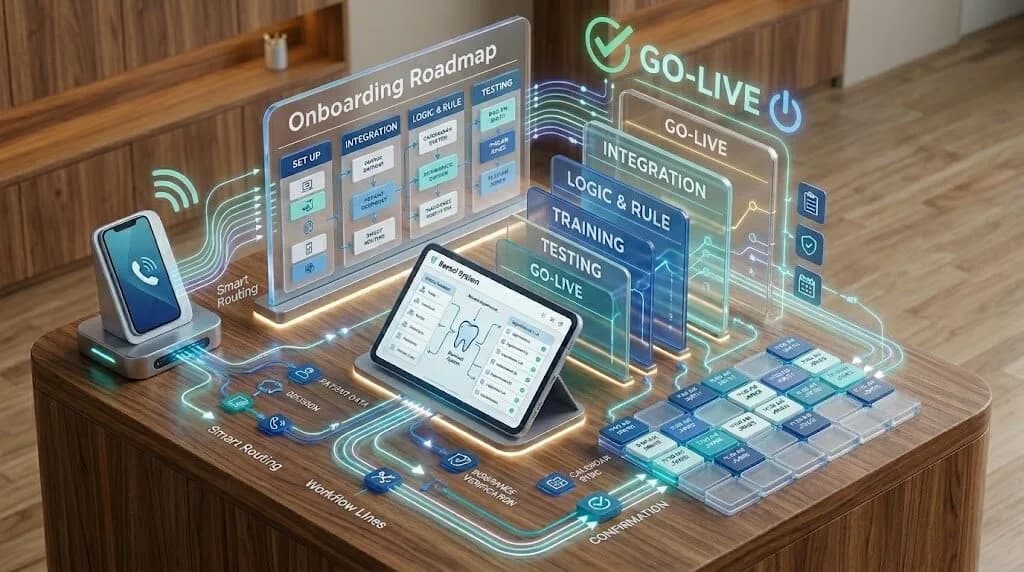
Most small dental practices go live with an AI receptionist within 7 to 21 days. The actual timeline depends on three factors: your phone system type, your PMS platform, and how quickly your team provides the practice-specific details your vendor needs to configure call handling.
Week one is typically discovery and configuration. Your vendor collects appointment types, office hours, provider schedules, emergency protocols, and frequently asked questions. This is where your office manager's input is critical. Nobody else knows that Dr. Patel doesn't do same-day crowns on Thursdays or that your hygiene schedule books in 50-minute blocks, not 60.
Week two covers integration and testing. The AI connects to your PMS, and your team runs test calls. You'll hear exactly how the system answers, how it handles scheduling conflicts, and what it says when a patient calls about a billing question it can't resolve. Testing is where you catch the rough edges. Don't skip it.
What Slows Things Down
VoIP systems are usually straightforward. Legacy analog phone lines can add extra days for porting or forwarding setup. If you're still on a traditional landline, ask your vendor about the porting process before you sign anything.
AI interest across dentistry is growing, which means onboarding teams may be handling more implementation requests than they were a year ago. Booking your kickoff call early can help keep your timeline on track.
See How DentiVoice Handles Onboarding
DentiVoice connects to your PMS, learns your schedule rules, and starts answering calls within days.
Learn More →What Data and Systems Should You Prepare Before Kickoff?
Before onboarding begins, gather your appointment type list, provider schedules, call handling preferences, and PMS login credentials for integration. Having these ready on day one prevents the most common delays small practices experience during AI receptionist setup.
Start with your appointment types. Not just "cleaning" and "exam," but every variation your team books: new patient comprehensive exams, limited problem-focused visits, hygiene recalls, emergency slots, consult appointments. The AI needs to know the difference between a 20-minute recare and a 90-minute implant consult. Miss one and patients will get booked into the wrong slots.
Your PMS Is the Backbone
Your practice management software is where the AI reads availability and writes new bookings. If you're on Open Dental or Dentrix, most vendors have pre-built integrations. Curve Dental and Eaglesoft may require a few extra configuration steps. Either way, you'll need admin-level access credentials ready.
A detailed PMS setup guide can help you prepare the right access levels and API settings before your vendor's team starts working.
If you're still narrowing down platforms before kickoff, this guide to the best AI dental receptionist software for small practices can help you compare features, pricing, and fit before committing to an onboarding path.
If HeyGent is one of the platforms on your shortlist, this DentalBase vs HeyGent AI dental receptionist comparison breaks down PMS integration, outbound calling, and pricing between the two before you commit to onboarding.
The Details That Get Overlooked
- Emergency triage rules: What counts as an emergency at your practice? Broken tooth, post-op bleeding, severe swelling? Your AI needs explicit rules for routing these calls.
- After-hours behavior: Decide if the AI should book appointments, take messages, or route emergencies to an on-call number. That choice shapes the patient experience when your front desk is unavailable.
- Insurance questions: Can the AI confirm which plans you accept? Or should it transfer those calls? This one decision affects a large share of inbound calls.
- New patient intake fields: What information do you need captured before someone walks through your door? Name, DOB, insurance ID, referring dentist?
Write all of this down before your kickoff meeting. Seriously. The practices that finish onboarding fastest are the ones that show up to that first call with answers, not questions.
Related: Wondering about insurance verification during AI calls? → Can AI Handle Dental Insurance Verification at Your Front Desk?
Common Onboarding Mistakes and How to Avoid Them
The biggest onboarding mistake small practices make is treating setup as a purely technical project and leaving the front desk team out of the process. Your staff's buy-in determines whether the AI receptionist gets used properly or quietly undermined within weeks.
That's not an exaggeration. If your receptionist doesn't understand what the AI handles versus what still needs a human, they'll either duplicate work or let things fall through the cracks. Both outcomes waste money.
Mistake 1: Skipping Staff Training
Your front desk team needs to know three things: what calls the AI answers, how to review AI-booked appointments in the PMS, and when to step in manually. A 30-minute training session covers this. Skip it, and you'll spend the first month answering "why did the computer book Mrs. Johnson at 2pm when I already blocked that slot?"
BrightLocal's research shows that 98% of consumers at least occasionally read online reviews when researching local businesses. If a patient has a bad booking experience because your team didn't coordinate with the AI, that review can show up online fast.
Mistake 2: Not Testing With Real Scenarios
Generic test calls won't reveal problems. Call your own practice and pretend you're a new patient with a cracked molar who also needs to verify insurance. Call as an existing patient trying to reschedule. Call after hours. These real-world scenarios expose gaps that a standard demo call won't catch.
Mistake 3: Going Live Without a Fallback
The first week should include a live transfer option for calls the AI can't handle confidently. Good vendors configure this by default. If yours doesn't, ask for it. A patient hearing "I'm sorry, I didn't understand that" on a loop is worse than a missed call.
Your AI fallback should be a live transfer, not a dead end. If a patient can't get confidence from the system on the first try, they need a human path immediately.
Avoid Costly Setup Mistakes
Get a walkthrough of how DentalBase handles onboarding so nothing falls through the cracks.
Book a Free Demo →How Do You Measure Success After Going Live?
Track three metrics during your first 30 days: call answer rate, booking conversion rate, and patient satisfaction scores. These tell you whether the AI is doing its job, doing it poorly, or doing it well enough that you can expand its responsibilities.
Start with call answer rate. If your practice was missing a noticeable number of calls before, your AI should bring that number down sharply. Any call that reaches the system should get answered. If your reports show dropped calls, there's either a phone routing issue or the AI is hitting a scenario it wasn't trained on.
Booking Conversion Tells the Real Story
Answering calls isn't enough. You need to know how many of those answered calls result in booked appointments. A healthy conversion rate for AI-handled scheduling calls depends on your script quality, scheduling logic, and the call types you're routing through the system. If performance is weak, your workflows probably need adjustment. Maybe the AI is offering times that don't match patient preferences, or it's failing to capture enough information to complete the booking.
Even a modest improvement in answer and conversion rates can generate meaningful revenue, especially if your practice has been losing new patient calls during busy hours.
Patient Feedback Matters More Than You Think
Ask patients about their calling experience during check-in for the first few weeks. Were they surprised to speak with an AI? Did it handle their request? Simple questions, but the answers will tell you what to fine-tune. Research shows that patient acceptance of AI receptionists is higher than most practice owners expect, especially when the AI is configured well.
Understand the Full ROI Picture
Your AI receptionist's value goes beyond answered calls. See how to calculate the complete return.
Read the ROI Guide →Should You Run AI and Human Receptionists Side by Side?
Yes, at least for the first 30 to 60 days. Running your AI receptionist alongside your front desk staff lets you catch configuration gaps, build team confidence, and avoid service disruptions during the transition period.
A parallel run doesn't mean double-staffing. It means routing specific call types to the AI while your receptionist handles the rest. Most practices start with after-hours calls and overflow during peak times. That's the lowest-risk approach because those are the calls you're already missing.
Your AI can pick up those overflow calls instantly, while your in-office team stays focused on patients at the desk. That's where the operational value shows up first.
When to Expand the AI's Role
Once your metrics look solid after 30 days, start routing more call types to the AI. New patient inquiries are a natural next step because they follow a predictable pattern: the caller needs to describe their issue, confirm insurance, and pick an appointment time. That's exactly the kind of structured conversation AI handles well.
Some practices eventually use AI for outbound calls too. Missed appointment follow-ups, recall reminders, and reactivation campaigns are all tasks that DentiVoice handles through outbound automation. Automated recall and reactivation workflows can support stronger retention when they stay aligned with your patient data and scheduling rules.
The goal isn't to replace your team. It's to stop forcing them to choose between the patient standing at the window and the phone ringing behind them. That choice is where mistakes happen. And where patients leave.
Related: Thinking about restructuring your front desk around AI? → Dental Front Desk Staffing AI: Build a Lean Team (2026)
Related: Still evaluating platforms? Start with our buyer's guide for feature comparisons and pricing → Virtual Dental Receptionist: Buyer's Guide (2026)
Is AI Receptionist Onboarding Worth the Effort for a Small Practice?
For most small dental practices, AI receptionist onboarding is worth the effort if missed calls, after-hours demand, and front desk overload are already affecting patient experience. The setup effort is real but limited, and the operational benefits compound as your team adjusts to working alongside the system.
Think about the math. If your practice is missing calls each week and you recover even a small share of those opportunities through better answer coverage and scheduling, the return can add up quickly. That's before factoring in the time your receptionist gets back for in-office tasks.
The real costs of an AI receptionist are predictable and typically lower than hiring a part-time employee. And unlike a new hire, the AI doesn't call in sick, doesn't need benefits, and doesn't forget to ask for the patient's insurance ID.
That said, the technology isn't magic. A poorly configured AI receptionist creates more problems than it solves. The practices that get the best results are the ones that invest time in setup, involve their front desk team from day one, and treat the first month as an active tuning period rather than a set-and-forget deployment.
AI receptionist onboarding dental practices is a short-term project with long-term payoff. Get the setup right, measure what matters, and you'll wonder why you didn't do it sooner.
Ready to Start Your AI Receptionist Onboarding?
See how DentalBase handles setup, PMS integration, and go-live support for small dental practices.
Book a Free Demo →Want More Guides Like This?
Browse Resources →Related Articles
Sources & References
Frequently Asked Questions
Most small dental practices complete AI receptionist onboarding in 7 to 21 days. The timeline depends on your phone system type, PMS platform, and how quickly your team provides scheduling rules and practice-specific configuration details to the vendor.
Your AI receptionist connects to your practice management software and phone system. Common PMS integrations include Dentrix, Open Dental, Eaglesoft, and Curve Dental. VoIP phone systems connect faster than legacy analog lines, which may require additional porting time.
Yes. Your front desk team needs to understand which calls the AI handles, how to review AI-booked appointments in the PMS, and when to step in manually. A 30-minute training session typically covers these essentials and prevents coordination issues.
AI receptionists can triage emergency calls based on rules you define during setup. You'll specify what counts as an emergency and whether those calls route to an on-call number or get flagged for immediate staff follow-up.
Onboarding costs vary by vendor but are typically included in the monthly subscription. Most AI receptionist platforms for dental practices cost less than a part-time employee. The ROI usually appears within two months through recovered missed calls alone.
Yes, for at least 30 to 60 days. Start by routing after-hours and overflow calls to the AI while your team handles the rest. This parallel approach catches configuration gaps and builds staff confidence before expanding the AI's role.
Track three metrics during the first 30 days: call answer rate, booking conversion rate, and patient satisfaction. Your call answer rate should approach 100%, and new patient booking conversion should reach 60-75% for AI-handled scheduling calls.
Was this article helpful?
Written by
Dentalbase Team
The Dentalbase Team is a collective of dental marketing experts, AI developers, and practice management consultants dedicated to helping dental practices thrive in the digital age.