Dental Insurance Verification Process: A Step-by-Step
A dental insurance verification process your front desk can follow step by step. Batch workflows, common errors, and timing that prevents billing delays.
Share:
Table of contents
The dental insurance verification process breaks down in the same predictable way at most practices. A patient arrives for a crown prep. Your front desk pulls up their insurance and discovers the plan changed employers three months ago. Now you're stuck: do the procedure and risk a denied claim, have an awkward payment conversation in the waiting room, or reschedule and lose a $1,200 production slot. None of those options are good. All of them were preventable.
This article walks your front desk team through a step-by-step verification workflow that catches problems two days before the patient sits down. You'll get the exact sequence, a checklist, timing strategy, common errors to avoid, and how to handle exceptions that trip up even experienced dental office operations teams.
What Should a Dental Insurance Verification Process Include?
A dental insurance verification process should confirm five things for every patient before their appointment: active eligibility, subscriber and group information, remaining annual maximum, copay or coinsurance amounts for planned procedures, and frequency limitations that could trigger a denial.
Most practices verify eligibility and stop there. They confirm the patient "has insurance" and move on. But eligibility alone doesn't tell you whether the plan covers the scheduled procedure, how much the patient owes out of pocket, or whether they've already used their annual maximum on treatment at another provider. Those details matter because they're the ones that generate surprise bills, patient complaints, and claim denials your billing team spends weeks chasing.
According to ADA Health Policy Institute data, dental benefit utilization patterns vary significantly by plan type, which means the same procedure can have completely different coverage depending on whether your patient carries a PPO, HMO, or discount plan. The complete guide to dental practice business management covers how verification connects to the larger revenue cycle that keeps your practice financially healthy.
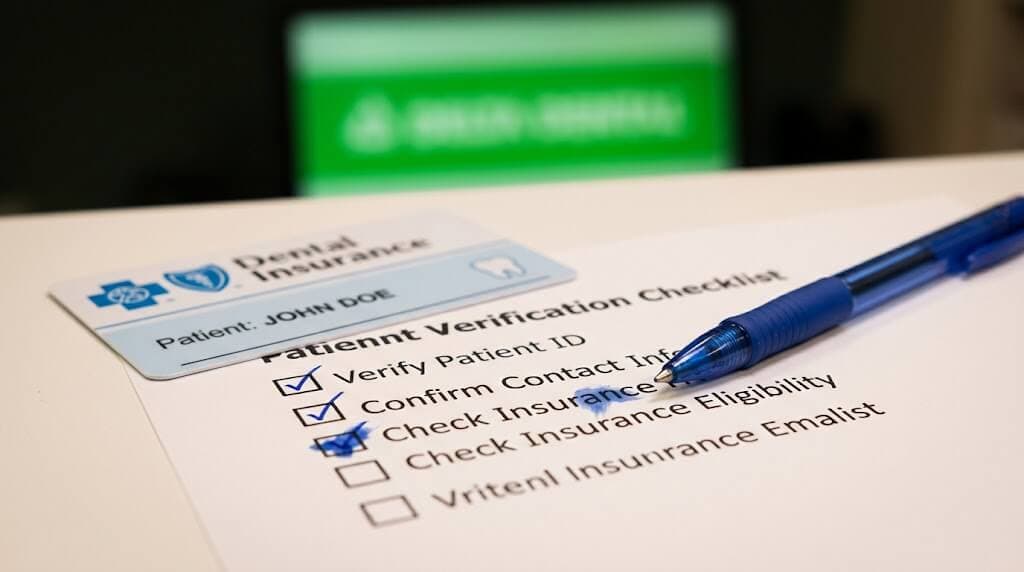
The Five-Point Verification Checklist
Verification Checklist (Per Patient)
Confirm each item two business days before the appointment.
All five must pass before marking the patient as verified.
Your Revenue Cycle Starts Before the Patient Arrives
DentalBase helps dental practices build front desk workflows that catch insurance problems before they become billing problems, from call handling to verification follow-up.
See How It Works →When Should Verification Happen Relative to the Appointment?
Run your verification workflow two business days before each patient's appointment. This timing gives your team a full business day to resolve issues, contact the patient about coverage changes, and adjust the treatment plan or financial expectations before anyone walks through the door.
Why two days and not one? Because one day isn't enough when something goes wrong. If you verify on Monday for a Tuesday appointment and discover the patient's plan terminated, you have roughly four hours to reach them, explain the situation, discuss payment options, and either confirm they're still coming or free up the slot. Most of the time that call goes to voicemail. Two days gives you breathing room to try again the next morning.
Three-Day Verification Timeline
| Day | Task | Owner |
|---|---|---|
| Day minus 2 (2:00 PM block) | Pull patient list, run batch eligibility, complete five-point checklist, flag issues | Insurance Coordinator |
| Day minus 1 (morning) | Call patients with coverage issues, update treatment plans, arrange payment alternatives | Insurance Coordinator |
| Day of appointment | Quick re-check only for flagged patients at check-in; no full re-verification needed | Front Desk |
For practices seeing 40 patients per day, that day-minus-two block means roughly 40 verifications in one sitting. According to Dental Economics, practices that batch verification into a dedicated daily block report fewer billing disputes and faster claim turnaround. The dental front office workflow checklist shows exactly where this fits into your team's daily time blocks.
Related: A deeper look at how to build the daily task structure around verification → Dental Front Office Workflow: Daily Checklist for 2026
Why Is Batching Verifications Faster Than Checking One at a Time?
Batching verifications into a single daily block is roughly twice as fast as checking patients individually throughout the day because it eliminates context switching, keeps your coordinator in one system, and allows bulk processing through your PMS clearinghouse portal.
Consider what happens when verification runs one patient at a time between calls and check-ins. The coordinator logs into the payer portal, pulls up the patient, checks eligibility, notes the details, then gets interrupted by a phone call or a walk-in. By the time she returns, she's lost her place. She logs back in. Another interruption. That cycle turns a 4-minute task into a 10-minute task, and across 40 patients, the difference is roughly 60-90 minutes batched versus three hours scattered.
Batched vs. Scattered Approach
| Approach | Time for 40 Patients | Error Rate | Staff Stress |
|---|---|---|---|
| Batched (single daily block) | 60 - 90 minutes | Low (focused attention) | Moderate (one task at a time) |
| Scattered (between other tasks) | 3+ hours | Higher (interruption-driven mistakes) | High (constant context switching) |
PMS platforms like Open Dental and Dentrix offer batch eligibility tools that pull coverage status for multiple patients in one request. These tools handle the eligibility check automatically, but they don't always return benefit details like remaining maximums or frequency limits. Your coordinator still needs to review flagged results manually. According to HubSpot's productivity research, task batching consistently outperforms multitasking across industries.
The insurance verification automation guide covers which parts of the process AI tools can take over and where human review is still required.
Free Your Front Desk From Phone Interruptions
DentiVoice AI Receptionist answers patient calls while your insurance coordinator runs verifications uninterrupted. No more choosing between the phone and the to-do list.
See DentiVoice in Action →What Are the Most Common Verification Errors That Cause Claim Denials?
The four most common errors are verifying the wrong subscriber, using an expired group number, missing frequency limitations on preventive procedures, and failing to check the remaining annual maximum before high-cost treatment. Each one leads directly to denied claims and delayed payments.
- Wrong subscriber: Family plans where a spouse is the primary subscriber. Your team verifies the patient's name instead of the subscriber's. The claim bounces because the IDs don't match. Always confirm who the subscriber is, not just who the patient is.
- Expired group number: Patients change employers. Employers switch carriers. The group number in your PMS might be six months old. Even if batch eligibility says "active," submitting claims under the old group number gets them denied. Always re-confirm the group number during verification.
- Missed frequency limits: A patient comes in for a second cleaning within six months, but the plan only covers two per calendar year and they had one at another provider in January. Your check didn't catch it because you only confirmed eligibility, not benefits.
- Exhausted annual maximum: A patient had $3,000 in dental work at a specialist earlier this year. Their annual maximum is $1,500. They're at zero remaining benefits, and nobody checked before scheduling a $1,200 crown. Thirty seconds during verification saves hours of billing follow-up.
The no-show reduction guide connects here too: patients who receive surprise bills after coverage issues are far less likely to return for future treatment. Accurate verification protects retention as much as it protects revenue.
How Do You Handle a Verification Failure Before the Patient Arrives?
When verification reveals a coverage problem, contact the patient by phone on day minus one, explain the issue clearly, present their options, and document the conversation in the PMS. Handling it privately by phone is always better than handling it at the front desk with other patients watching.
Conversation Framework for Coverage Issues
Your team needs a framework for this call. Not a rigid script, but a structure that covers the key points. Something like: "Hi [name], I'm calling from [practice] about your appointment on [date]. We checked your benefits and noticed [specific issue]. I wanted to let you know before you come in so we can discuss your options." Then present the alternatives.
Those alternatives typically include paying the estimated out-of-pocket amount at the time of service, adjusting the treatment plan to stay within coverage limits, splitting treatment across two benefit years if timing allows, or rescheduling until the coverage situation is resolved. Give the patient time. Don't pressure during the call.
The average dental practice misses 15-20 calls per week, according to Dental Economics. Patients who call back about billing questions and reach voicemail rarely try again. If your front desk is making outbound coverage calls while also fielding inbound patient calls, something gets dropped. That's why separating tasks into dedicated time blocks matters for both scheduling and verification.
Let AI Handle the Phone While Your Team Handles Insurance
DentiVoice answers inbound calls, schedules appointments, and handles patient questions so your insurance coordinator can focus on verifications without interruption.
Learn About DentiVoice →How Do You Train New Staff on Verification Without Losing Accuracy?
Train new front desk staff by giving them the same written five-point checklist your experienced team uses, pairing them with your insurance coordinator for their first two weeks, and having them verify a small batch independently before going solo. Written checklists close the knowledge gap that creates billing errors during turnover.
Here's the problem most practices face. Your experienced coordinator has been doing this for years. She knows which payers require a phone call, which portals are unreliable, and which plans have unusual frequency rules for fluoride. That knowledge lives in her head. When she's sick, on vacation, or leaves the practice, the person covering her doesn't have that context. Claims get denied. Patients get surprise bills.
The fix is documentation. Build a payer-specific reference sheet listing quirks for your top 10 insurance companies. Note which ones need phone verification. Flag payers whose batch results don't include benefit details. Keep this sheet next to the checklist and update it quarterly. The Bureau of Labor Statistics projects continued growth in dental support roles through 2032, which means competition for experienced staff will keep intensifying. Documented workflows protect your practice when someone leaves.
The dental practice automation guide covers which verification tasks can be partially automated to reduce the training burden on new hires.
Related: Tracking whether your verification improvements affect your bottom line → Dental Practice KPIs: 12 Numbers Every Owner Should Track Monthly
Your dental insurance verification process is the firewall between your practice and billing chaos. Every denied claim, every patient complaint about a surprise balance, every awkward checkout conversation traces back to something that should have been caught during verification. The fix isn't complicated. Verify two days out. Use the five-point checklist. Batch the work. Train your team on a written process, not tribal knowledge.
Start this week: pick one day and audit your current workflow. How long does verification take? How many interruptions happen? How many patients arrive with unverified coverage? Those numbers tell you exactly where the process is failing, and where to focus your fix. The practice management tips guide covers how to carve out the admin time to make operational improvements stick.
Ready to Fix Your Front Office Workflow?
See how DentalBase helps practices automate call handling and patient follow-ups so your front desk can focus on verification, billing, and the patients in front of them.
Book a Free Demo →Want more guides and tools for dental practice growth?
Browse Resources →Sources & References
- ADA Health Policy Institute - Dental Benefits and Coverage Statistics
- Dental Economics - Front Office Billing and Verification Benchmarks
- Dental Economics - Practice Operations and Revenue Cycle Efficiency
- Bureau of Labor Statistics - Dental Administrative Staffing Projections
- BrightLocal - Patient Booking Behavior and Scheduling Preferences
- HubSpot - Workflow Productivity and Time Management Research
Frequently Asked Questions
A dental insurance verification process is a repeatable workflow where your front desk confirms each patient's coverage, eligibility, benefits, and limitations before their appointment. It typically includes checking the subscriber ID, group number, annual maximum remaining, copay amounts, and procedure-specific frequency limitations.
Verify insurance two business days before the appointment. This gives your team one full business day to resolve any issues, contact the patient about coverage changes, and adjust the treatment plan or payment expectations before they arrive at the office.
Individual verification takes 3-7 minutes depending on the payer and method. Batching 30-40 verifications into a single daily block takes 60-90 minutes total. Doing them one at a time throughout the day between other tasks can consume three or more hours due to context switching.
You need the patient's subscriber name, subscriber ID number, group number, date of birth, and the planned procedure codes. Your PMS should have most of this on file, but always confirm the subscriber ID and group number haven't changed since the last visit.
The most common errors are verifying the wrong subscriber, using an expired group number, missing frequency limitations for procedures like cleanings or X-rays, and not checking the remaining annual maximum. Each of these leads to claim denials that take weeks to resolve.
Parts of it can. Many PMS platforms offer batch eligibility checks that pull coverage status automatically. But automated checks don't always return benefit details like remaining maximums or frequency limits. Your team still needs to review flagged results and handle exceptions manually.
You risk discovering coverage issues at check-in, which forces an awkward financial conversation in front of other patients. Unverified claims also have higher denial rates, which delays payment by weeks and increases administrative follow-up costs for your billing team.
Was this article helpful?
Written by
DentalBase Team
Expert dental industry content from the DentalBase team. We provide insights on practice management, marketing, compliance, and growth strategies for dental professionals.