Google Business Profile for Dentists: Local SEO Guide
Learn how to optimize your Google Business Profile for dentists to rank in the local map pack, win 'dentist near me' searches, and grow new patient calls.
Share:
Table of contents
A Google Business Profile for dentists is the single highest-leverage asset in local search, it controls whether your practice appears in the map pack when someone types "dentist near me" or "dental office open Saturday." According to Google, 46% of all searches seek local information, and that share is even higher for healthcare. If your GBP is incomplete, outdated, or unoptimized, you are invisible to the people already searching for care in your zip code.
This guide covers every element of local SEO for dentists that touches your map listing. It runs from the basics of verification through the weekly habits that separate top-three rankings from page-two obscurity. It is written for owners and office managers who want a clear, actionable approach.
Blog content is one of the easiest ways to keep a GBP profile active between review requests and photo updates, this guide to starting a dental blog covers the platform, compliance, and publishing cadence behind that first post.
A strong Google Business Profile is one piece of a bigger picture, patients also weigh your website, reviews, and social proof before they ever call. This look at how patients choose a dental office online walks through how those pieces work together to win the appointment.
Want a full local SEO review for your practice?
See DentalBase ServicesWhat is a Google Business Profile for dentists and why does it matter?
A Google Business Profile for dentists is a free listing that controls how your practice appears in Search and Maps. The three practices shown in the map pack are ranked almost entirely on GBP signals, proximity, and review velocity, so patients judge this listing before your website.
What your profile actually tells Google
The profile pulls together your name, address, phone number, hours, photos, services, reviews, and posts into a structured data card. Google uses this card to decide whether your practice is relevant, authoritative, and trustworthy enough to surface in the local pack. According to BrightLocal, 98% of people read local reviews before choosing a business, and the Google Health Study found that 86% of users contacted a dentist after running a search. A thin or inconsistent listing signals the opposite.
Why two similar practices rank differently
The practical consequence is simple. Two practices a mile apart can offer identical care, yet the one with a complete, actively managed profile takes the calls. Google has no way to judge clinical quality, so it leans on the structured signals your Google Business Profile for dentists provides.
How do you claim and verify your Google Business Profile as a dentist?
Claiming your listing starts at Google's Business Profile documentation, or by searching your practice name on Google Maps. If a listing exists, you request ownership. Verification proves you own the physical location, and no optimization matters until it is complete.
Verification methods available to dental practices
The most common verification methods for dental practices are:
- Postcard by mail: Google mails a PIN to your office address. This takes 5-14 days and is the default for most practices.
- Phone or text: Available for some listings when your phone number is already associated with your address in Google's data.
- Video verification: A newer option where you record a short video confirming your physical location, equipment, and signage.
- Instant verification: Available if your website is already verified in Google Search Console and the domains match.

What to set up right after verification
Once verified, you gain full control over every field. Set your primary category to "Dentist" and add relevant secondary categories such as "Cosmetic Dentist," "Pediatric Dentist," or "Emergency Dental Service" based on the services you actually provide. These categories are the strongest relevance signals in the entire profile.
Which profile fields have the most impact on dental Google Maps ranking?
Not all GBP fields carry equal weight. Google weighs relevance, distance, and prominence, and your profile fields feed the relevance signal directly. Practices with fully completed listings appear in the local pack far more often than those with partial information. Prioritize these Google Business Profile for dentists fields in order, top to bottom.
Which fields to prioritize first
| GBP Field | Ranking Impact | Dentist-Specific Note |
|---|---|---|
| Business Name | High | Use your legal practice name; no keyword stuffing |
| Primary Category | Very High | "Dentist" first; add specialty categories second |
| Address & NAP | Very High | Must match your website and all directories exactly |
| Hours of Operation | Medium-High | Keep current; add holiday hours proactively |
| Services & Attributes | Medium-High | List every procedure you perform by name |
| Reviews & Responses | High | Review velocity and response rate both matter |
| Photos | Medium | Office exterior, team, treatment rooms; update quarterly |
| GBP Posts | Medium | Active posts drive 35% more clicks per BrightLocal |
| Q&A Section | Medium | Seed with your own common patient questions |
Complete, accurate fields matter even more for high-competition procedure searches. Our dental implant SEO guide covers how implant-specific terms reward the same relevance signals, just against tougher national competition.
How should dentists write the GBP business description for local SEO?
Your business description runs up to 750 characters and influences whether a searcher picks your listing over the one beside it. Write factually, naming your location, primary services, and one practical differentiator. Google suppresses descriptions that read like ad copy, which works against dentist near me SEO.
A description formula that works
A workable formula for dental practices:
- City + specialty + established date: "Family dental care in downtown Riverside since 2009."
- Two to three core services by name: "General dentistry, Invisalign, and same-day emergency appointments."
- One practical detail patients care about: "In-network with Delta Dental and most PPO plans."
- A single call to action: "Call or book online to schedule a new patient exam."
Language to leave out
Avoid phrases like "serving all your dental needs", they add no information. Use the name of the city, neighborhood, or zip code your patients actually search from. That specificity is what connects your listing to the "dentist near me" query when a patient's device resolves to your service area. This is the GBP optimization lever most offices overlook completely. See our guide to keywords for a dental website for how GBP keywords should differ from the ones on your homepage and service pages.
What is the right review strategy for dentist near me SEO?
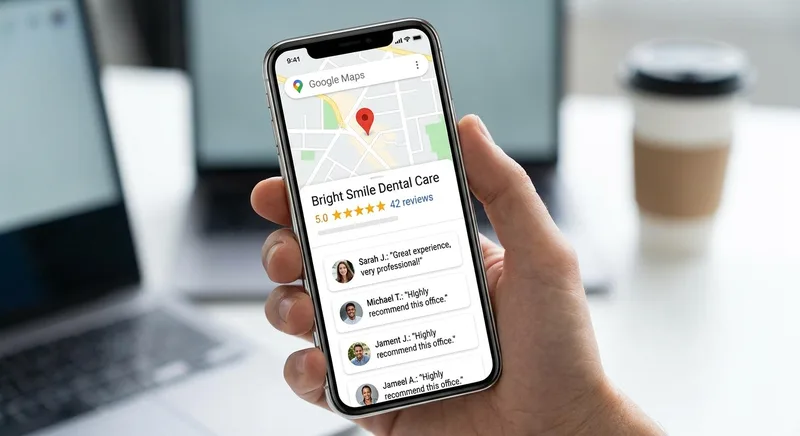
Reviews are one of the three pillars of Google's local ranking algorithm, alongside relevance and proximity. They are also the main factor patients use to choose between map pack results. Review velocity, meaning how often new reviews arrive, matters as much as your total review count.
According to BrightLocal, 98% of people read local reviews before choosing a business, and 88% are more likely to use a business whose owner responds to all reviews. Reviews are also the primary factor patients use when choosing between map pack results.
The habit behind top-three rankings
The practices that consistently hold top-three map pack positions share a common habit. They ask every satisfied patient for a review at checkout, usually with a QR code linking to the review form. Waiting for patients to volunteer reviews produces a slow trickle. That pace loses to competitors who manage their listings actively.
How to manage reviews week to week
Key practices for review management:
- Create a short review link from your GBP dashboard and add it to checkout cards, appointment reminders, and post-visit emails.
- Respond to every review within 48 hours. Thank patients by first name. Respond to negative reviews professionally and offer to resolve the issue offline.
- Do not incentivize reviews with discounts or gifts, this violates Google's terms and can result in removal of your entire review set.
- Monitor for fake or inaccurate reviews and flag them through the dashboard.
Why response rate beats review count
A practice with 80 reviews averaging 4.6 stars and a 100% response rate will almost always outperform one with 200 reviews and no responses. Response rate is a signal Google uses to assess whether a listing is actively managed, and inactivity here is penalized as much as inactivity in posting. For more on managing patient reviews over time, see what a year of dental patient reviews actually taught one practice owner.
Related Reading
Build Your Full Local SEO Foundation
Related: Spoken queries lean on the same listing data, but return only one answer instead of a map pack. See how voice search SEO for dental practices works →
How do GBP posts improve local map pack visibility for dental practices?
GBP posts are short updates covering offers, events, new services, or news, and they appear directly on your map listing. Posts expire after seven days, with the exception of Event posts. Consistent weekly publishing is what maintains the freshness signal your local ranking depends on.
According to BrightLocal, dental practices that publish posts regularly see 35% more website clicks than those that don't post. Each post is another chance for your Google Business Profile for dentists to match a patient query.
Post types that earn engagement
Effective post types for dental offices:
- Offer posts: New patient specials, whitening promotions, or back-to-school exam reminders. Include an expiration date and a "Book Now" call to action.
- Update posts: New team members, extended hours, or a new service added to your menu (implants, Invisalign, sedation dentistry).
- Event posts: Community health days, free screening events, or continuing education webinars.
- FAQ posts: Short answers to common patient questions like "Do you accept Medicaid?" or "How long does a crown take?"
How often to publish
Post at least once per week. Use images in every post, listings with photos and regular posts generate significantly more direction requests and phone calls than those without. Keep post text under 300 words; Google truncates longer content in the card view.
Does NAP consistency affect your Google Maps ranking as a dentist?
Yes. NAP consistency, meaning Name, Address, and Phone, is foundational for local search, and mismatches suppress map pack visibility. Google cross-references your listing against Yelp, Healthgrades, Zocdoc, the ADA provider directory, and citation aggregators. Conflicting data caps your ranking no matter how well optimized your profile is.
Directories to audit first
For dental practices, the highest-priority directories to audit are:
- Google Business Profile (your source of truth)
- Yelp
- Healthgrades
- Zocdoc
- WebMD Physician Directory
- ADA Find-A-Dentist
- Your state dental association directory
- Apple Maps
- Bing Places
How often to re-check your citations
Run a NAP audit at least once per year, and immediately after any change to your phone number, address, or legal practice name. Even minor inconsistencies, "Suite 100" vs. "Ste. 100", can create duplicate listings that dilute your ranking authority and undo months of optimization work. Fix the largest directories first, since aggregators copy from them and feed errors back into your Google Business Profile for dentists. For practices managing multiple specialties, also check that dental patient referral sources are sending traffic to the correct location listing.
What photos should a dental practice add to its local business listing?
Photos affect both rankings and click-through rate. Google reads regular photo uploads as a freshness and engagement signal, and profiles updated quarterly outperform static listings in the map pack. Patients also use photos to judge comfort and quality, often deciding between two otherwise comparable listings nearby.
The minimum photo set
For a dental practice, the minimum photo set should include:
- Exterior photo (required by Google): Taken during daylight hours, showing your building signage and parking if visible. This is the first image many patients see when getting directions.
- Reception and waiting area: Clean, well-lit, and inviting. Patients use this to assess comfort before they visit.
- Operatory rooms: Modern equipment visible. This signals that your technology is current without you having to say so.
- Team photos: Headshots of the dentist and key staff. Practices with visible, named teams tend to generate more review responses mentioning specific staff by name.
- Cover photo: This appears at the top of your profile card. Choose a high-resolution image of your exterior or a team photo.
Keeping your photo set fresh
Update your photo set at least quarterly. Avoid stock photography, Google's systems and patients can both identify generic images, and they reduce the perceived authenticity of your listing.
How do you measure local SEO performance from your Google Business Profile?
Your built-in GBP Insights dashboard is the primary measurement tool. It separates direct name searches from discovery searches, then shows how many people called, requested directions, or clicked through to your website. Those three actions map to new patient volume and show whether your Google Business Profile for dentists is working.
Metrics worth checking every month
Key metrics to review monthly:
- Search impressions: How often your profile appeared in results. A plateau here usually means a competitor has improved their listing or review velocity.
- Direction requests: A proxy for new patient intent. Most people who request directions have not yet been to your office.
- Phone calls from the listing: Compare against your front-desk call log to identify drop-off between people who see the profile and those who actually reach someone.
- Photo views vs. competitors: GBP Insights shows how your photo views compare to similar businesses. A large gap usually means you need fresher images.
- Review count and average rating over time: Track the trendline, not just the current number.

Turning Insights data into decisions
According to Dental Economics, review velocity, profile completeness, and posting frequency are the strongest predictors of map pack position for dental practices. For a deeper look at where your dental patients are coming from, pairing GBP data with website analytics gives you the full attribution picture.
Should dentists add services and attributes to their map listing for better visibility?
Yes. Services and Attributes are the most commonly skipped fields in local profile optimization, yet they decide whether you appear for procedure-specific searches. When someone searches "Invisalign provider near me," Google favors listings that explicitly name that service over listings that leave the field empty.
According to Pew Research, 71% of people looking for a dentist run a search before scheduling. Broader search behavior data compiled by HubSpot shows the same pattern across local service categories, so filling these fields captures more of those queries.
Services to name explicitly
Services to list by name:
- Teeth cleaning and dental exams
- Teeth whitening
- Invisalign / clear aligner therapy
- Dental implants
- Emergency dental care
- Root canal treatment
- Dental crowns and bridges
- Pediatric dentistry (if applicable)
Attributes patients filter by
Attributes to complete include accepted insurance plans, payment methods (CareCredit, financing available), accessibility features, appointment options (online scheduling, same-day appointments), and health safety attributes. Each attribute you fill in is a potential match for a patient query your listing doesn't currently appear for. For practices running paid search alongside organic, this attribute data also informs dental PPC campaigns that rely on the same local intent signals.
What is the fastest way to improve your dental map pack ranking this week?
Start with a 15-minute audit. Confirm your NAP matches your website exactly, verify your primary category is "Dentist," and count how many service and attribute fields are filled in. Most practices find at least three gaps in their Google Business Profile for dentists, each one a set of local queries they are invisible for.
Five actions ranked by expected return
From there, prioritize these five actions in order of expected return:
- Fix any NAP inconsistencies between your listing and your top five directories. This removes a suppression signal that caps your ranking ceiling regardless of what else you do.
- Request five new reviews this week from recent patients, using a direct review link from your GBP dashboard. Velocity matters more than total count in the short term.
- Publish one post with an image and a specific offer or update. Inactive listings rank lower than actively managed ones.
- Upload three new photos of your office interior or team. Fresher images raise your photo view count relative to nearby competitors.
- Complete your Services section with every procedure you perform. Procedure-level searches are growing faster than general "dentist near me" queries as patient search behavior becomes more specific.
For a complete view of how your map listing fits into broader digital marketing, the dental SEO ranking guide covers on-page optimization, link authority, and the technical factors behind local search. For practices that want to measure how their map presence compares to nearby competitors, new patient acquisition tracking provides the attribution data you need.
If you are handing this work to an outside provider instead of running it yourself, this breakdown of what dental SEO services should include every month lists the deliverables worth demanding in the scope.
Where to go from here
The "dentist near me" query generates 1.2 million Google searches per month in the US, according to Google Trends data. Whether your practice appears in the resulting map pack depends almost entirely on the GBP optimization decisions covered in this guide. According to BrightEdge, 68% of all online experiences start with a search engine. BrightLocal's consumer research adds that local reviews are the primary trust signal. Patients use them to decide which map pack result to click. Getting these fundamentals right does not require a large budget. It requires consistent execution over 60 to 90 days.
For practices ready to go beyond the basics, blogging as a dentist builds organic authority that strengthens your map listing signals. DentalBase resources include tools for tracking your local search position over time.
GBP optimization works best alongside a blog that targets the same local keywords. For the topic research and publishing cadence that make that pairing work, see our guide to content marketing for dentists.
Local visibility only pays off if the page behind the click holds up. For implant searches in particular, see the dental website architecture mistakes that lose implant cases after the click.
Related: A rebuild like this was one of four changes behind a recent growth turnaround. what a Google Business Profile rebuild did for one practice's new patient numbers →
Related: A strong profile like this matters even more as more well-funded competitors enter local markets. Read about DSO consolidation and what it means for independent practices →
Related: GBP is the foundation of local visibility, but not the whole system. Our complete guide to dental SEO.
DentalBase SEO Services
Want your practice in the map pack, and keeping it there?
DentalBase manages GBP optimization, local citations, review systems, and on-page SEO for dental practices that want measurable local growth.
Book a Free DemoSee AI ReceptionistExplore more free guides and tools for growing your dental practice.
Browse ResourcesSources & References
- BrightLocal Local Consumer Review Survey, 98% Read Reviews Before Choosing a Business
- Dental Economics: Google Reviews, Your Secret Weapon for Beating Bigger Dental Practices
- Google Business Profile Developer Documentation, Verification and Setup
- HubSpot Marketing Statistics, Search Behavior and Local Queries
- American Dental Association: Practice Management, Patients and Directory Listings
Frequently Asked Questions
Most dental practices see measurable improvement in map pack position within 60 to 90 days of fully optimizing their GBP, completing all fields, resolving NAP inconsistencies, and establishing a consistent review and posting cadence. Highly competitive markets may take longer.
Yes. Google evaluates your website as a relevance and authority signal for your GBP. A website with consistent NAP data, relevant service pages, and location-specific content strengthens the local SEO signals your map listing generates.
No. Google prohibits duplicate listings for a single physical location. If you have multiple office locations, each location gets its own GBP with its own address, phone number, and hours. Creating duplicate profiles for the same address violates Google's guidelines and risks suspension.
Google allows public users to suggest edits to business listings, which can be accepted without notifying the owner. Log into your GBP dashboard at least twice per month to confirm all information is accurate. If your listing is suspended, you can appeal through Google's Business Profile support.
Google does not set a minimum, but profiles with 10 or more photos consistently outperform those with fewer in local pack visibility. Start with your five must-have photos (exterior, reception, operatory, team, cover) and add three to five new images each quarter.
Posts are a moderate ranking signal and a strong click-through signal. Their primary value is keeping your listing marked as actively managed by Google, which correlates with higher local visibility, and giving prospective patients a reason to click your result over a competitor's.
Was this article helpful?
Written by
DentalBase Team
Expert dental industry content from the DentalBase team. We provide insights on practice management, marketing, compliance, and growth strategies for dental professionals.