
Dental Website Mobile Speed: The Fix Losing You Patients
Hero image bloat is the one dental website mobile speed problem costing practices 40% of inquiries. Here is how to diagnose it and fix it in 2 hours.
Share:
Table of contents
Your dental website mobile speed is probably 4 to 7 seconds. You do not know this because you mostly look at your site on a desktop with fast WiFi, where everything feels instant. On a phone with cellular data, which is how most patients see your site for the first time, the experience is completely different. And the single biggest cause of that difference is one specific problem: the giant image at the top of your homepage.
Website speed is one piece of the bigger picture. It sits alongside design and marketing under DentalBase dental practice services, and getting the whole system right matters more than any single fix.
The real reason your dental website feels fast (and isn't)
This is not a general "your site is slow" article. The four other things people blame for slow dental websites (too many plugins, bloated themes, third-party scripts, hosting) usually account for 10 to 20% of load time. The hero image alone accounts for 60 to 80%. Fix the hero image and most dental sites drop from 6+ second mobile loads to under 2 seconds without touching anything else.
According to Google's Core Web Vitals research, consumers expect websites to load in 3 seconds or less. Anything longer and bounce rates rise sharply. For dental sites where the average mobile load time runs 5 to 7 seconds, that means roughly 40% of qualified patients leave before they see anything beyond the loading spinner. The fix is the cheapest, highest-ROI website work you can do in 2026.
What exactly is hero image bloat on a dental website?
Hero image bloat is when the photo at the top of your homepage is multiple megabytes in size, takes 4 to 7 seconds to load on mobile, and blocks the rest of the page from rendering. On dental websites it is usually a stock photo or panoramic office shot exported at 3000+ pixels wide at full quality.
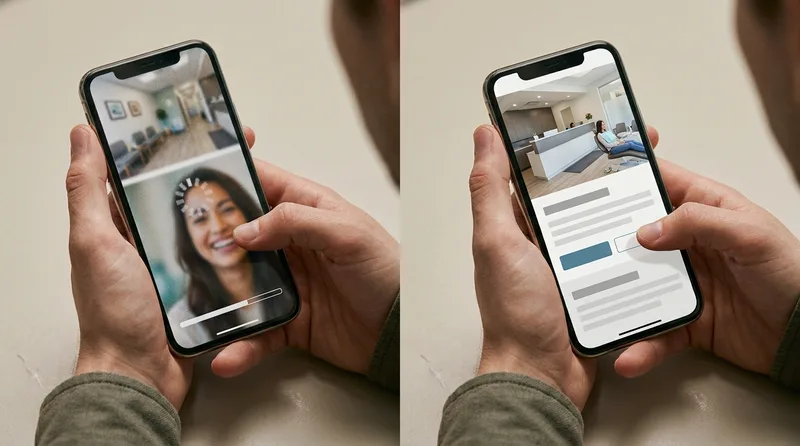
The image was probably uploaded once when the site was built, and nobody has touched it since. It looks fine on desktop because desktop browsers download it in under a second on most connections. On mobile, it kills the site.
Why hero image bloat is so common on dental sites specifically
Dental websites are built by agencies that prioritize visual polish over performance. The hero image is the most visible part of the site, so designers push for the biggest, highest-quality version. The developer uploads it without compression because the platform allows it. Nobody runs a speed test on mobile before launch. The problem ships, the site goes live, and the practice loses inquiries silently for years.
According to Dental Economics, every new patient is worth $12,000 to $15,000 in lifetime value. Losing 40% of qualified inquiries because of a single oversized image is a six-figure annual cost for most practices, and almost none of them know it is happening.
How do you diagnose a hero image speed problem in 30 seconds?
You do not need a developer or expensive software. Google's PageSpeed Insights tool diagnoses the problem instantly and shows you the exact image causing it. Open the tool, paste your homepage URL, and look at the mobile score and the "Largest Contentful Paint" metric.

If the Largest Contentful Paint is over 2.5 seconds, you have a hero image problem. The tool will name the specific image file and show its size in megabytes. From there, the fix is mechanical.
What the numbers should actually look like
For dental websites that load fast on mobile, the numbers fall in specific ranges. Use these as your targets when fixing the hero image and the rest of the page.
| Metric | Bad (Most Sites) | Target |
|---|---|---|
| Hero image file size | 3 to 8 MB | 200 to 400 KB |
| Mobile load time | 5 to 7 seconds | Under 2 seconds |
| Largest Contentful Paint | 4 to 6 seconds | Under 2.5 seconds |
| PageSpeed mobile score | Under 50 | Above 85 |
| Image format | JPG or PNG, uncompressed | WebP or AVIF, compressed |
How do you fix dental website mobile speed in 2 hours?
The fix is mechanical and well-defined. Any competent developer can do it in 1 to 2 hours, or you can do it yourself with free tools if you are comfortable editing your CMS. The work breaks down into four steps applied to the hero image and any other large images on the homepage.

Step 1: Compress and resize the hero image to mobile dimensions
The hero image rarely needs to be wider than 1920 pixels even on desktop. On mobile it renders at roughly 400 pixels wide. Resize the source to 1920 pixels wide for desktop, then compress with one of these free tools:
- Squoosh.app: Google's free in-browser image compressor with side-by-side preview
- TinyPNG: drag-and-drop compression, free up to 20 files at once
- ShortPixel: WordPress plugin that compresses every uploaded image automatically
- ImageOptim (Mac): desktop app for batch compression
Any of these can drop a 5 MB JPG to under 400 KB without visible quality loss.
Step 2: Convert from JPG to WebP or AVIF format
WebP and AVIF are modern image formats that produce files 25 to 50% smaller than JPG at the same visual quality. All current browsers support them. Convert the compressed hero image to WebP using the same free tools listed above. Your hero image should end up at 200 to 400 KB instead of 3 to 8 MB.
Step 3: Serve different image sizes to different devices
This is the slightly technical step. The HTML for the hero image should use the srcset attribute to serve a smaller version to mobile devices and a larger version to desktop. Most modern dental website platforms do this automatically; if yours does not, ask your developer to enable responsive images. The mobile version should be no more than 800 pixels wide.
Step 4: Lazy-load every image below the fold
The hero is the first image patients see. Everything else (team photos, testimonial images, service icons) should lazy-load, meaning the browser only downloads them when the patient scrolls down to that section. Add loading="lazy" to every image tag except the hero. This single change can drop total page weight by 50 to 70 percent on dental sites with lots of below-fold visuals.
Why does this one fix matter more than other speed optimizations?
Most "speed up your dental website" advice covers a dozen optimizations: caching, minification, CDN, hosting, plugins, third-party scripts. Each of those helps. But none of them produces results comparable to fixing the hero image, because none of them targets the single largest asset blocking page render.
According to Moz's local SEO research, page speed has become a direct ranking factor for local searches, particularly on mobile. Practices stuck above 3-second load times rank lower regardless of other SEO work because Google interprets slow sites as low-quality results for the patient.
Other speed fixes ranked by impact
If you only do one thing, fix the hero image. If you have time for more, the rest of the optimization list is worth doing in order of impact.
- Hero image fix: 60 to 80% of total page weight reduction, biggest single win
- Lazy-load below-fold images: 30 to 40% additional weight reduction
- Remove unused plugins: 5 to 15% reduction depending on how many you have
- Enable browser caching: 10 to 20% improvement on repeat visits
- Minify CSS and JavaScript: 5 to 10% improvement on initial load
- Use a content delivery network: 10 to 30% improvement for visitors outside your geographic area
Total time for the full optimization stack: 6 to 10 hours of developer time. Time for just the hero image fix: 1 to 2 hours, with 70 to 80% of the total improvement. This is why hero image bloat deserves its own article instead of being item one in a 12-step list.
Get a free mobile speed audit for your dental website
DentalBase audits dental website mobile speed and rebuilds the hero image plus every other below-fold asset. Most practices see PageSpeed mobile scores jump from 40s to 90+ in a single sprint.
Book a Free Demo →How do you measure the patient impact after fixing dental website mobile speed?
Most practice owners want proof that the fix produced real results, not just a higher PageSpeed score. The patient-side impact shows up in three specific metrics within 30 to 60 days of launching the faster version of your site. Track these before and after the fix.
Metric 1: Mobile bounce rate in Google Analytics
Open Google Analytics 4 and segment by mobile device traffic on your homepage. Bounce rate (percentage of visitors who leave without interacting) typically drops 15 to 25 percentage points after a major hero image speed fix. If your mobile bounce rate was 65%, expect to see it drop to 45 to 50% within 30 days.
Metric 2: Inquiry form completion rate
Patients who reach your booking form are the ones who survived the slow load. After the fix, more patients reach the form, and a higher percentage of them complete it. According to BrightLocal research, frictionless mobile experiences drive significantly higher form completion rates compared to slow sites.
Metric 3: Organic mobile traffic from Google
Google rewards faster sites with better rankings on mobile-first searches. Practices that drop from 5+ second loads to under 2 seconds commonly see organic mobile traffic climb 15 to 30% over the following 60 to 90 days as Google recrawls and re-evaluates. The improvement is gradual but compounding.
Related: Architecture problems compound with speed problems. Here is what fixed pages should look like. → Dental Website Speed: Why Load Time Costs You Patients
Does a faster mobile homepage also improve local SEO rankings?
Yes, a faster mobile homepage also improves local SEO rankings, because Google treats mobile page experience as a direct local-search ranking signal. Practices whose homepage loads under 2 seconds on mobile commonly outrank slower competitors in the same city, independent of backlink count or content volume.
Google's local ranking algorithm folds Core Web Vitals directly into how it orders the map pack and organic results for searches like "dentist near me." A practice with a clean, fast mobile experience gets treated as a higher-quality result than one with the same backlink profile but a slow homepage. This is one reason DentalBase pairs website speed work with its dental SEO service instead of treating the two as separate projects.
Which ranking signals move first
Three ranking signals move first once the hero image is fixed:
- Largest Contentful Paint drops from the 4-6 second range into Google's "good" threshold, which the algorithm weighs directly in local mobile results.
- Mobile usability score improves because a compressed, correctly sized hero image stops layout shift and tap-target crowding on smaller screens.
- Bounce and dwell time improve as more patients stay past the homepage instead of leaving during the load, a behavioral signal Google factors into how it ranks local results over time.
Why mobile-first design and speed work together
Mobile accounts for 62% of all dental-related searches, according to Google, so a homepage that only performs well on desktop is optimizing for the smaller share of traffic. Fast, mobile-friendly pages also make it easier for AI systems to crawl and cite your site, and our technical checklist for getting a dental website cited in AI search shows what to check. For a deeper breakdown of what mobile-first design actually changes beyond speed, see how mobile dental website design wins more new patients, and for the layout and navigation patterns that keep the rest of the site fast, dental website SEO structure covers what to fix next.
Speed and mobile-first design work together rather than as separate fixes. Why mobile optimization matters for dental websites goes into the patient-behavior side of this, and once the hero image and rankings improve, the last piece is making sure the extra visitors actually book. That is covered in dental website booking conversion, which picks up exactly where this article ends.
Drop your dental site mobile load time below 2 seconds
DentalBase fixes hero image bloat and the rest of the mobile speed stack in a single sprint. Book a demo to see the before-and-after numbers we deliver to dental practices.
Book a Free Demo →Sources & References
Frequently Asked Questions
Run your homepage through Google PageSpeed Insights. If the mobile score is under 70 and the Largest Contentful Paint is over 2.5 seconds, hero image bloat is the most likely cause. The tool will name the specific image file and show its exact size.
Hero images should be 200 to 400 KB after compression, regardless of original source size. The image should be 1920 pixels wide at most for desktop, served as WebP or AVIF format with a smaller mobile version via responsive image markup.
Patients abandon sites that take over 3 seconds to load on mobile, and dental searches happen mostly on phones. According to Google research, mobile bounce rates climb sharply after the 3-second mark, with roughly 40% of qualified patients leaving slow dental sites before they see anything.
Not visibly. Modern compression tools like Squoosh and TinyPNG drop image file sizes by 80% or more while keeping visual quality nearly identical to the source. Patients viewing on phones cannot distinguish the compressed version from the original, even side by side.
One to two hours for a competent developer, or longer if you are doing it yourself with no prior experience. The four steps are compress and resize the hero, convert to WebP, add responsive image markup, and lazy-load below-fold images. Each step is well-defined.
The opposite. Google rewards faster mobile sites with better rankings, particularly on local searches. Practices that drop mobile load time below 2 seconds commonly see organic mobile traffic climb 15 to 30% over the following 60 to 90 days as Google re-evaluates the site.
Was this article helpful?
Written by
DentalBase Team
Expert dental industry content from the DentalBase team. We provide insights on practice management, marketing, compliance, and growth strategies for dental professionals.